SECTION 3
OPERATING PRINTER
68
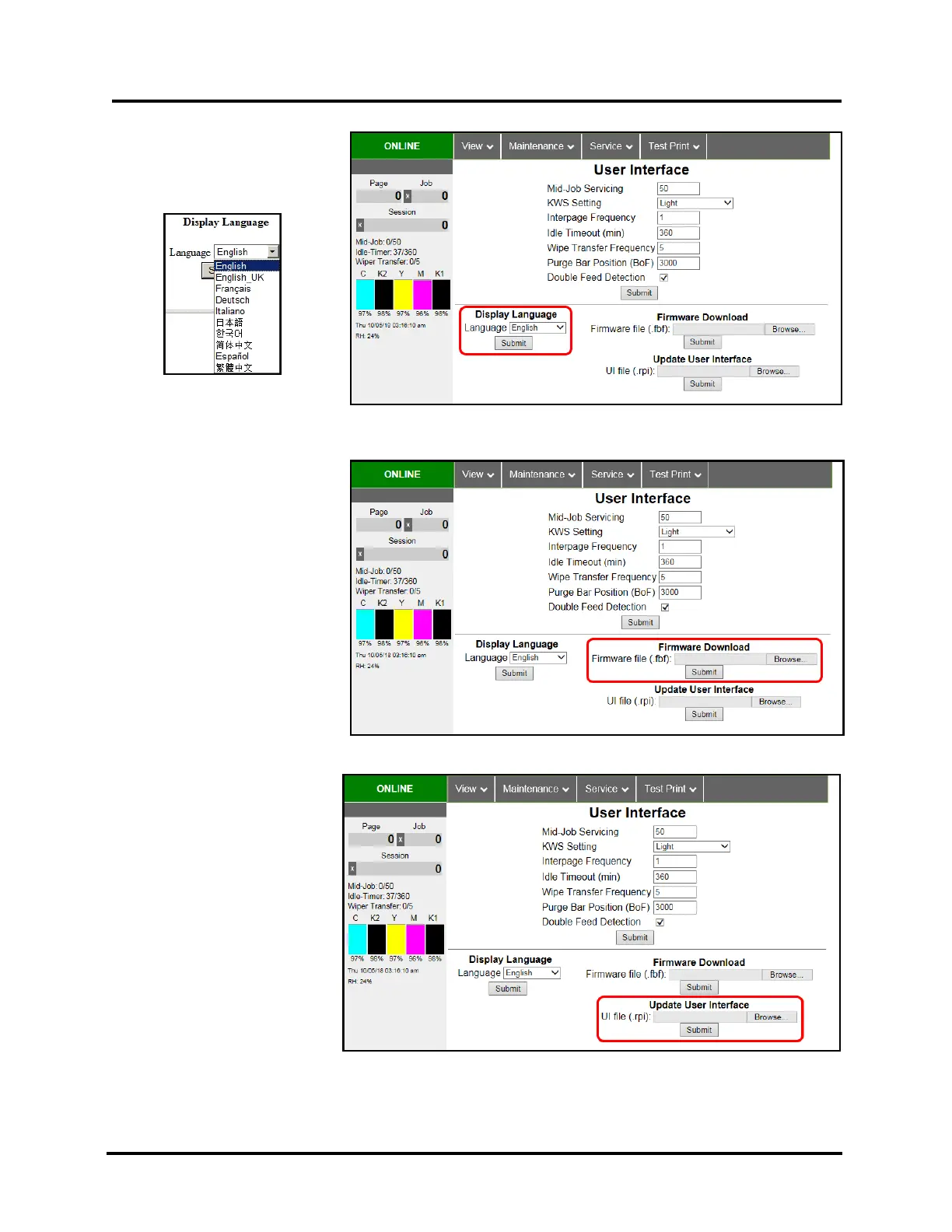
DISPLAY LANGUAGE:
Selects language Toolbox will
display. Click “Submit” after
selecting language.
FIRMWARE DOWNLOAD:
This feature is used to update the
firmware in the Printer.
NOTE: Firmware and UI updates
are normally provided in a set. To
ensure compatibility, please be sure
to update both items in the set.
Printer will reboot after firmware
file (.fbf) is sent and update has
completed.
WARNING: This procedure should
only be performed by qualified
service personnel. If this process is
not performed properly, Printer
could be rendered inoperable.
UPDATE USER INTERFACE:
This feature is used to update the
User Interface (UI) software for
the Printer Touchscreen.
NOTE: Firmware and UI updates
are normally provided in a set. To
ensure compatibility, please be
sure to update both items in the
set. UI will reboot after software
file (.rpi or .rpz) is sent and update
is complete.
WARNING: This procedure
should only be performed by
qualified service personnel. If this
process is not performed properly,
Printer could be rendered
inoperable.



 To Next Page