APPENDIX
J
P/N 016-0171-493 Rev. I 245
A ppendi x J
Serial Console
Interfaces
Interface the Envizio Pro with the Bogballe Calibrator Zurf, Kuhn/Rauch LH5000, or Amazone Amatron+
console to add the data-logging, mapping, and 2D/3D guidance features to current system operations. If the
single product variable rate key (P/N 077-0180-031) has been activated on the Envizio Pro, the field computer
may be used to variable rate product application via the existing serial console.
Note: When connected with the Bogballe Calibrator Zurf console, the Envizio Pro is capable of
performing AccuBoom, automatic section control, features during field operations. An AccuBoom
control node is not required to enable the AccuBoom feature on the field computer in this
configuration.
Console Connection
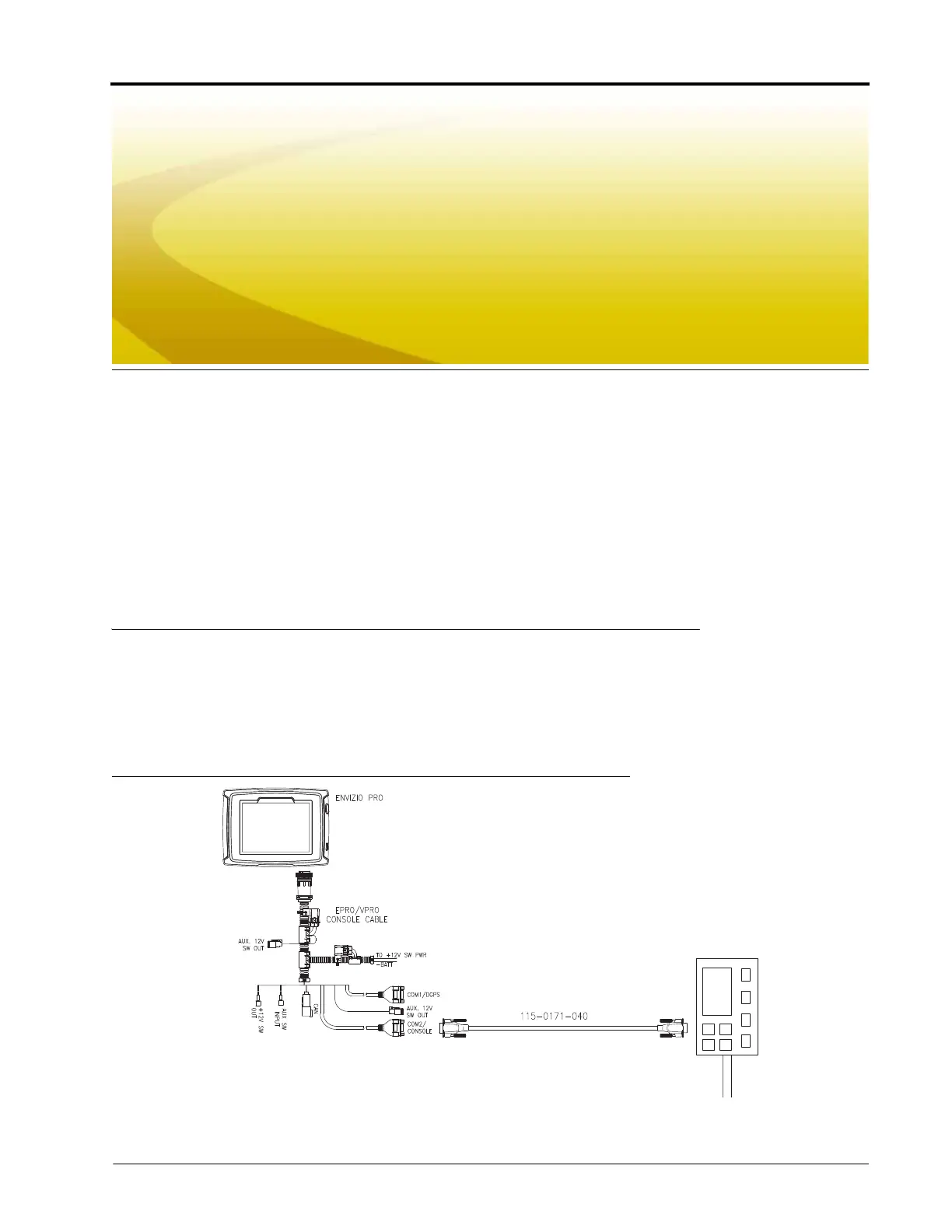
Connect the COM2 connector on the field computer interface (P/N 115-0171-746) or chassis interface (P/N
115-0171-926) cable with the Calibrator Zurf, LH5000, or Amatron+ serial input via a null terminated serial
cable (P/N 115-0171-040 or 115-0159-822).
FIGURE 1. Connecting the Envizio Pro and Serial Control Console
Connect the speed interface cable to send GPS speed from the field computer to the serial control console.



 To Next Page
 Loading...






