91
Disable SS-L Configuration Tools
USER GUIDE
ONBOARD CONFIGURATION TOOLS (SS-L)
SMART-SENSOR
™
2004 – 2014 Reliable Controls
®
Corporation. All rights reserved.
DISABLE SS-L CONFIGURATION TOOLS
If desired, the SS-L onboard configuration tools can be disabled, thereby preventing op-
erators from accessing any of the configuration tools by entering the key code combina-
tions.
TO DISABLE THE ONBOARD CONFIGURATION TOOLS
The FL-OVR parameter must be set back to 0 when the calibration procedure is complete to
allow the MACH-Air
™
to revert to normal programmed operation. This VAR overrides the
control airflow setpoint and any value > 0 will prevent the MACH-Air
™
from controlling as
programmed.
1 Connect to the system and open the SMART-Sensor worksheet of the desired
SS-L in RC-Studio
®
2.0 as outlined in this manual.
2 Click the Setup button to open the SMART-Sensor Setup dialog box.
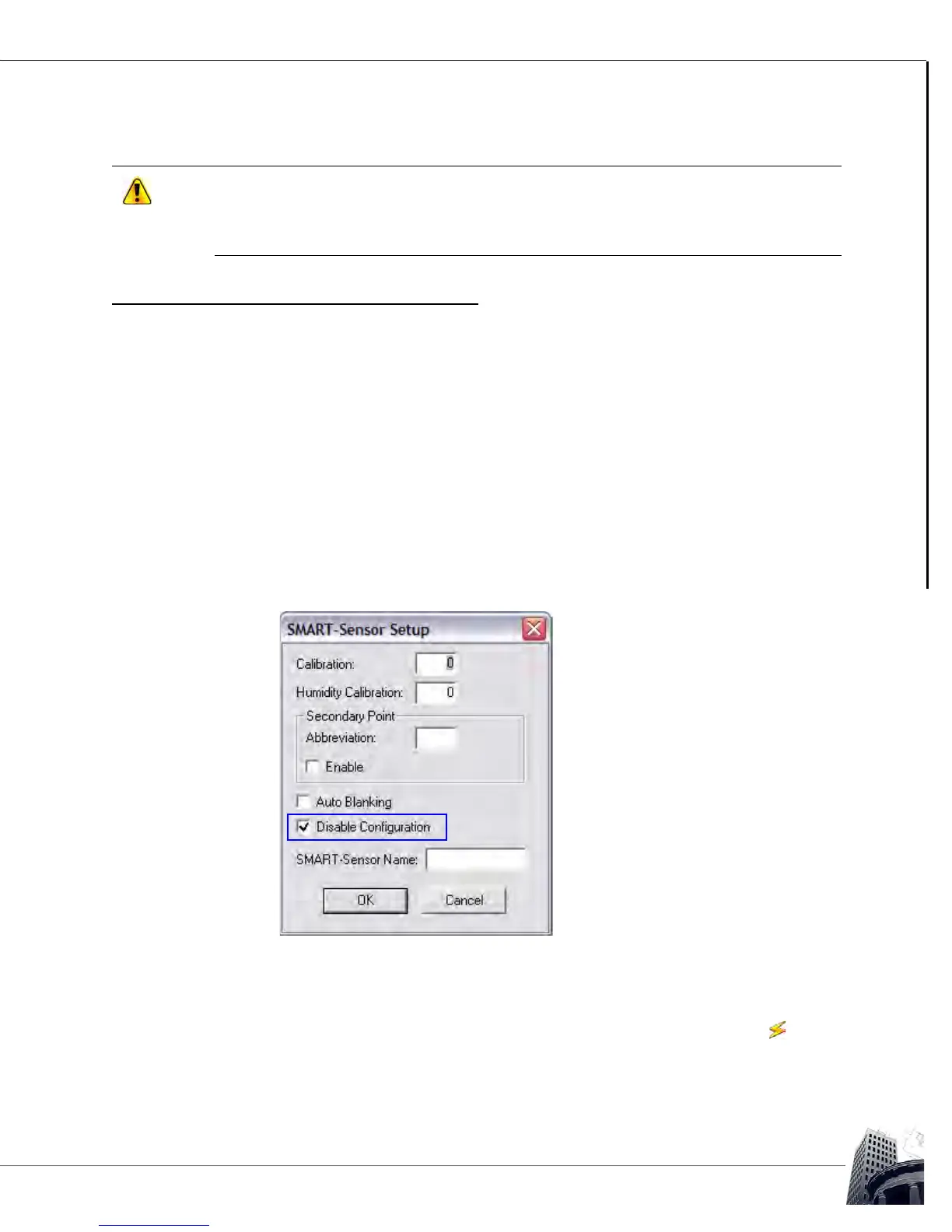
3 Enable the Disable Configuration checkbox.
FIGURE 82: SMART-SENSOR SETUP DIALOG BOX WITH DISABLE CONFIGURATION CHECKED
4 Click the OK button to close the SMART-Sensor Setup dialog box.
5
Click the Mode button to toggle the SMART-Sensor worksheet to the mode
to save the change and commit it to the controller.



 To Next Page