27
SMART-Sensor Expansion Board (SSX)
USER GUIDE
SMART-NET NETWORK TOPOLOGY
SMART-SENSOR
™
2004 – 2014 Reliable Controls
®
Corporation. All rights reserved.
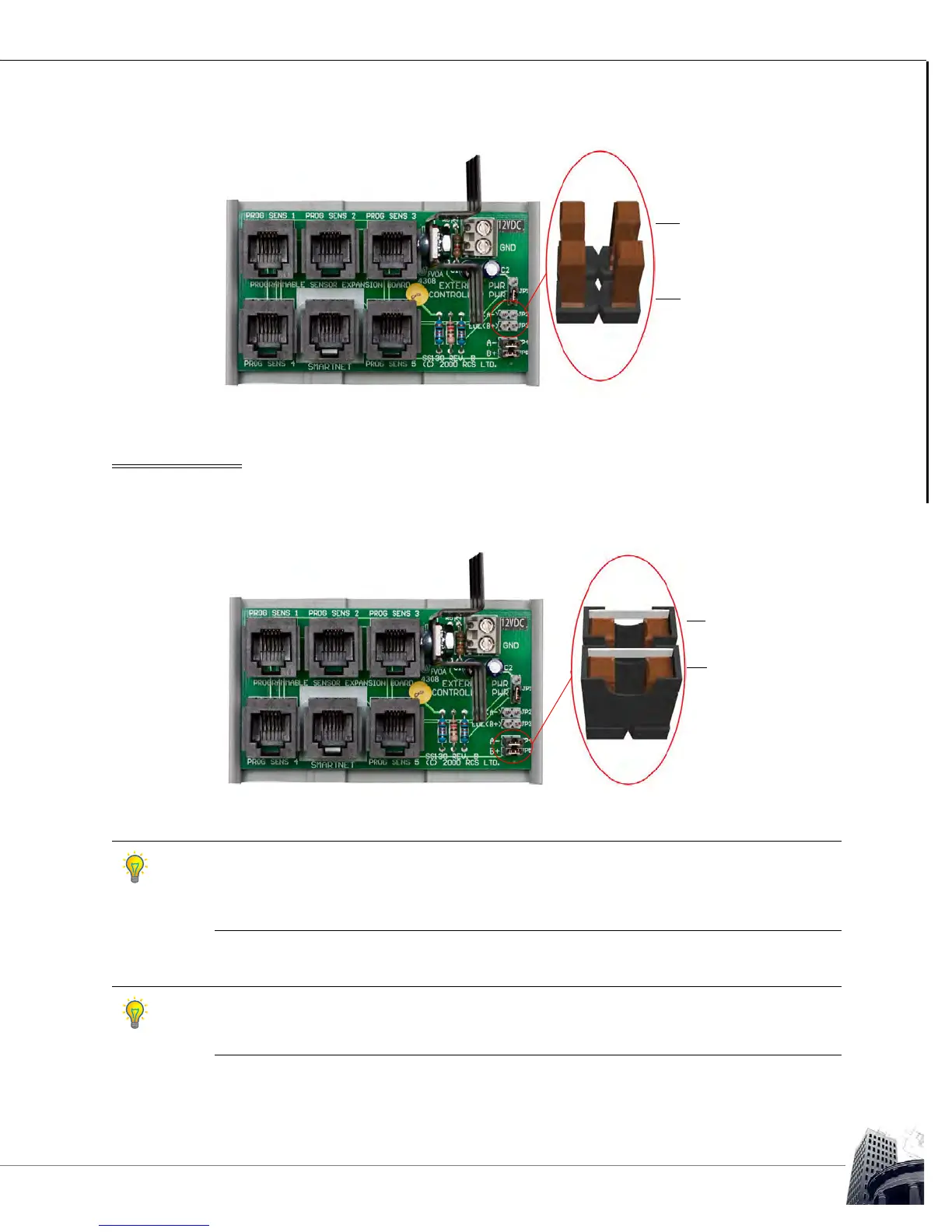
FIGURE 20: SSX EOL JUMPERS
NET TERMINATION
If operator workstation access using an X-Port-2
™
converter through an SS is required, the
network jumpers (JP4 & JP5) must be installed.
FIGURE 21: SSX NETWORK JUMPERS
To minimize network distortion, maintain the default factory settings by leaving the jumpers
out. This will improve EIA-485 network performance. It will have no effect on SMART-Net
™
performance. However, the ability to connect an X-Port-2
™
converter and operator
workstation to any SS connected to the SSX will be lost.
The jumper sets JP2/JP3 and JP4/JP5 should always be set together. For instance, if JP2 is
installed, JP3 should also be installed. Likewise, if JP4 is installed, JP5 should also be
installed. There is no application where only one jumper of either set should be installed.
JP2 - EOL (A-)
JP3 - EOL (B+
)
EOL
jumper
JP4 - (A-)
JP5 - (B+)
NET
jumpers



 To Next Page