52
2004 – 2014 Reliable Controls
®
Corporation. All rights reserved.
LCD SCREEN INTERFACE
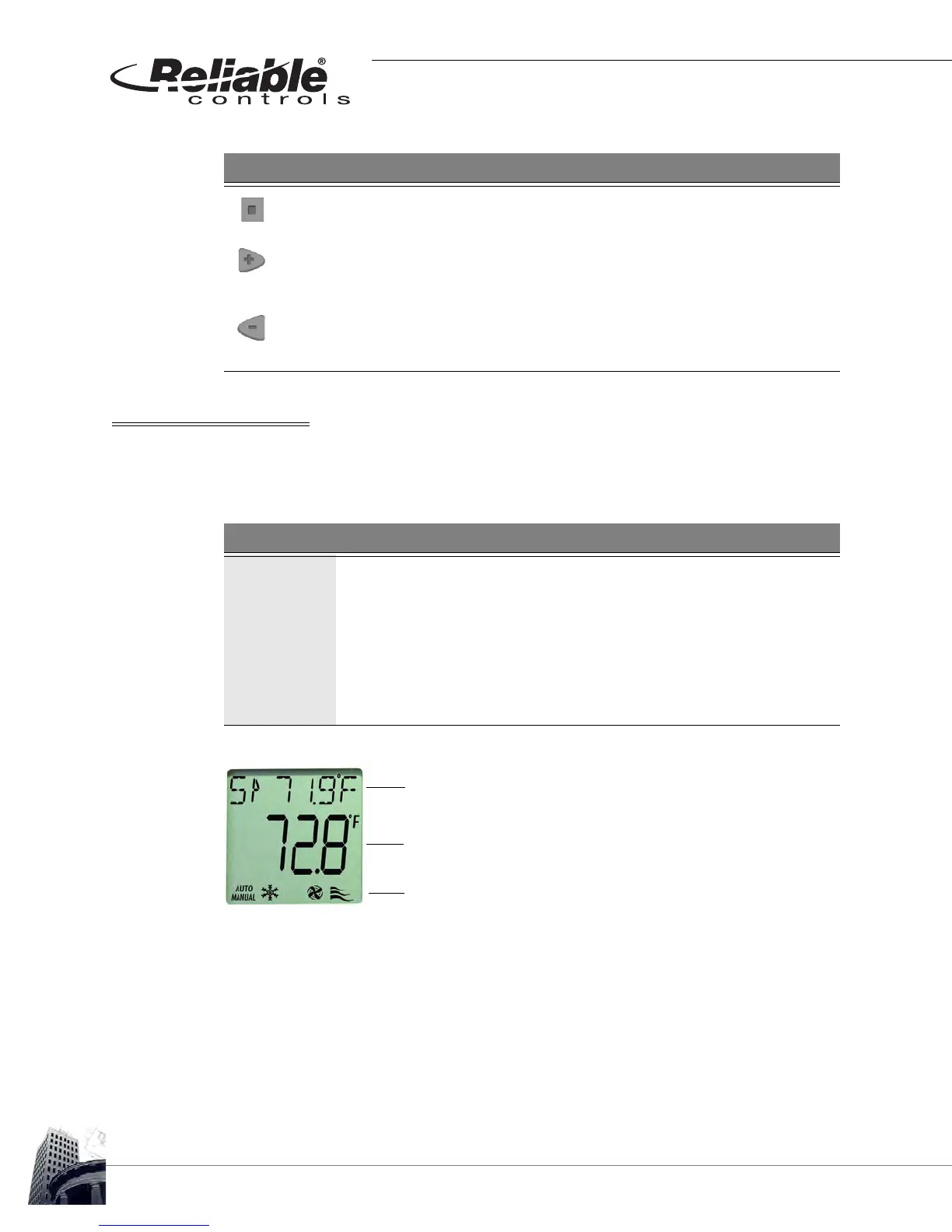
The SS-L features a 36 mm x 36 mm (1
3
/8” x 1
3
/8”) LCD display screen. This screen is
capable of displaying text and icons arranged in three rows as outlined in Table 9.
FIGURE 51: SS-L LCD SCREEN DISPLAY
TABLE 8: SSL INTERFACE BUTTON CONTROL
Button Functionality
Pressing the center navigation button cycles the LCD display through each
of the configured point values.
Pressing the increment button will increase the value of analog points or
toggle the status of binary points configured to permit operator
modification.
Pressing the decrement button will decrease the value of analog points or
toggle the status of binary points configured to permit operator
modification.
TABLE 9: SSL LCD SCREEN DISPLAY ROWS
Row Display
To p
Six 7.62 mm (
5
/16”) alphanumeric characters may be used to display:
1) a short point name or, 2) the configured secondary point.
Middle
Four 15.24 mm (
5
/8”) alphanumeric characters used to display the
present value of the configured point. The units of the point may also
be displayed.
Bottom Up to six simultaneous unique icons may be displayed to indicate
system status (icon details in Table 10).
Top Row
Middle Row
Bottom Row



 To Next Page