76
2004 – 2014 Reliable Controls
®
Corporation. All rights reserved.
OCCUPANCY SENSOR OPTION (-OC)
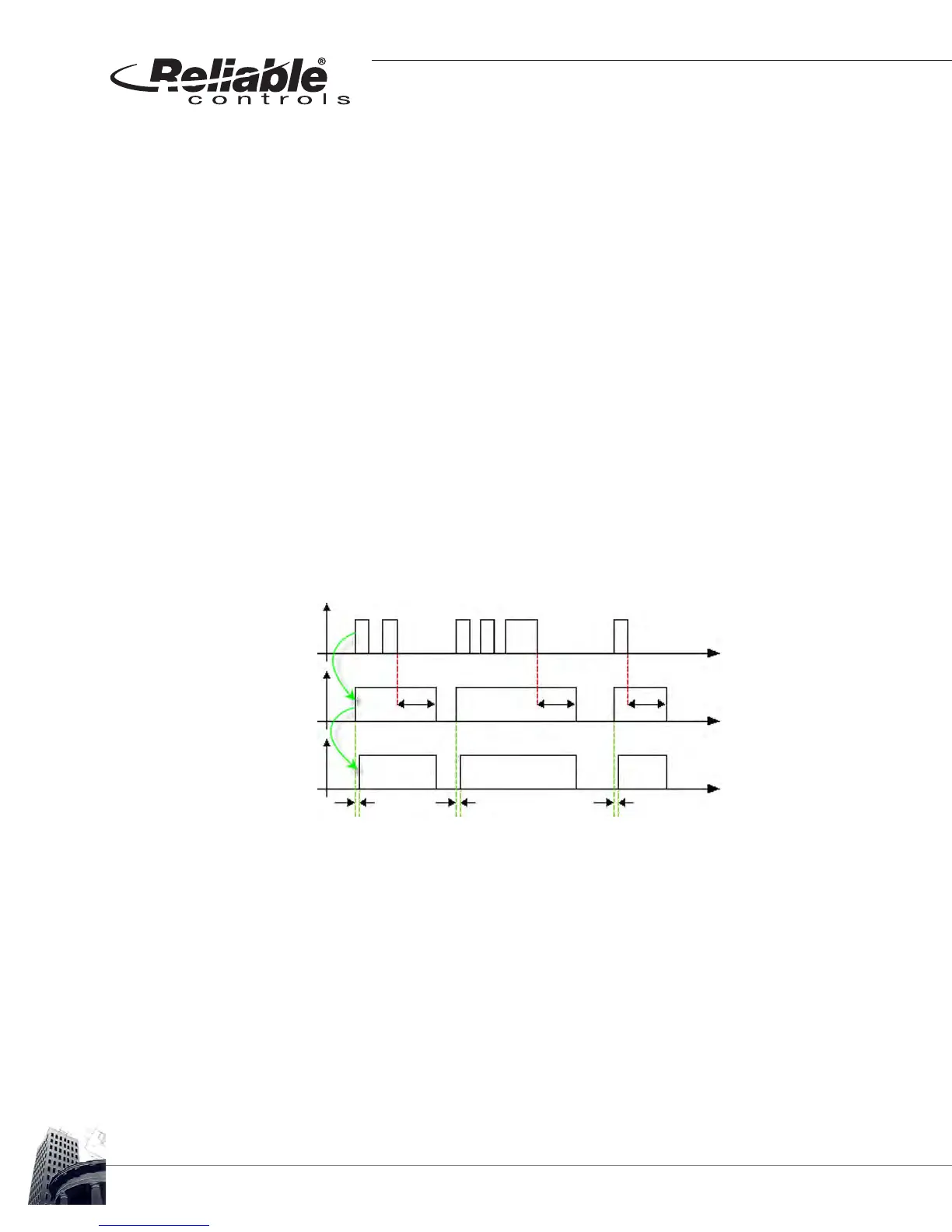
The occupancy sensor installed in SMART-Sensors with the -OC option is capable of
detecting many motion events in a short amount of time. The SS occupancy protocol was
designed for setting the occupancy point (Point #5) as well as minimizing network traffic
over SMART-Net
™
. Traffic is minimized by only communicating changes in occupancy
after a fixed period of no motion. This fixed interval is referred to as ton (timer for minimum
occupancy ON time) and has a default of 10 minutes.
After an initial detection of motion, the occupancy sensor is in a True state. This, in turn,
sets the SS occupancy state and the controller occupancy state (Point #5) to a True state.
Whenever the occupancy sensor state transitions to the True state, the ton timer is reset
to the default. Whenever the occupancy sensor transitions to the False state, the ton timer
starts timing down. The occupancy sensor state may change many times, but the SS
occupancy state will remain True until the ton timer has counted down to zero following
the last motion sensed.
The state of the occupancy can be set to Unoccupied or False by the controller at any time
via Control-BASIC, or by manually adjusting Point #5 of the SMART-Sensor worksheet.
Setting Point#5 to False resets the ton timer back to the default. The ton timer will remain
at the default as long as the occupancy state is True and will start counting down to zero
only after a False state is detected. For more details, see Product Bulletin #4294.
FIGURE 71: SS OCCUPANCY SENSOR
Time
Time
Time
ton
ton
ton
td
td
td
ton - timer for
minimum on time,
SS state set to
false after ton
expires
td - delay time
for SS state to be
communicated to
the controller
Occupancy
Sensor
State
SS
Occupancy
State
Controller
Occupancy
State
True
True
True
False
False
False



 To Next Page