46
2004 – 2014 Reliable Controls
®
Corporation. All rights reserved.
CONFIGURING THE SS
Each controller can host multiple SSs on its SMART-Net
™
. After all the SSs have been
installed, if there is more than one SS connected to a controller, each SS must be
configured with a unique address.
ADDRESSING THE SS
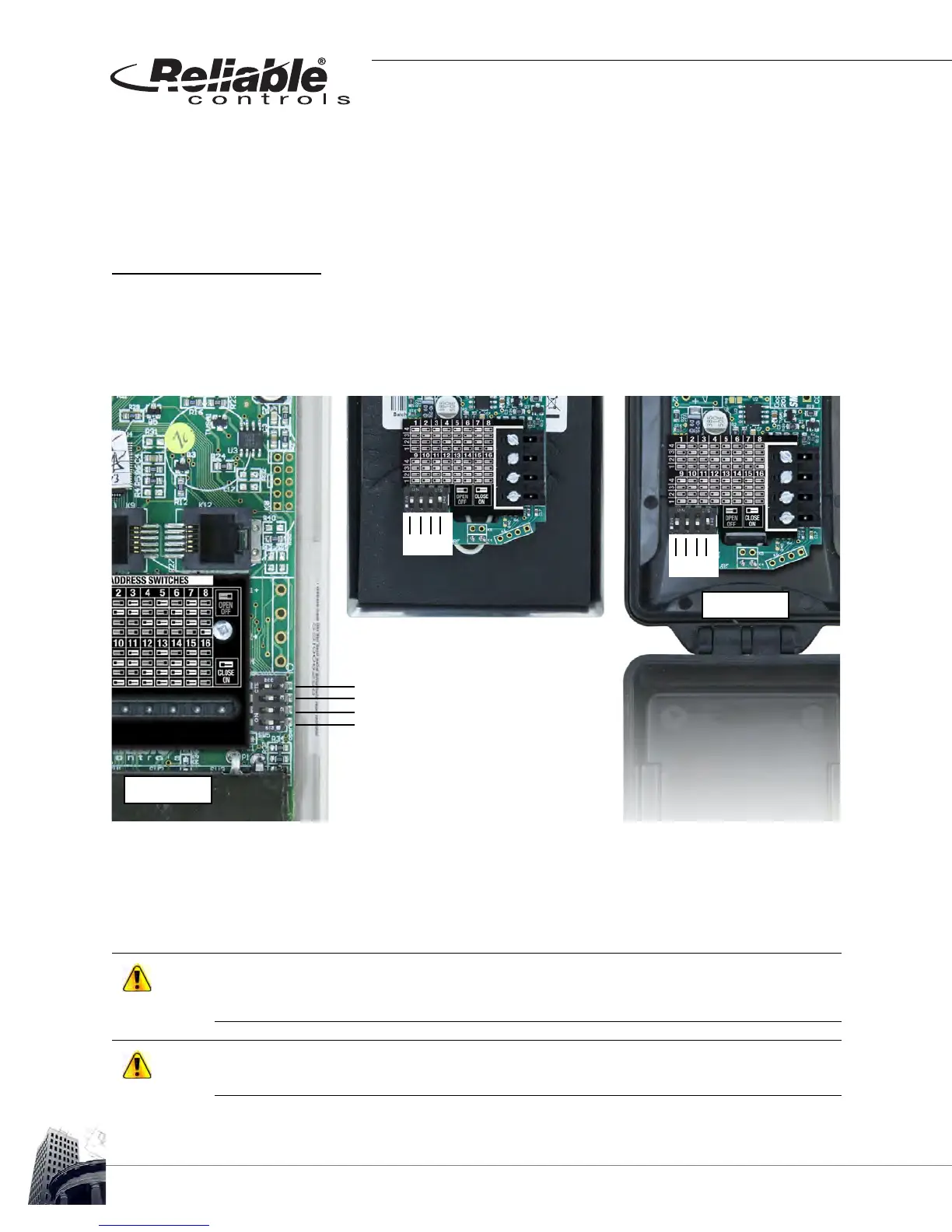
To address an SS that does not have an LCD screen, a DIP switch rack with four switches
is provided. Locate the DIP switch rack and configure the address by closing or opening
the appropriate switches as shown in Figure 44.
FIGURE 44: PROTECTOR DIRECTOR FOR THE SS, SS-P, AND THE SS-DUCT SHOWING THE ADDRESS CONFIGURATION
The 16 possible addresses are represented in binary and switch #4 (the switch located a
the top) is the least significant bit. For example, to configure the SSEA as address #1 open
switches #1, 2, and 3 while closing switch #4.
Do not skip SS addresses. When the host controller encounters the first unpopulated
SMART-Sensor worksheet, the previous SS address will be interpreted as the last device and
communication with higher addresses will not occur.
When addressing SSs be mindful of the maximum number of SSs supported by the host
controller.
4 - least significant bit
3
2
1
1 2 3 4
SS-P
1 2 3 4
SS-DUCT
SS



 To Next Page