74
2004 – 2014 Reliable Controls
®
Corporation. All rights reserved.
If the determination to manually calibrate the SS-CO2 has been made, follow the
procedure detailed below.
TO MANUALLY CALIBRATE THE CO
2
SENSOR
1
Open the appropriate SMART-Sensor worksheet in RC-Studio
®
.
2 Measure the CO
2
with a reference sensor (this could be a handheld meter or a
known good sensor). Enter the reference CO
2
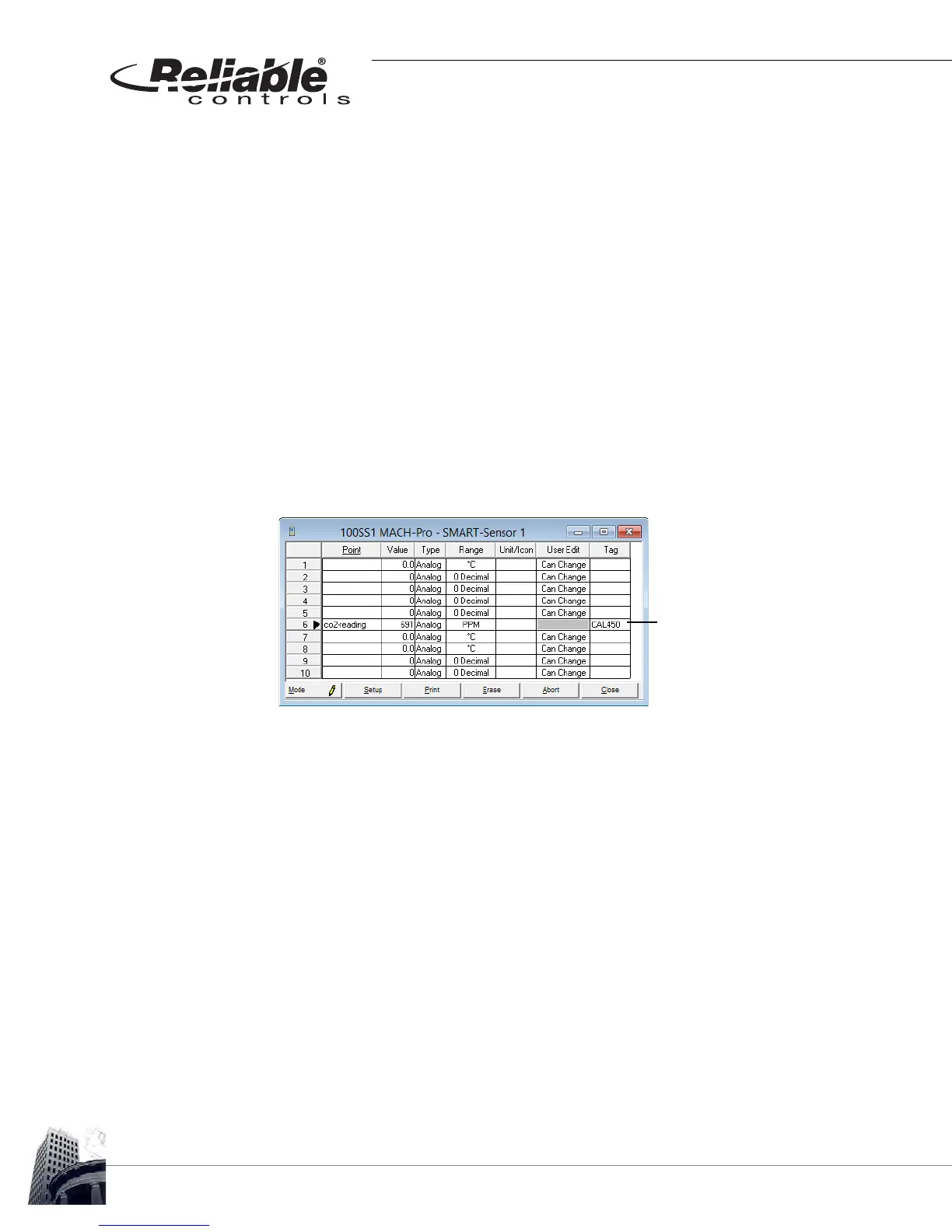
in PPM in the Tag field using the
format CALXXX. Where the XXX value is the reference value. In the example
shown in Figure 70, the reference sensor measured 450 PPM, therefore CAL450
was entered in the Tag field.
FIGURE 70: SMART-SENSOR WORKSHEET MANUAL CALIBRATION USING THE TAG FIELD
3 Activate the Mode button to send the changes.
4 Deactivate the Mode button.
5 The SMART-Sensor worksheet row number will highlight in orange when
calibration has been successful. Once this visual feedback is received, clear the
Tag field (VERY IMPORTANT).
6 Activate the Mode button again to send the changes.
7 Verify that the CO
2
value of the SS-CO2 matches the reference sensor. If not,
perform steps 1 – 7 again.
The reading of 691 PPM
was calibrated to read 450
PPM by entering CAL450
in the Tag field.



 To Next Page