DURADRIVE Drive Controllers Replacing or Exchanging Drive Components 11-9
DOK-DURADR-HDC01.1****-PR02-EN-P
11.3 Replacing Firmware
Replacing the Parameter Module
• Secure parameters (DriveTop)
• Switch drive controller off
• Remove programming module
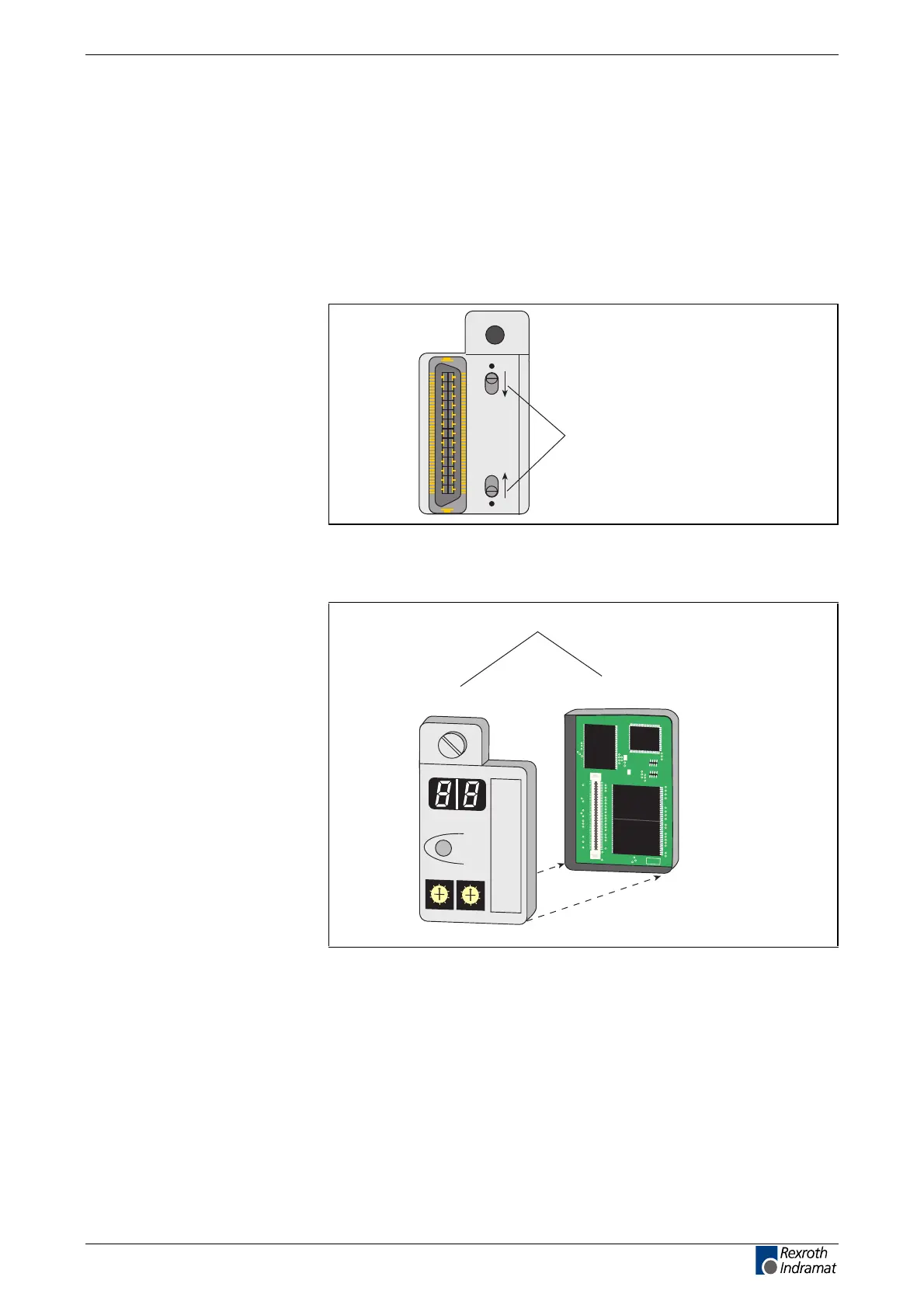
• Open the lock on the back
Push locking plate
inside to open
Ap5145f1.fh7
Fig. 11-5: Locking the programming module
• Open the programming module
Ap5146f1.fh7
Programming module
Firmware module
Parameter module
Barcode
0
1
2
3
4
5
6
7
8
9
0
1
2
3
4
5
6
7
8
9
H1
S1
S3
S2
Barcode
H1
S1
S3
S2
0
1
2
3
4
5
6
7
8
9
0
1
2
3
4
5
6
7
8
9
ISSI
IS61C6416-20T
C2110900 9728
splSI2032
110LT48
H813A08
ESF2
SDS
Fig. 11-6:Programming module
• Connect new parameter module and old firmware module
• Close lock (switch outward)
• Insert programming module
• Switch drive controller on
• Load parameters (DriveTop)
LSA Control S.L. www.lsa-control.com comercial@lsa-control.com (+34) 960 62 43 01



 To Next Page