11-4 Replacing or Exchanging Drive Components DURADRIVE Drive Controllers
DOK-DURADR-HDC01.1****-PR02-EN-P
Replacing the cooling fan unit
Mounting
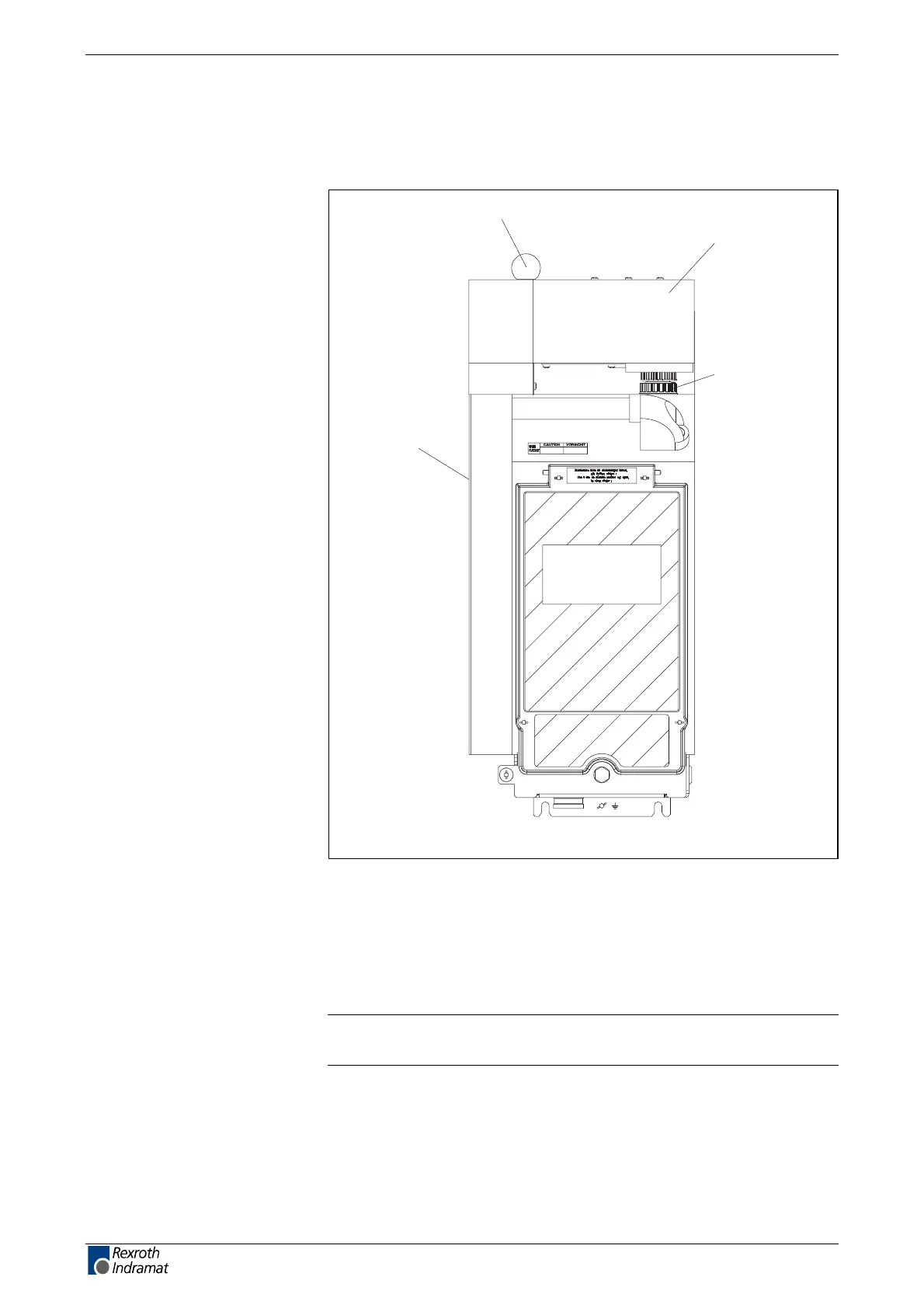
MZ0003F1.FH7
ventilator unit
ball handle screw
connector X14
cooling air guide
Fig. 11-2: Drive controller with cooling fan unit
The cooling fan unit should only be mounted after the drive controller has
been mounted.
Mounting the cooling air guide
The cooling air guide only needs to be mounted with the HDC01.1-A040N
drive controller.
Note: The cooling fan unit only works correctly when the cooling air
guide has been mounted.
• Put both hooks of the cooling air guide in the slots of the cover of the
left housing side.
• Screw on the cooling air guide at the front side of the drive controller.
Mounting the cooling fan unit
• Loosen the cover of connector X14.
LSA Control S.L. www.lsa-control.com comercial@lsa-control.com (+34) 960 62 43 01



 To Next Page