• There are different character encodings for Unicode. If the file is saved as a non-Unicode little
endian file, the file cannot be used. The screen which allows you to choose the format used to
save files differs according to the text editor or spreadsheet software you are using.
Display examples for Unicode little
endian format
Display examples for unavailable format
• Unicode
• Unicode text
• Unicode little endian
• UTF-16LE
• Unicode big endian
• UTF-16BE
• UTF-8
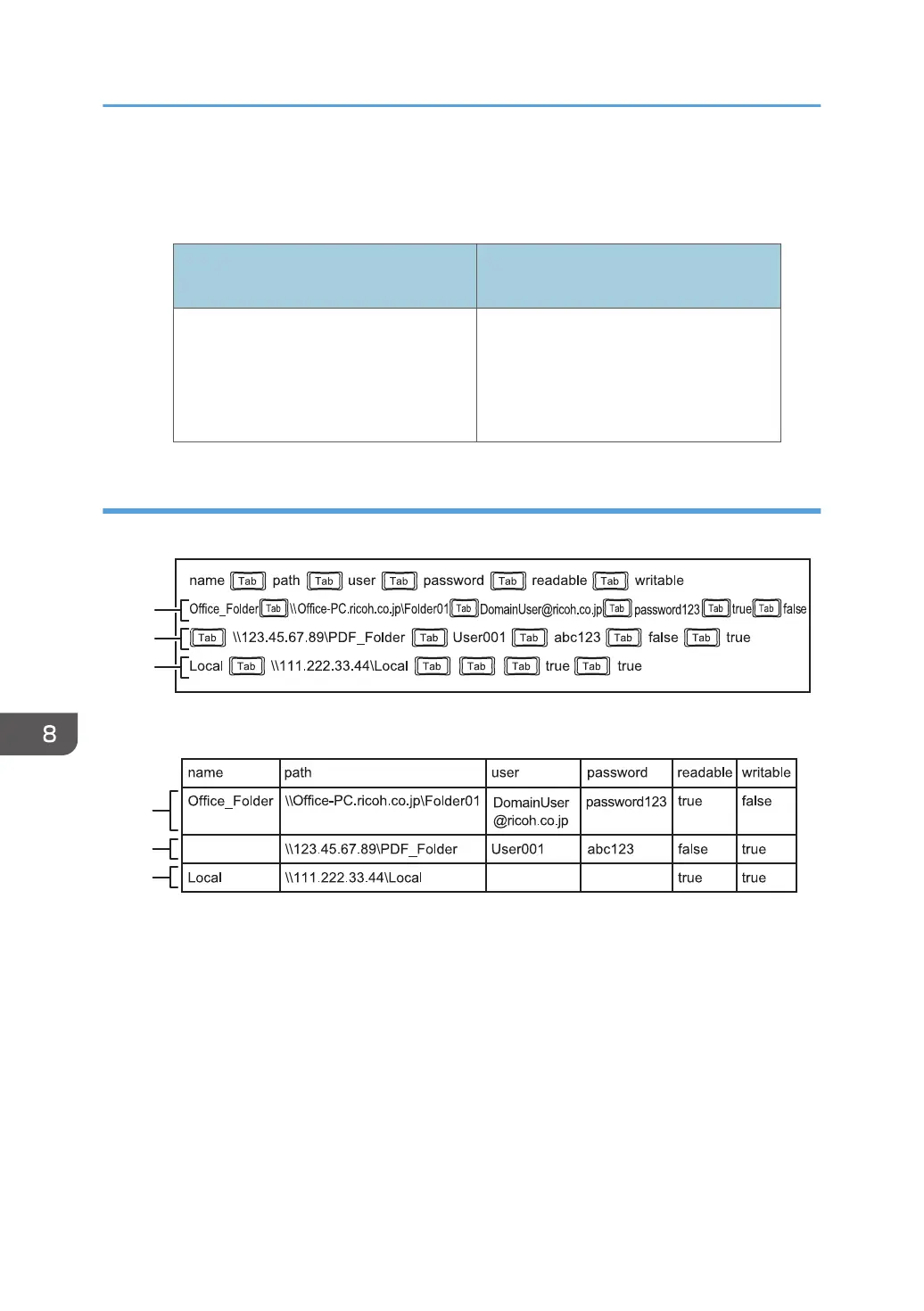
Sample shared folder list
Using a text editor such as Notepad to create a shared folder list
Using spreadsheet software such as Excel to create a shared folder list
1. First entry (2nd row)
The shared folder "Folder01" on the computer whose host name is "Office_PC" is registered.
• Name column: The entry is named "Office_Folder".
• Path column: "\\Office-PC.ricoh.co.jp\Folder01" is entered.
• User column: "DomainUser@ricoh.co.jp" is entered.
• Password column: "password123" is entered.
• Readable column: The entry is listed in the file list.
• Writable column: The entry is not listed in the file list.
2. Second entry (3rd row)
The shared folder "PDF_Folder" on the computer whose IP address is "123.45.67.89" is registered.
8. Changing the Interactive Whiteboard Settings
152



 To Next Page