140
Editing a Tone (Pro Edit)
Com MOD COSM1/2 TVAOSC1/2 AP Syn Effects
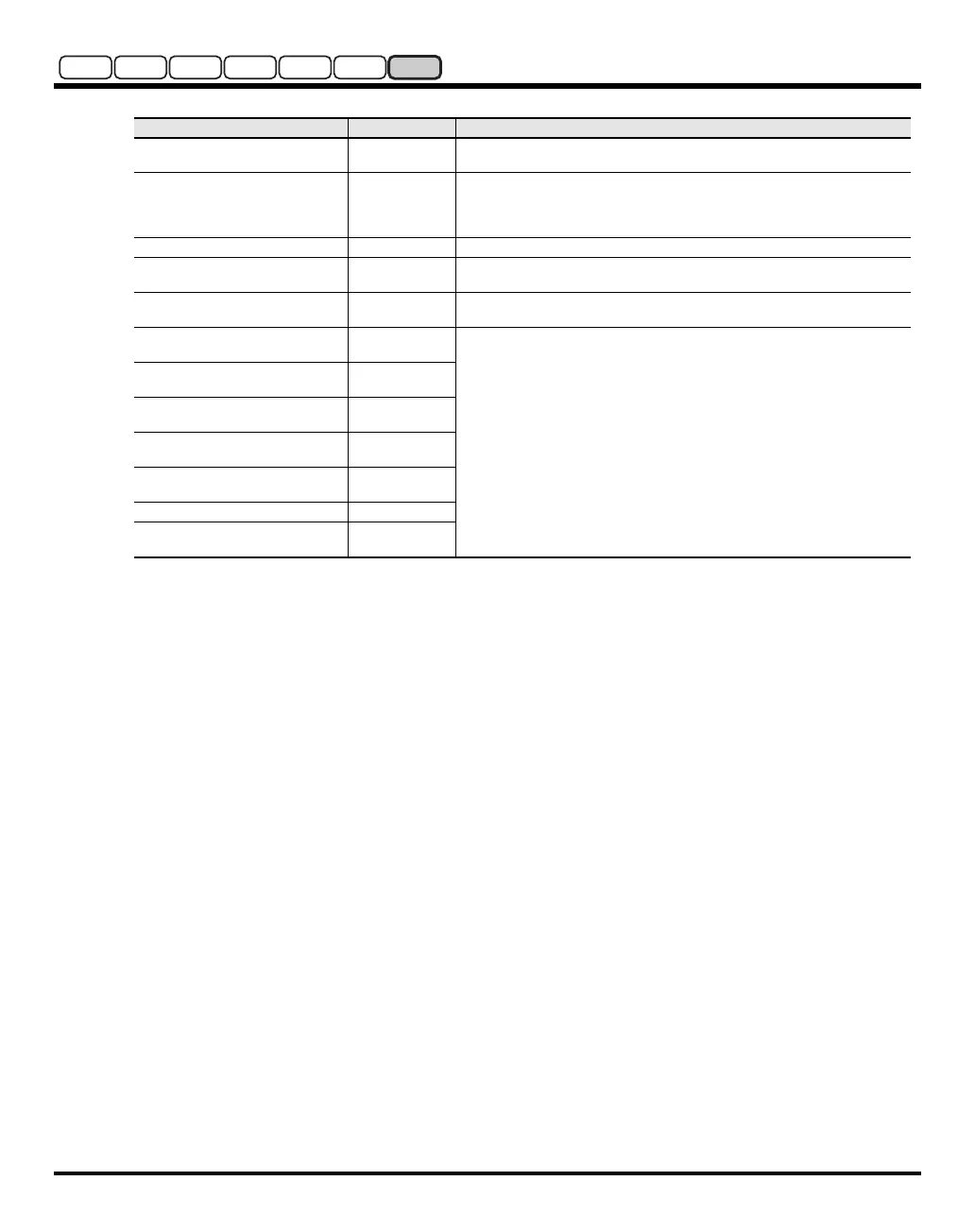
Tone-FX
(Tone-FX On/Off Switch)
OFF, ON
Switches Tone-FX on and off.
Tone-FX Type
00 (Thru)–41
Touch this to jump to the Tone-FX screen (p. 141), where you can choose the
desired Tone-FX from 41 different types. For details on each Tone-FX type,
refer to “COSM_EffectsList(E).pdf” in the “EFFECTS LIST” folder on the includ-
ed CD-ROM.
Tone-FX Master Level
0–127
Adjusts the volume of the sound that has passed through the Tone-FX.
Tone-FX To CHO
(Tone FX Chorus Send Level)
0–127
Adjusts the amount of chorus for the sound that passes through Tone-FX. If
you don’t want to add the Chorus effect, set it to “0.”
Tone-FX To REV
(Tone-FX Reverb Send Level)
0–127 Adjusts the amount of reverb for the sound that passes through Tone-FX. If you
don’t want to add the Reverb effect, set it to “0.”
CHO
(Chorus On/Off Switch)
OFF, ON
These parameters can be specified individually for each patch.
For details, refer to
“Effects (Setting Effects for a Patch)”
(p. 76).
CHO Type
(Chorus Type)
00 (Off)–08
CHO Master Level
(Chorus Master Level)
0–127
CHO To REV
(Chorus Reverb Send Level)
0–127
REV
(Reverb On/Off Switch)
OFF, ON
REV Type (Reverb Type)
00 (Off)–13
REV Master Level
(Reverb Master Level)
0–127
Parameter
Value Description
V-Synth-GT_e.book 140 ページ 2007年4月9日 月曜日 午後1時46分


 To Next Page
 Loading...