Introducing the Ruckus Wireless AP
Getting to Know the AP Features
Ruckus Wireless Indoor AP 100.2.0 User Guide, 800-70892-001 Rev A 73
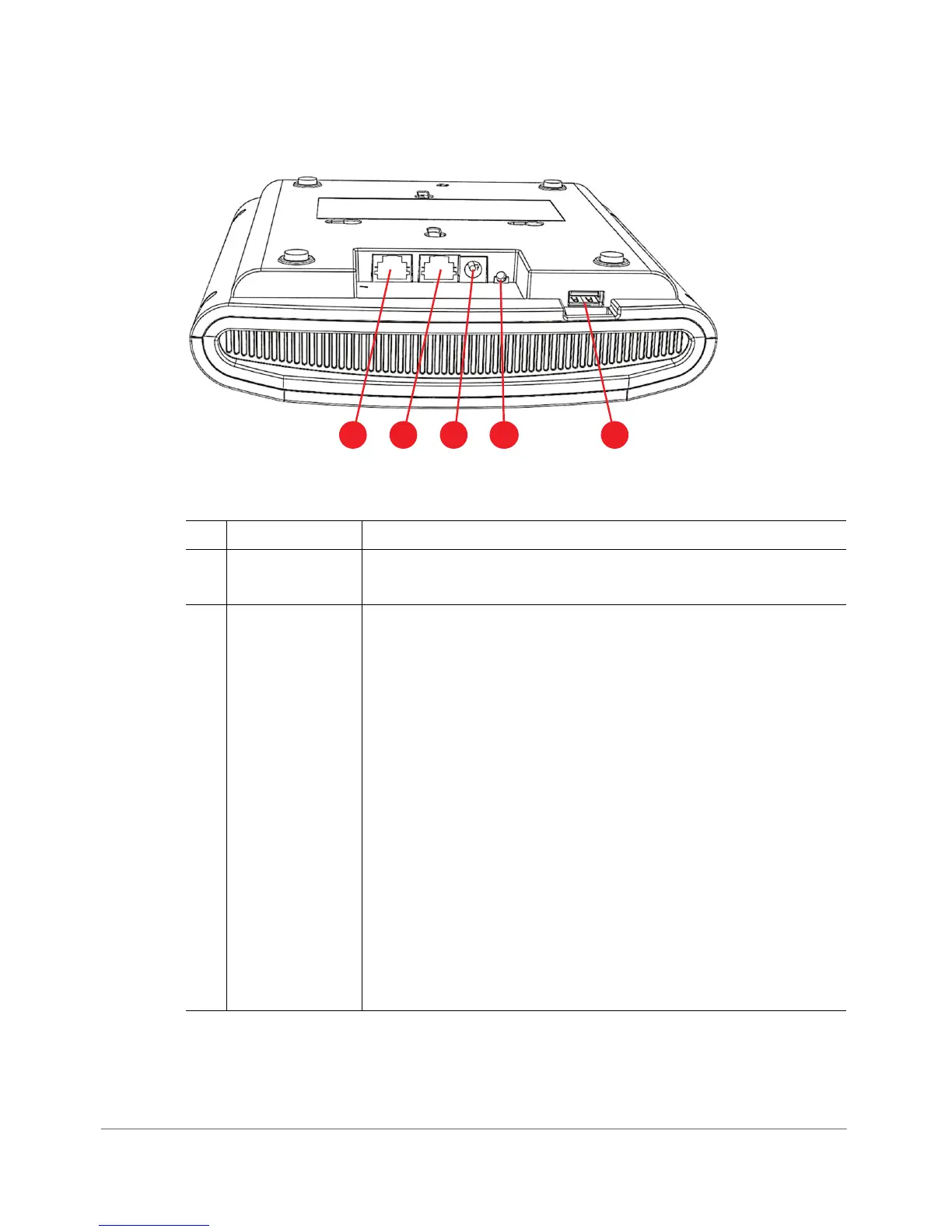
Figure 33. R710 bottom panel
Table 38. R710 rear panel elements
No. Item Name Description
1 Ethernet (eth1)
Port
RJ-45 port for a 10/100/1000 connection.
2Ethernet + PoE
(eth0) Port
RJ-45 port for a 10/100/1000 with PoE in.
NOTE: The R710 can be powered by a 802.3at-compliant
(25.5W) Power over Ethernet (PoE) switch or PoE injector.
--OR--
an 802.3af-compliant PoE switch or PoE injector.
CAUTION: The AP can operate off of 802.3af power, but the
feature set is reduced: the USB port is disabled, the non-PoE
(eth1) Ethernet port is disabled, and the 2.4 GHz transmit power
is reduced from 28dBm to 25dBm (aggregate of spatial
streams), and country limits apply.
(The R710 is a Class 4 device when powering the USB port.)
WARNING! For units using Power over Ethernet (PoE). These
products and all interconnected equipment must be installed
indoors within the same building, including the associated
LAN connections, as defined by Environment A of the IEEE
802.3af Standard.












 To Next Page