SATEL INTEGRA Plus 59
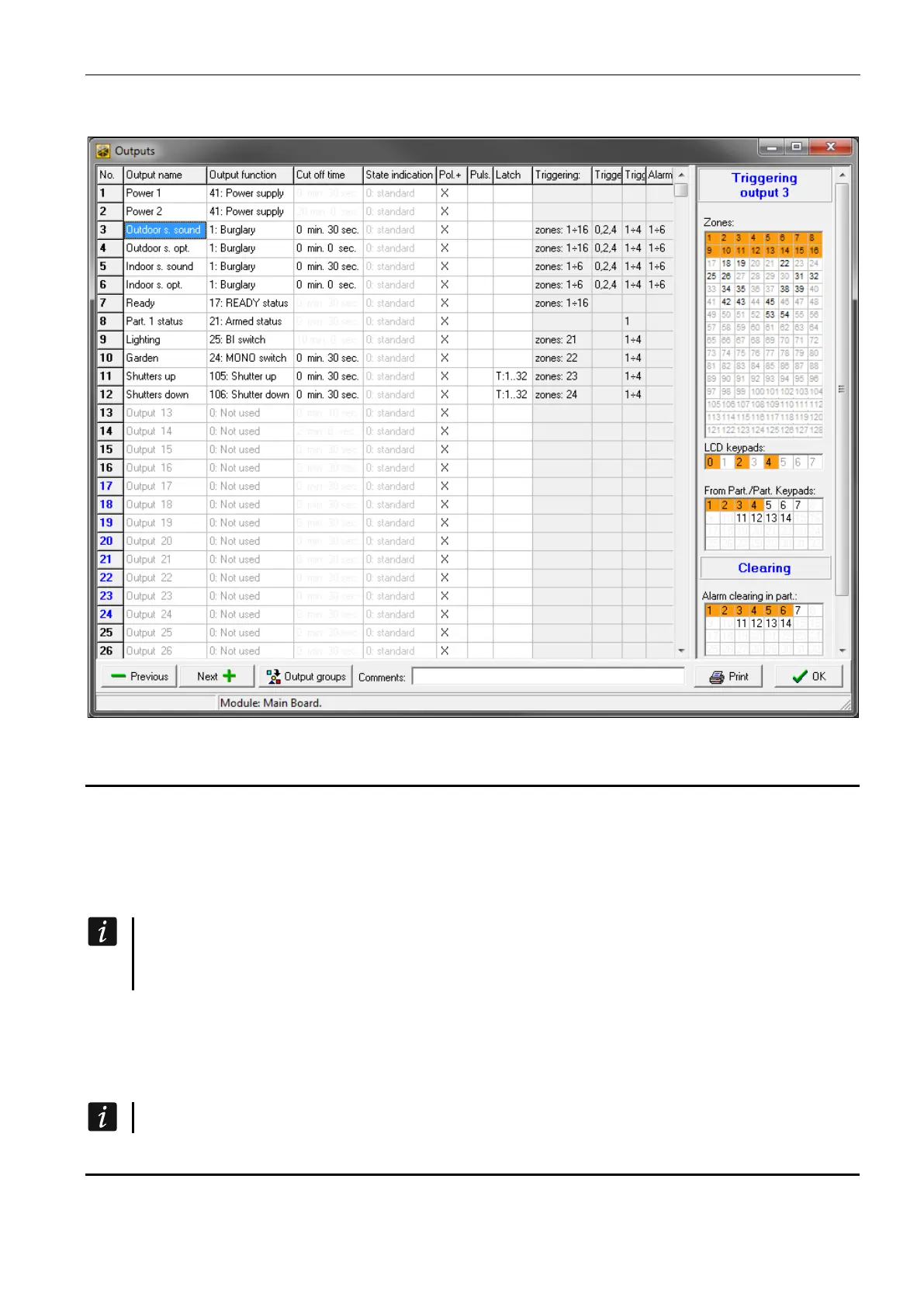
• using the DLOADX program, in the “Outputs” window.
Fig. 6. “Outputs” window in the DLOADX program.
5.1 Output parameters
Output name – individual name of the output (up to 16 characters).
Output function (see: “Output functions”).
Cut off time – time during which the output is active. The cut-off time can be programmed
with an accuracy of up to 0.1 second. The parameter is irrelevant for the status indicating
outputs.
To set the cut-off time with an accuracy of up to 0.1 sec using the DLOADX program,
right-click on the “Cut off time” column. A pop-up menu will appear, in which you must
click on “Edit”.
State indication – instead of the output state, the state of selected zone can be displayed.
This can be useful if the output is activated just for a short while to turn on / off a device
and the device state is supervised by the control panel zone. In the service mode, to
define how the output state is to be presented on the keypad, use the OUTS STATE BY
function (OUTPUTS GROUPS OUTS STATE BY).
The output status cannot be presented according to the zone 256 status.
5.2 Output functions
0. NOT USED



 To Next Page