80 Programming SATEL
5 – alarm events memory [Alarms log] – if this option is enabled, the user can press and
hold down the key with number 5 for 3 seconds to view the alarms log (based on the event
log).
6 – trouble memory [Troubles log] – if this option is enabled, the user can press and hold
down the key with number 6 for 3 seconds to view the troubles log (based on the event
log).
7 – trouble status [Troubles] – if this option is enabled, the user can press and hold down
the key with number 7 for 3 seconds to view the troubles.
8 – chime on/off [Chime changing] – if this option is enabled, the user can press and hold
down the key with number 8 for 3 seconds to enable / disable the CHIME signal in the
keypad.
.
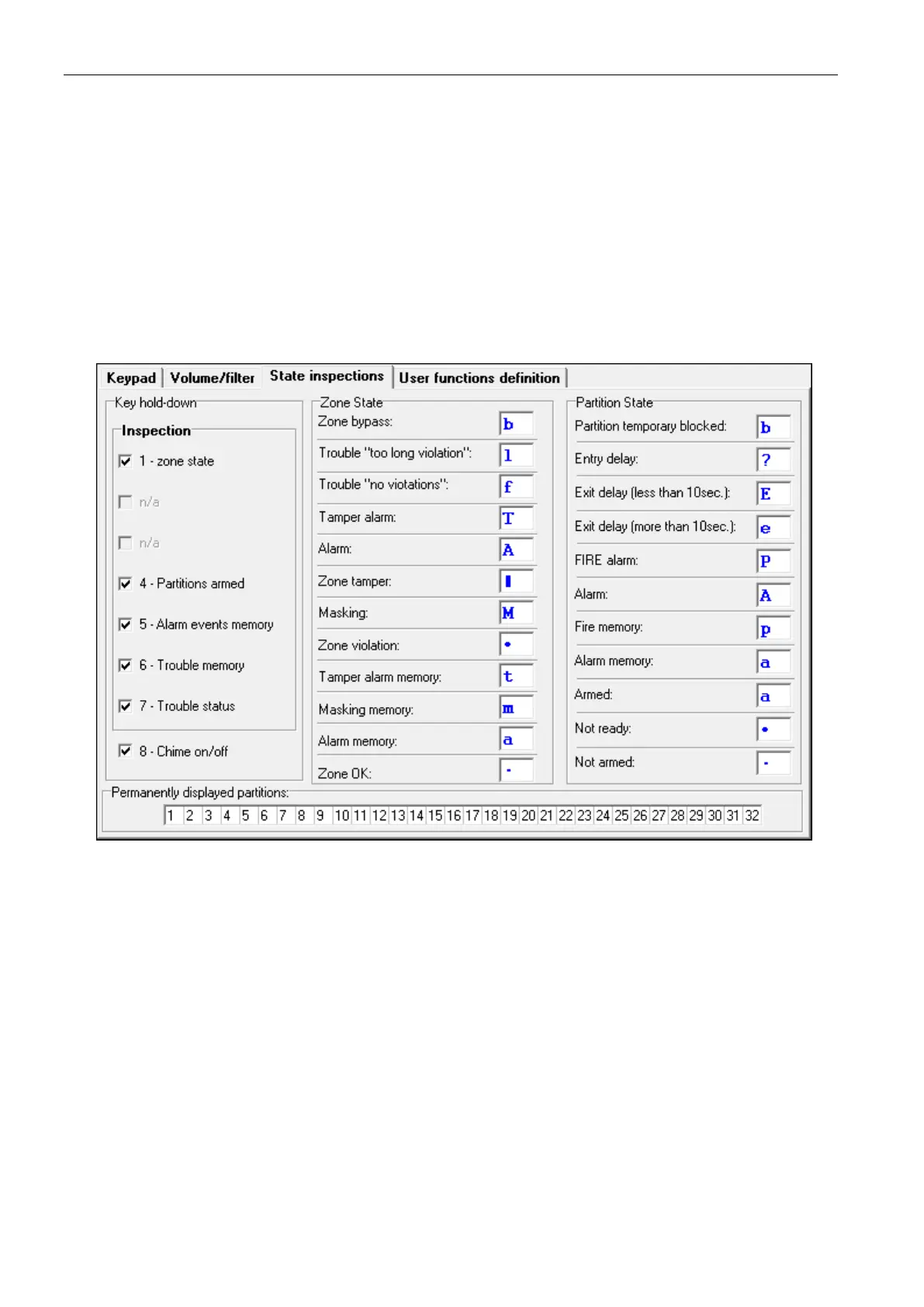
Fig. 9. Keypad “State inspections” tab in DLOADX program.
Zone state [Zone characters]
You can define the symbols which will be used to illustrate the state of zones on the display.
Partition state [Part.characters]
You can define the symbols which will be used to illustrate the state of partitions on the
display.
Permanently displayed partitions [State part.]
You can select the partitions whose state will be permanently presented in the lower line of
the display. Up to 16 partitions can be selected. The partitions are displayed successively: for
example, if the partitions 3, 6 and 7 are selected, their state will be displayed in the first,
second and third position of the display.












 To Next Page