EN
101
General section (BASIS and PREMIUM)
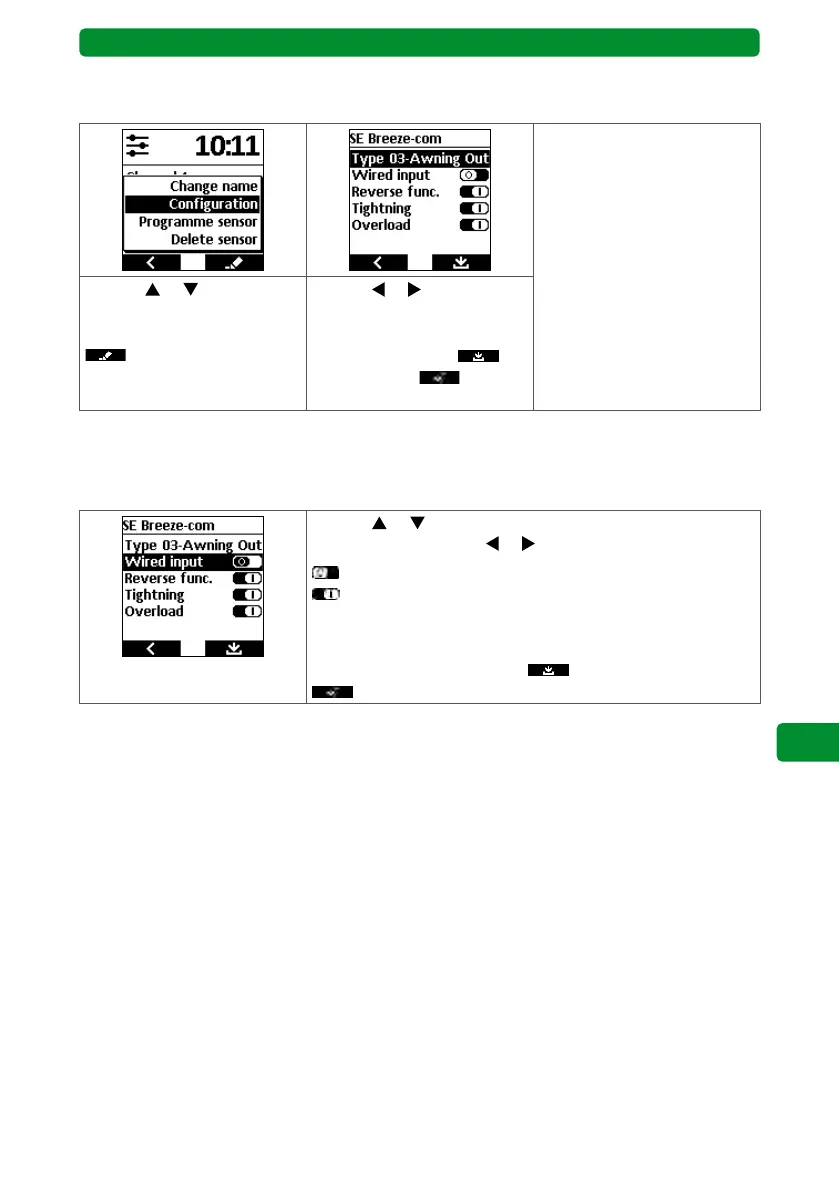
13.9.2. Menu item “Configuration”
Determining the receiver application
Selectable receiver applica-
tions:
Type 00: Blind, interior
Type 01: Blind, exterior
Type 02: Awning/screen,
interior
Type 03: Awning/screen,
exterior
Type 04: Commercial awning
Type 05: Roller shutter
Type 06: Window drive
Use the
or buttons to
select “Configuration”, then
press the right display button
.
Use the
or buttons to
select the required receiver
application, then press the
right display button
to
confirm. Press to
return to the SELECT menu.
Note: You can find more information about the receiver application in the instructions for the
respective drives/receivers.
Activating or deactivating drive/receiver functions
Use the or buttons to select the required function, then
switch it on or off using or .
= function switched off
= function switched on
Attention: The number and type of functions depend on the
receiver.
Press the right display button
to confirm and press
to return to the SELECT menu.



 To Next Page