146
PREMIUM version
17.9. Devices
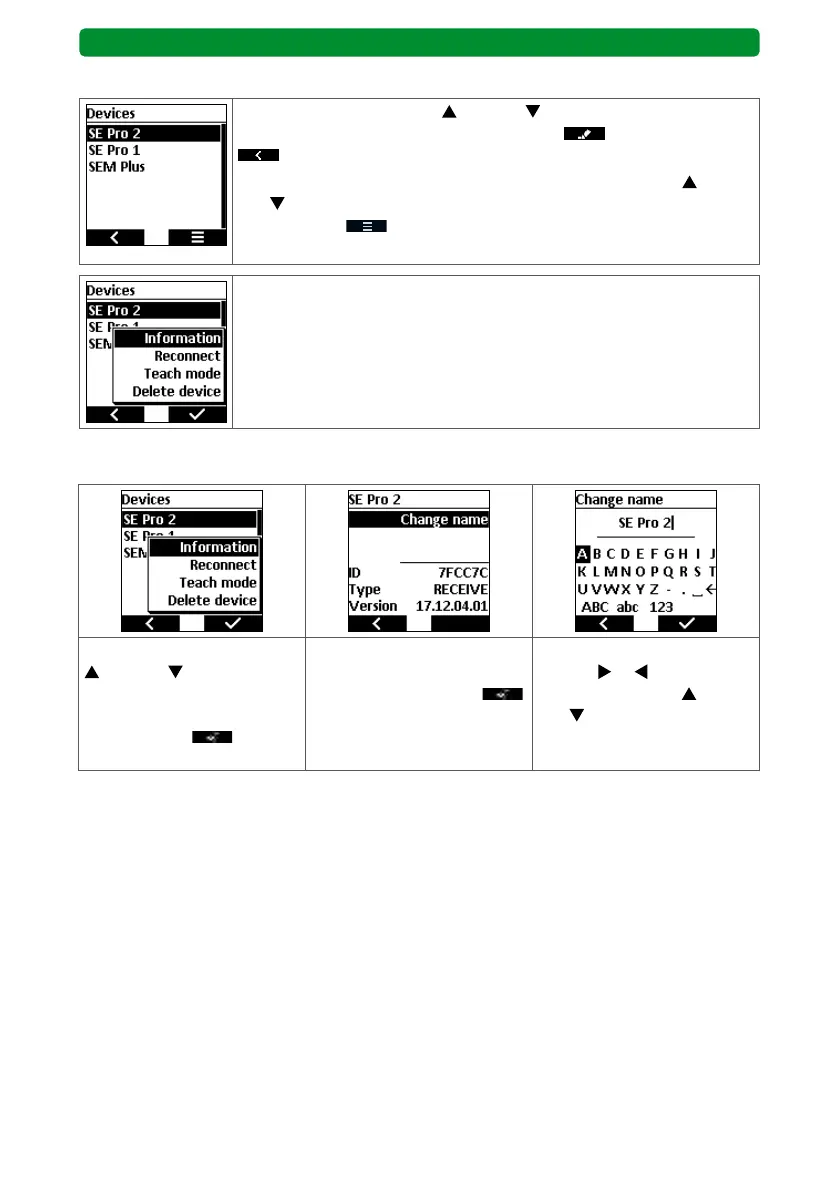
Use the movement buttons (up) and (down) to select the “Devic-
es” menu, and press the right display button to access it. Press
to return to the main menu without saving.
The assigned devices are shown. Use the movement buttons
(up)
and (down) to select the required device menu, and press the right
display button
to open a new menu.
Note: The selected device executes a short movement.
The following functions for the selected device are offered:
• Information: Displays the ID no. and software version of the device.
• You can change the device name (saved in the drive or receiver).
• You can edit the sensor values.
• You can delete devices.
17.9.1. Changing the device name
Use the movement buttons
(up) and (down) to
select the “Information” sub-
menu, and press the right
display button
to open
it.
Press the STOP button to
open the editor for changing
the device name. Press
to save and return to the
submenu.
Use the channel selection
buttons
or and the
movement buttons (up)
and (down) to select the
required letter, and press the
STOP button to confirm.



 To Next Page