152
PREMIUM version
17.9.7. Editing device parameters
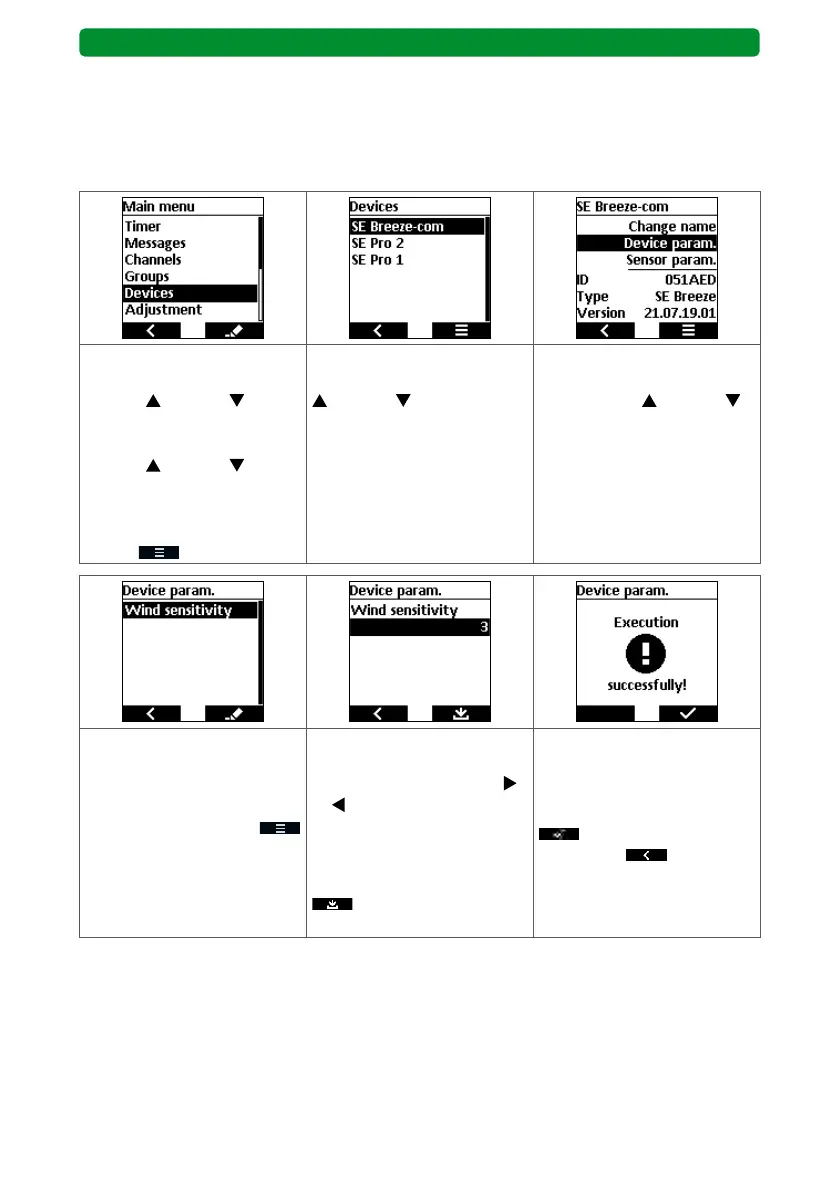
Setting or changing wind sensitivity
To adjust the wind sensitivity on drives with integrated wind detection (e.g. SE Breeze-com),
select the corresponding drive in the “Devices” menu. Perform the setting via the device
parameters.
Select the “Devices” sub-
menu using the movement
buttons (up) and
(down). Select the required
drive using the movement
buttons
(up) and (down)
(here: SE Breeze-com). Con-
firm the selected drive by
pressing the right display
button
.
Select the required drive
using the movement buttons
(up) and (down) (here:
SE Breeze-com). Confirm the
selected drive using the STOP
button.
Select the “Device param.”
menu item using the move-
ment buttons (up) and
(down). Confirm the menu
item using the STOP button.
The submenu currently con-
tains only the “Wind sensitiv-
ity” menu item, so this is
automatically selected. Press
the right display button
to confirm the menu item.
Set the required wind sensi-
tivity from 1 to 5 with the
channel selection buttons
or .
1 = high wind sensitivity.
5 = low wind sensitivity.
Press the right display button
to confirm the menu
item.
The successful changing of
the wind sensitivity is con-
firmed.
Press the right display button
once and the left dis-
play button four times
to return to operation.



 To Next Page