EN
107
BASIS version
15.4. Timer
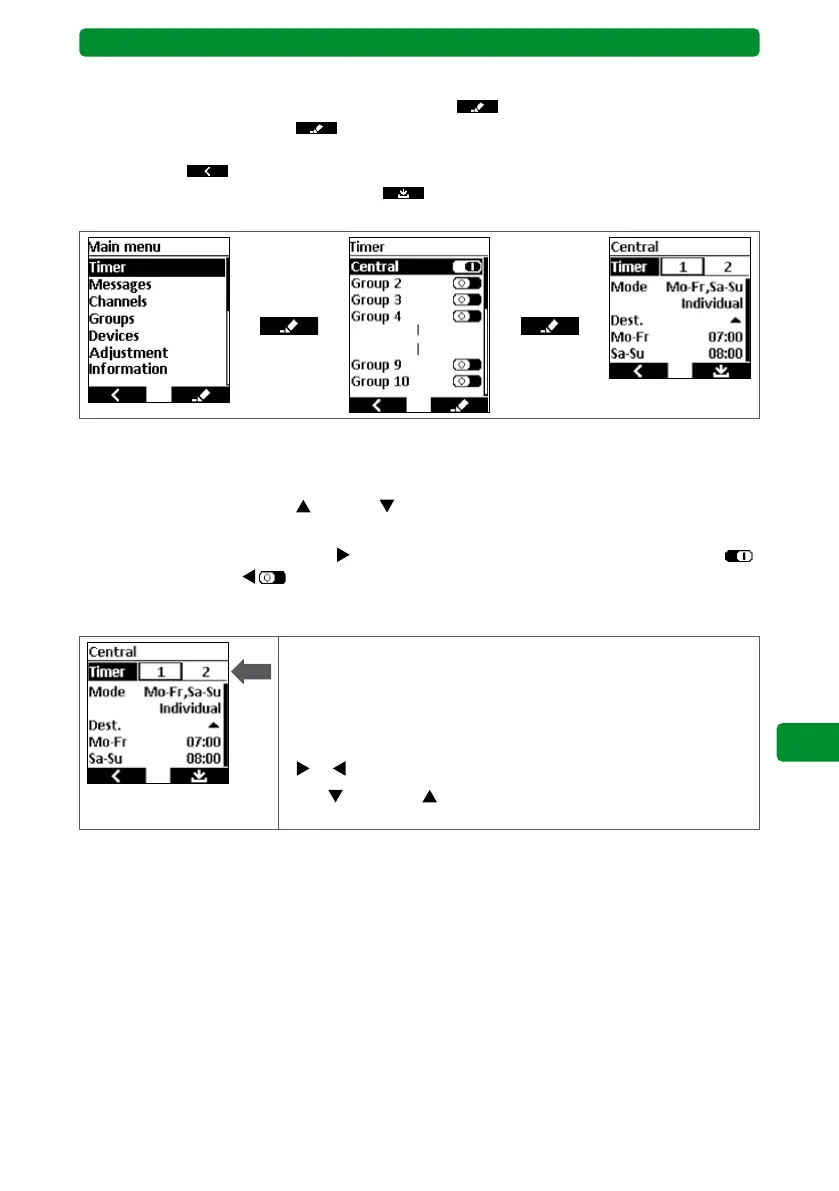
From the main menu, press the right display button
to switch to the “Timer” menu.
Press the right display button again to switch to the “Groups” or “Central” menu,
where you can adjust the switching times and activate/deactivate the groups. Press the left
display button
to return to the previous menu without saving. In the “Groups” or “Cen-
tral” menu, press the right display button to save the altered values and return to the
“Timer” menu.
15.4.1. “Timer” menu
• You can programme 2 switching times each for up to 10 groups.
• Use the movement buttons
(up) and (down) to select the central group or any other
required group.
• Use the channel selection button
to activate the function of the central group/group
or deactivate it with
.
15.4.2. Selecting 2 switching times
• You can allocate 2 separate switching times for each central
group or group.
• These 2 switching times can have different modes, destination
and switching days.
• Select the switching times using the channel selection buttons
or .
• Use
(down) or (up) to select the next step (mode, desti-
nation or switching days).



 To Next Page