EN
159
PREMIUM version
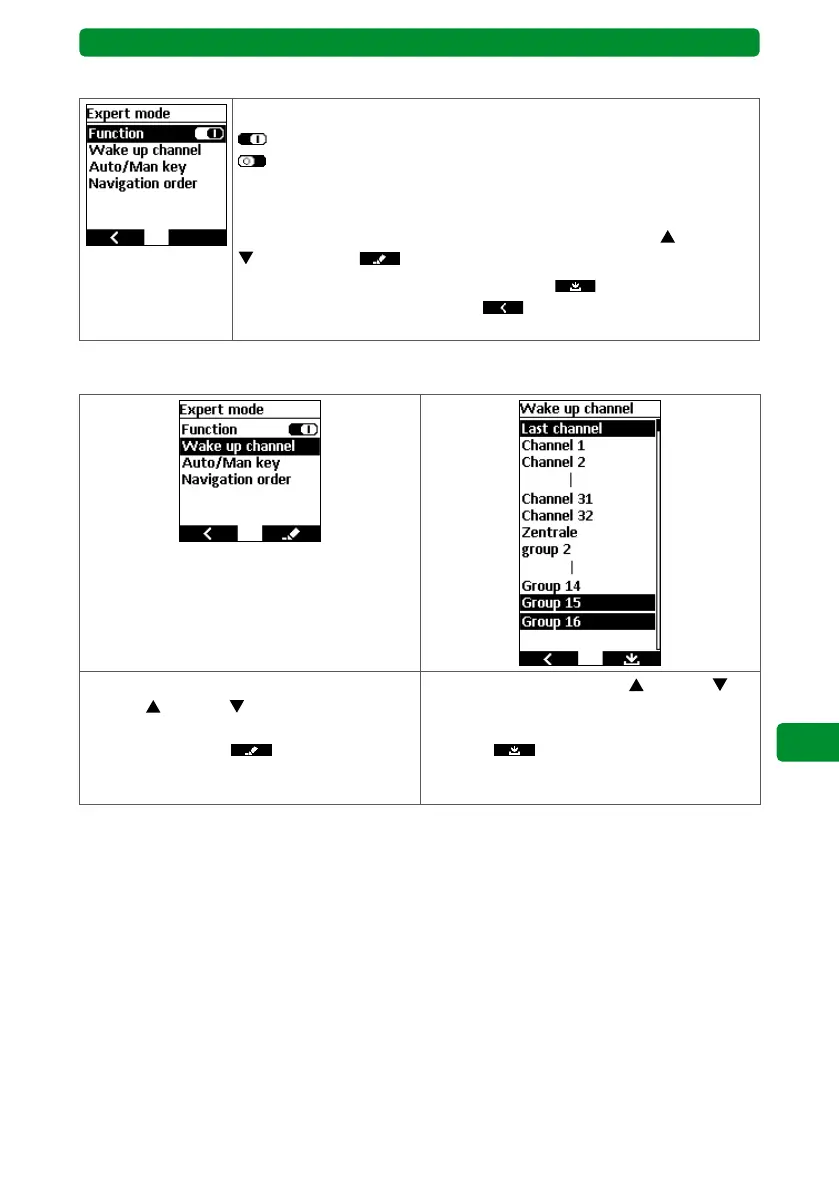
17.11. Expert mode
You can activate/deactivate expert mode.
: “Expert mode” activated.
: “Expert mode” deactivated.
If expert mode is activated, the display is automatically expanded. This
allows you to edit additional functions.
Select the required function using the movement buttons
(up) and
(down). Press to open the submenu and edit.
After editing, press the right display button
to save and return to
the “Adjustment” menu, or press to return to the “Adjustment”
menu without saving.
17.11.1. Wake up channel
In the “Devices” menu, use the movement
buttons
(up) and (down) to select the
“Wake up channel” function, and press the
right display button to open the sub-
menu.
Use the movement buttons
(up) and
(down) in the submenu to select the channel
you wish to show when the display is activat-
ed. Press
to confirm.
The display switches back to the “Expert
mode” menu.



 To Next Page