EN
141
PREMIUM version
17.7. Channels
In the main menu, use the movement buttons
(up) and (down) to select the “Channels”
menu, and press the right display button to access it. Press to return to the main
menu without saving.
The channel describes the connection of one or more devices. It is expedient for only one
drive or receiver to be assigned to a channel.
In the “Channels” menu, you can see whether one or more devices are assigned to the chan-
nel and whether the channel is still available.
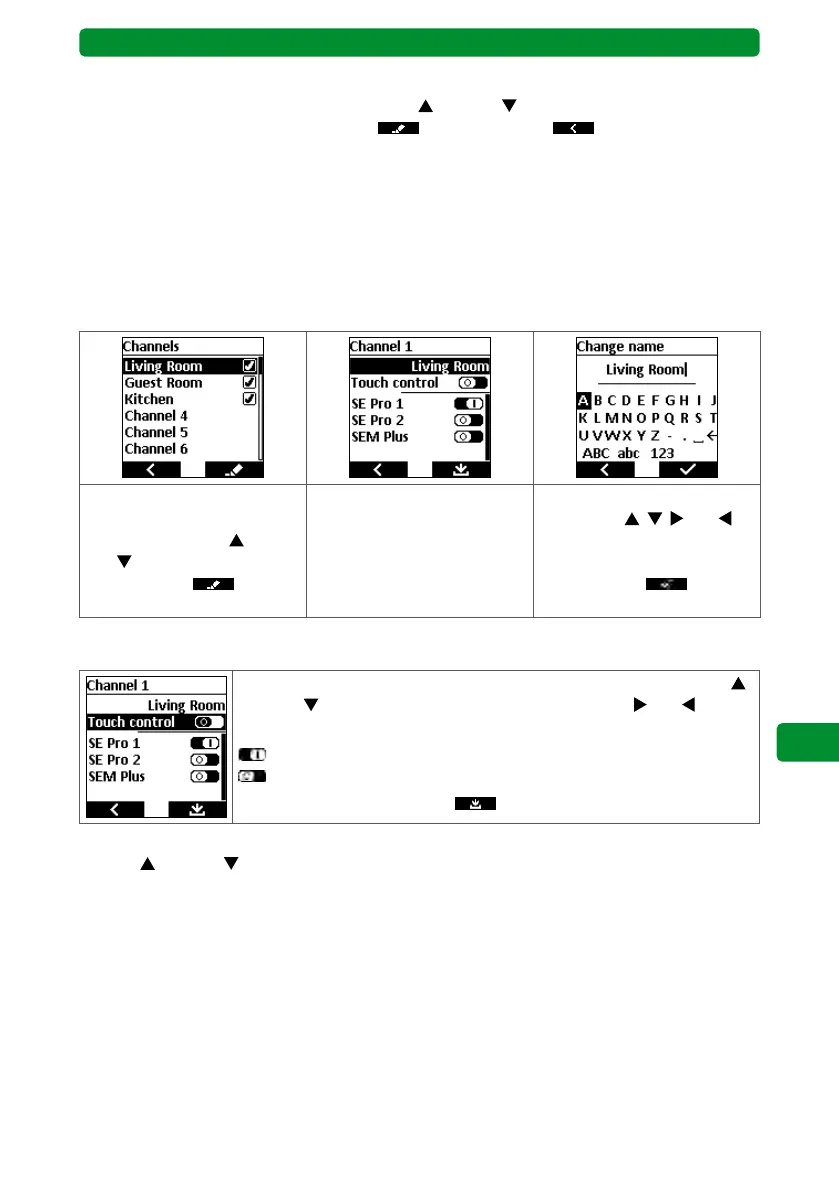
17.7.1. Renaming a channel
You can give individual names to all 32 channels.
Select the required channel
or channel name using the
movement buttons
(up)
and (down). Press the right
display button
to
switch to the submenu.
Press the STOP button to
switch to the “Change name”
menu.
Select the required letter or
action with
, , and ,
and confirm by pressing the
STOP button. Press the right
display button to save
and return to the submenu.
17.7.2. Switching between touch control and automatic end run
Select the “Touch control” menu item using the movement buttons
(up) and
(down). Use the channel selection buttons and
to acti-
vate/deactivate the function.
: “Touch control” activated.
: “Touch control” deactivated.
Press the right display button
to save and return to the menu.
Note: When touch control is activated, the drive moves when you press the movement
buttons
(up) and (down) with a delay of 0.5 seconds. Once you release the movement
button, the drive will stop within one second. If you press and hold the button for longer than
1 second, the drive will switch to automatic end run mode.
Note: Touch control can be useful for precisely setting the angle of Venetian blinds.
Touch control is deactivated upon delivery.



 To Next Page