EN
99
General section (BASIS and PREMIUM)
13.9. Configuration with commeo Multi Send
Note: The drive must be selected for these settings with a transmitter in SELECT mode (status
LED slowly flashes orange). If multiple drives/receivers are shown, press and hold the SELECT
button until the required drive/receiver briefly twitches.
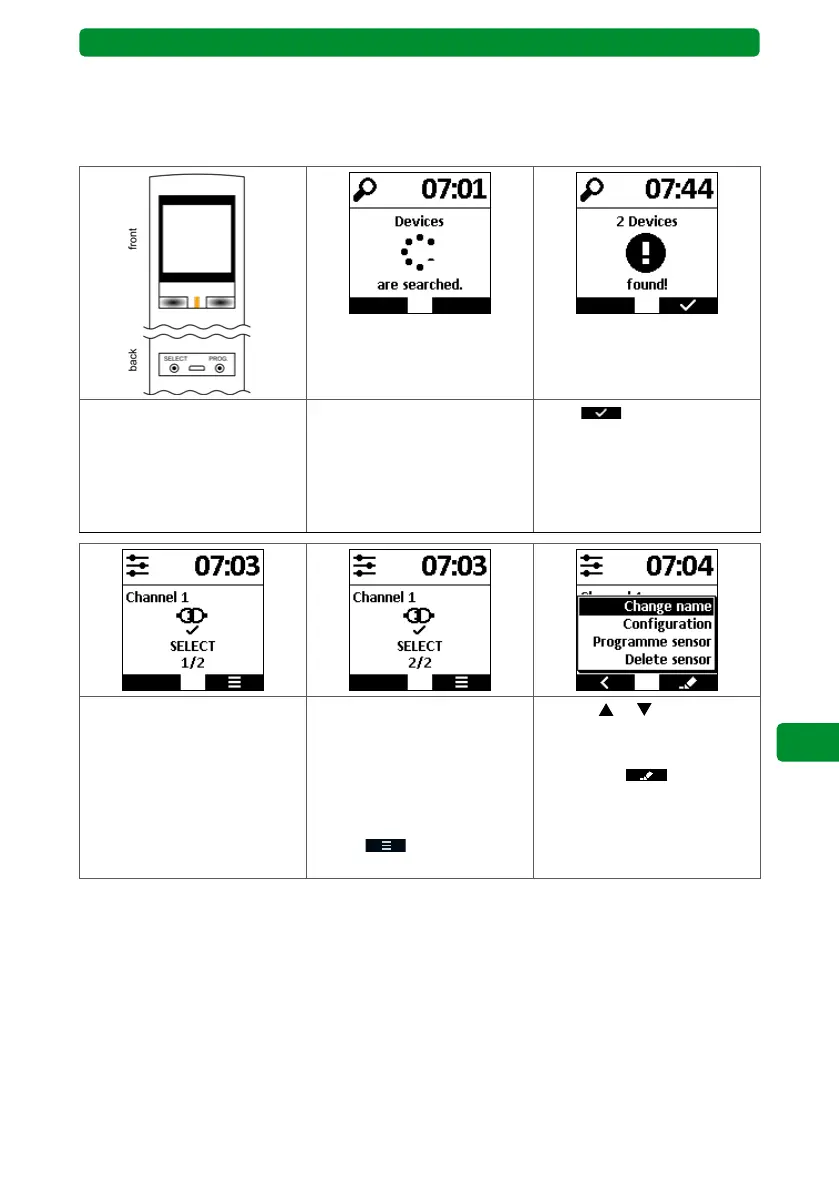
Press and hold the SELECT
button on the rear side of the
commeo Multi Send for
3 seconds. The LED flashes
orange.
The commeo Multi Send
scans the environment and
finds drives/receivers that
are new or that previously
experienced a voltage inter-
ruption.
Press to confirm the
scan.
The display shows whether
multiple drives/receivers
have been found. Here:
2 drives have been found, the
first is selected (automatical-
ly)
Briefly press the SELECT but-
ton to select the next drive/
receiver. The selected drive
twitches briefly up and
down.
Next, press the right display
button
to go to the
configuration menu.
Use the
or buttons to
select the required menu
item, then press the right dis-
play button .
Attention: The number and
type of menu items depend
on the receiver currently
selected via SELECT.



 To Next Page