124
15.9. Adjustment
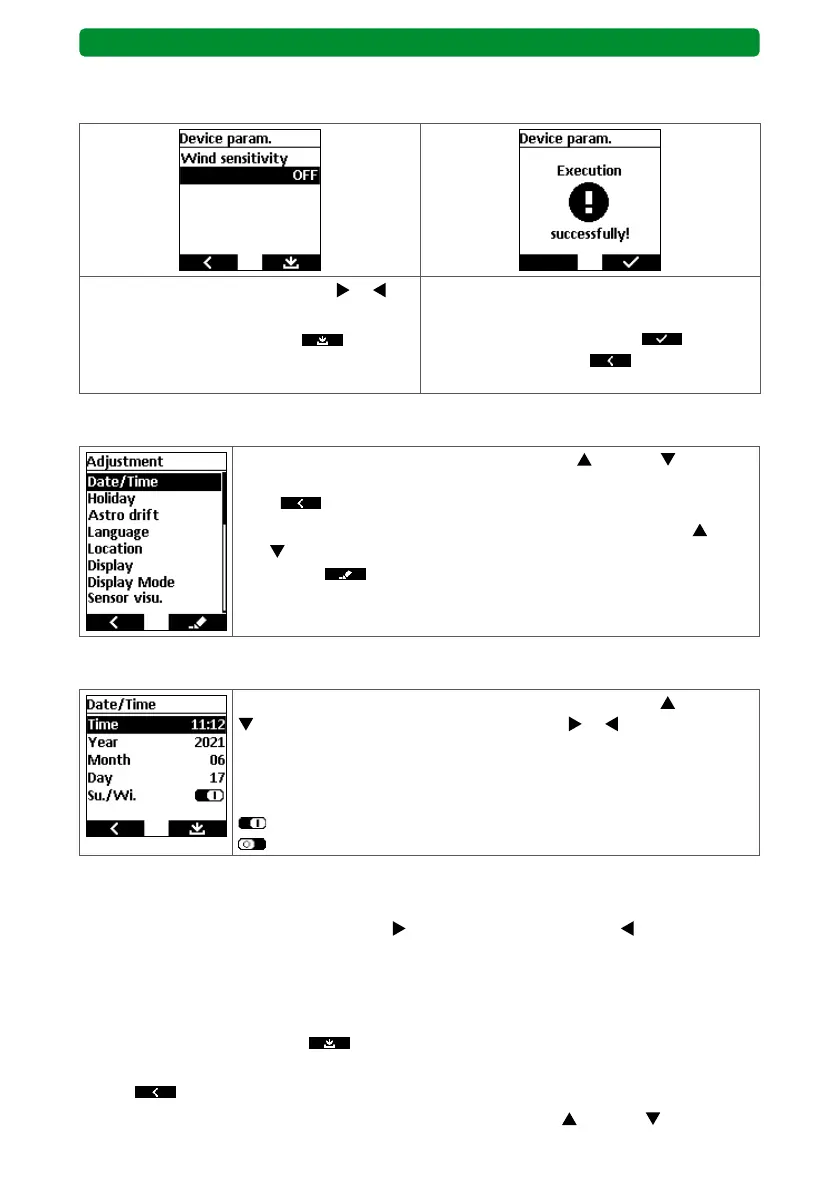
In the main menu, use the movement buttons (up) and (down) to
select the “Adjustment” menu, and press the STOP button to access it.
Press
to return to the main menu without saving.
The editable functions are shown. Use the movement buttons
(up)
and
(down) to select the required function, and press the right dis-
play button to open the respective submenu for editing the
function.
15.9.1. Time and date
Select the required function using the movement buttons (up) and
(down). Use the channel selection buttons or to edit the func-
tion.
The automatic switch to correct the summer and winter time can be
activated or deactivated.
: “Su./Wi.” function activated.
: “Su./Wi.” function deactivated.
Time
The set time is displayed as a 24 hour clock “HH:MM”.
Briefly press the channel selection buttons
(plus 1 minutes per press) or (minus 1 min-
utes per press) to precisely adjust the time. Press and hold one of the channel selection but-
tons to start a fast cycle, first in intervals of one minute, then 10 minutes. Release the tower
selection button to stop the cycle.
Continue as follows:
• Press the right display button
to save the change and return to the “Adjustment”
menu or
• press
to return to the “Adjustment” menu without saving or
• select and edit a different function using the movement buttons
(up) and (down).
BASIS version
Deactivating integrated wind detection
Attention: This disables protection against strong winds.
Use the channel selection buttons or to
select “OFF”.
Press the right display button
to con-
firm the menu item.
The successful deactivation of the wind
detection is confirmed.
Press the right display button
once and
the left display button four times to
return to operation.



 To Next Page