112
15.6. Channels
In the main menu, use the movement buttons
(up) and (down) to select the “Channels”
menu, and press the right display button to access it. Press to return to the main
menu without saving.
The channel describes the connection of one or more devices. It is expedient for only one
drive or receiver to be assigned to a channel.
In the “Channels” menu, you can see whether one or more devices are assigned to the chan-
nel and whether the channel is still available.
Note: It is not possible to assign a timer to a channel. In this case, you must also set up a
group with the device/s.
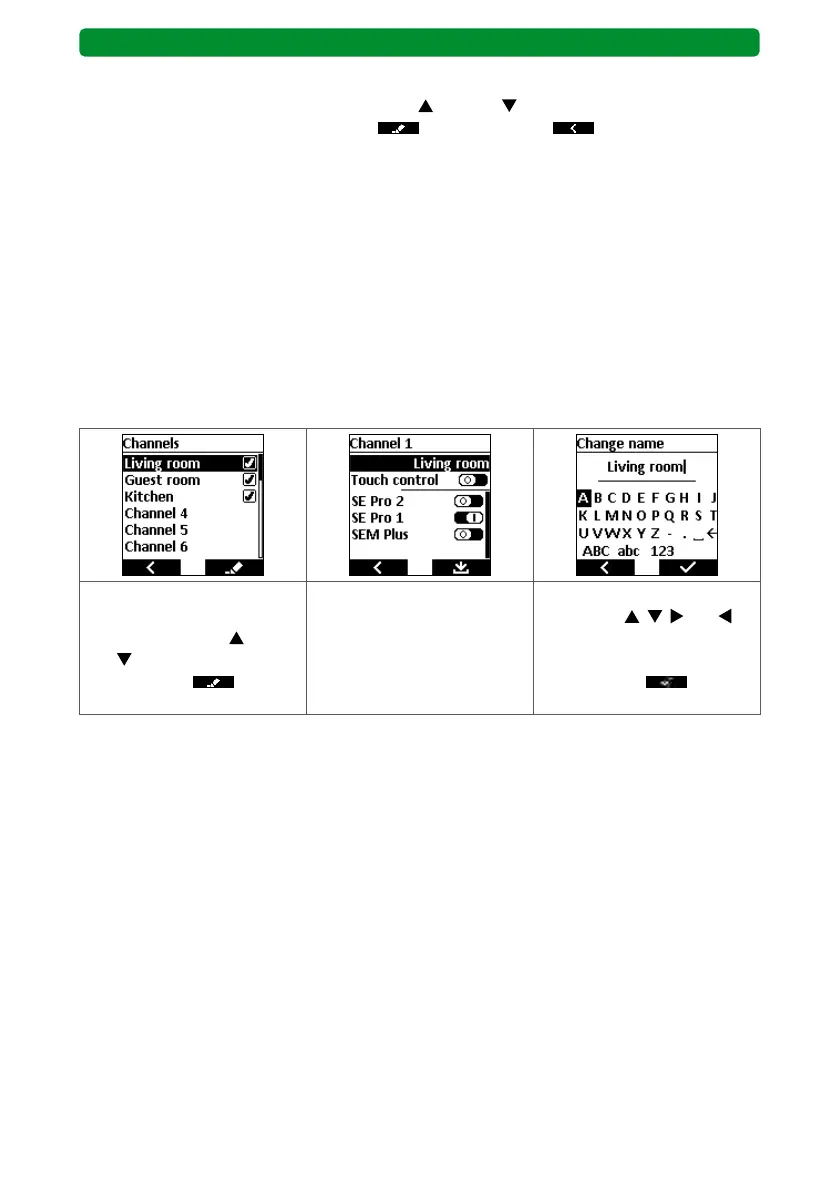
15.6.1. Renaming a channel
The 20 channels can be named individually.
Example: A channel is named after a room, e.g. living room. The devices saved in the
commeo Multi Send can then be allocated to this channel (= activated).
Select the required channel
or channel name using the
movement buttons
(up)
and (down). Press the right
display button to
switch to the submenu.
Press the STOP button to
switch to the “Change name”
menu.
Select the required letter or
action with
, , and ,
and confirm by pressing the
STOP button. Press the right
display button to save
and return to the submenu.
BASIS version



 To Next Page