EN
147
PREMIUM version
17.9.2. Editing sensor parameters
Editing the sensor values requires at least one active sensor (e.g. commeo Sensor WSRF) to
be connected to the commeo Multi Send. If there is no sensor connected, “Sensor param.”
does not appear in the display.
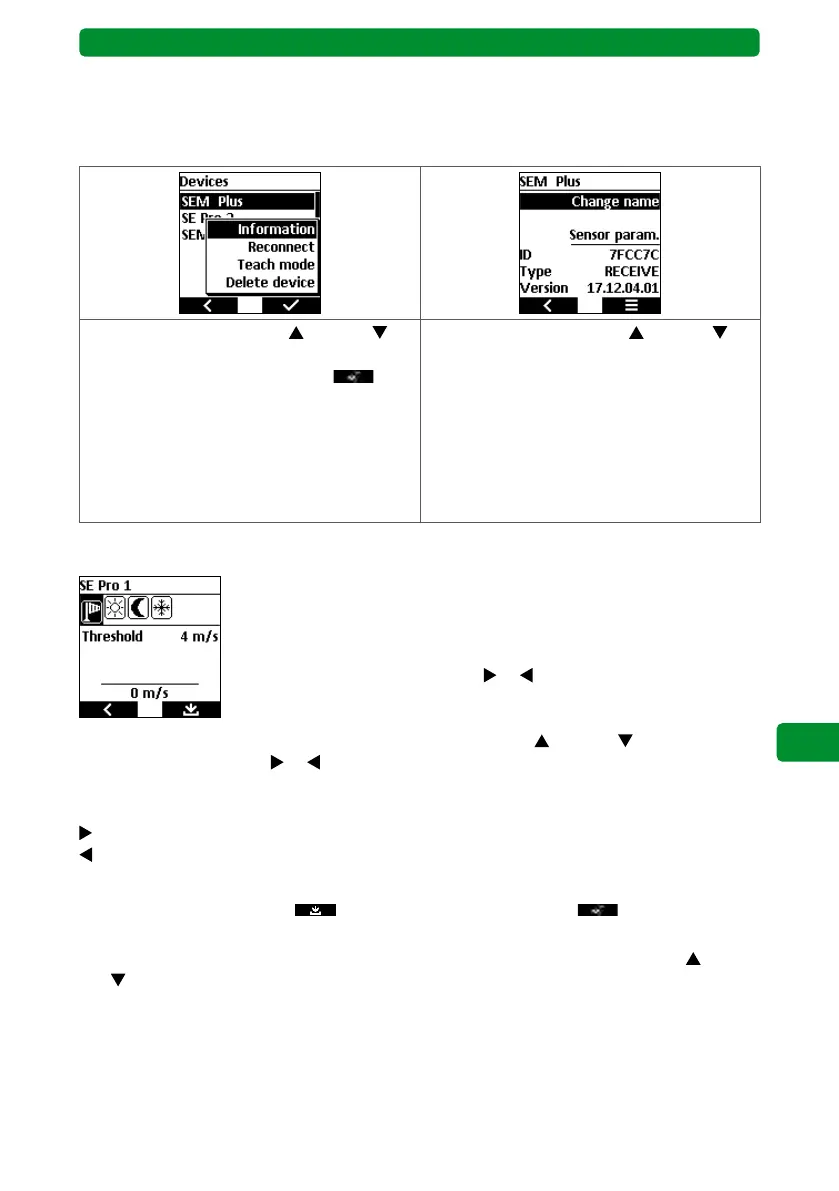
Use the movement buttons (up) and
(down) to select the “Information” submenu,
and press the right display button to
open it.
Use the movement buttons (up) and
(down) to select the “Sensor param.” menu
item, and press the STOP button to confirm.
You can edit the following parameter values
for the sensor:
• Wind
• Sun
• Dusk
• Frost
Wind speed
This function performs an action for the selected device based on the
wind speed. If the wind speed measured by the sensor exceeds the set
value, this action is performed for the selected device (e.g. the awning is
retracted for safety reasons).
Use the channel selection buttons
or to select the wind symbol
(windsock). The set permitted wind speed for the selected device is
shown as the “Threshold”.
Select the “Threshold” submenu using the movement buttons
(up) and (down). Use the
channel selection buttons
or to set the permitted wind speed for this device. The setting
range is between 2 m/s and 30 m/s. The lower section of the display shows the currently
measured wind speed.
= Increase the permitted wind speed by 2 m/s.
= Reduce the permitted wind speed by 2 m/s.
Note: The wind monitoring function cannot be deactivated.
Press the right display button
to confirm the change and press to confirm the
query.
Should you wish to adjust the sensor parameters again, use the movement buttons
(up)
and (down) to select the “Sensor param.” function, and press the STOP button to confirm.



 To Next Page