160
PREMIUM version
17.11.2. Auto/Man key
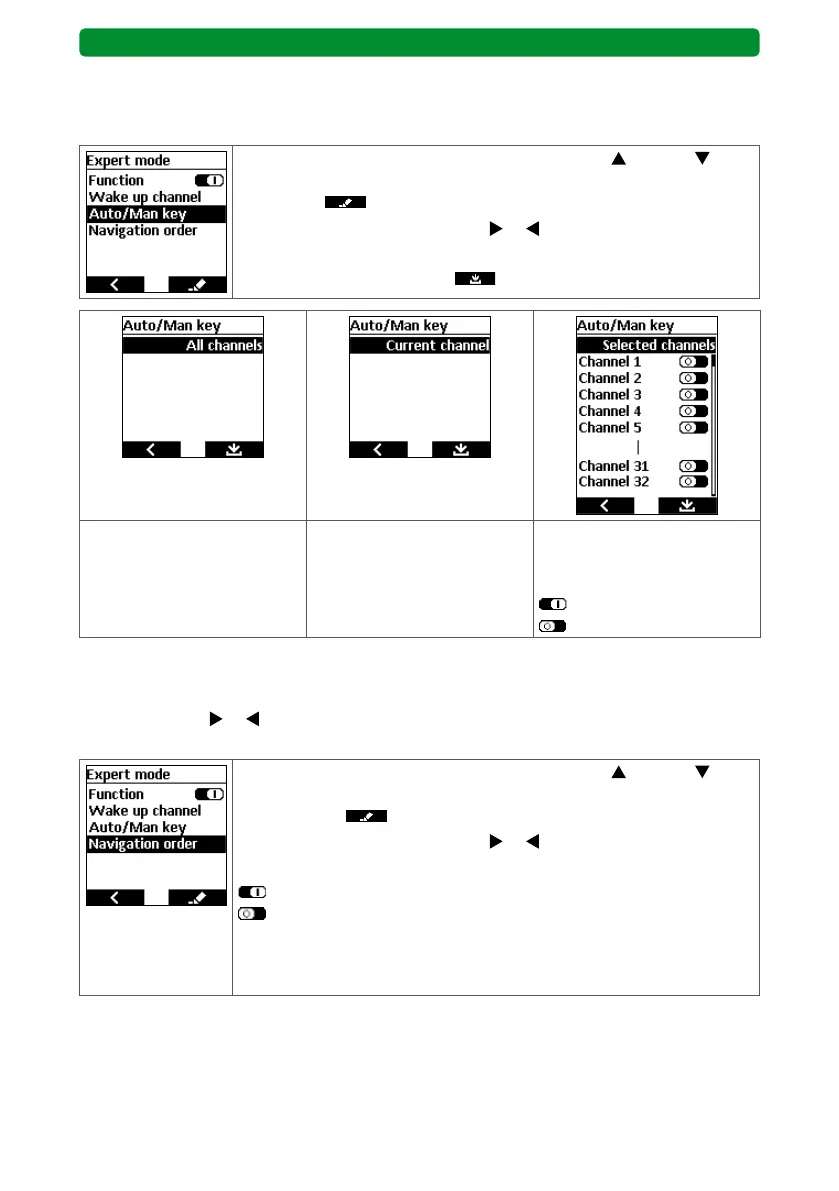
Here, you can determine the channel allocation to be applied when switching from manual to
automatic mode (start screen, right display button).
In the “Devices” menu, use the movement buttons (up) and
(down) to select the “Auto/Man key” function, and press the right dis-
play button to open the submenu.
Use the channel selection buttons
or to choose between “All
channels”, “Current channel” and “Selected channels”.
Press the right display button
to save.
All channels are allocated to
the Auto/Man switch.
Only the current channel
reacts to the Auto/Man
switch.
Only the selected channels
react to the Auto/Man
switch.
: Auto/Man activated.
: Auto/Man deactivated.
17.11.3. Navigation order
Here, you can set the navigation order of the channels in the start screen. Use the channel
selection buttons
or to display the channels one after another and arrange them in any
order.
In the “Devices” menu, use the movement buttons (up) and
(down) to select the “Navigation order” function, and press the right
display button to open the submenu.
Use the channel selection buttons
or to activate/deactivate the
“Navigation order” function.
: “Navigation order” activated.
: “Navigation order” deactivated.
If the “Navigation order” function is activated, the channels are initial-
ly arranged beneath each other according to consecutive number. You
can change this order.



 To Next Page