EN
151
PREMIUM version
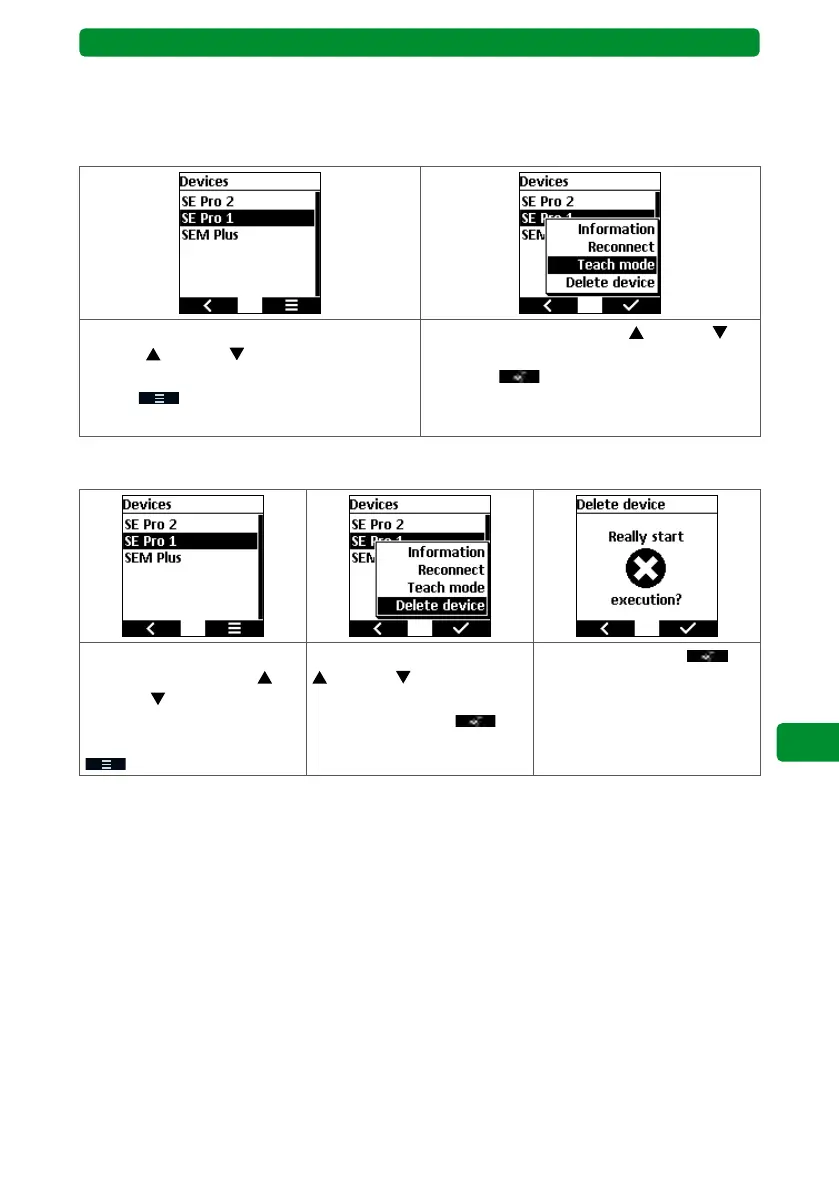
17.9.5. Teach mode
This function is very similar to the search, which can also be achieved by pressing and holding
the SELECT button for 3 seconds. Newly found devices are taught immediately and will then
be available in the devices list.
In the “Devices” menu, use the movement
buttons (up) and (down) to select the
required device, and press the right display
button
to open a new menu.
Use the movement buttons
(up) and
(down) to select the “Teach mode” function,
and press to confirm.
The search begins. Any new devices found
are displayed.
17.9.6. Delete device
In the “Devices” menu, use
the movement buttons
(up) and (down) to select
the required device, and
press the right display button
to open a new menu.
Use the movement buttons
(up) and (down) to
select the “Delete device”
function, and press
to
confirm.
Confirm by pressing
.
Note: You can also delete devices that can no longer be addressed using the commeo Multi
Send (e.g. defective or removed drives).



 To Next Page