EN
131
PREMIUM version
16.2. Display description
16.2.1. Operation mode
1
3
7
6
2
5
4
10
9
8
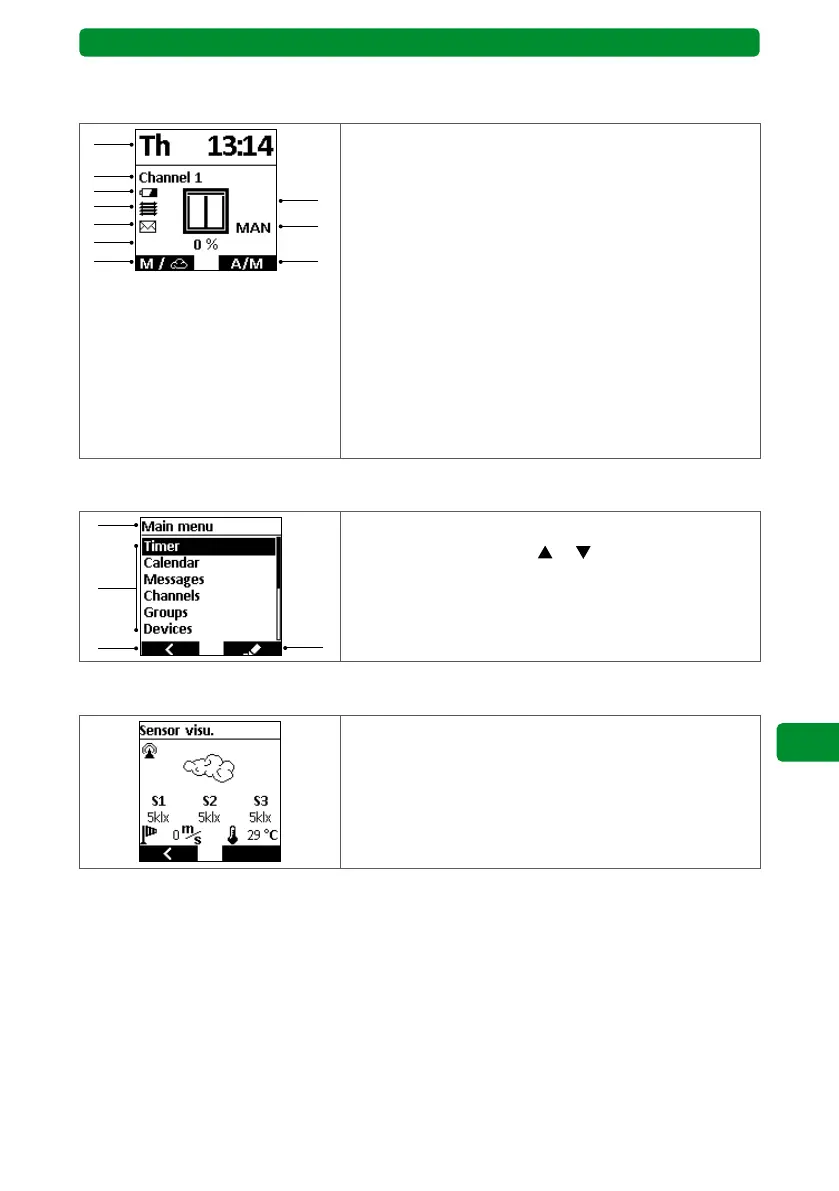
1 Week day and time
2 Channel/group or channel/group name
3 Battery status (only when almost depleted)
4 Display “Touch control activated”
5 Display “Message present”
6 Device position display in %
7 Left display button function:
• Short press: Main menu
• Long press: Sensor visualisation
8 Visual position display
9 “Automatic/manual” display
10 Right display button function:
Switch between automatic and manual operation
16.2.2. Menu mode
1
3
2
4
1 Menu item display
2 Select menu items with
or button
3 Left display button function: “Exit without saving”
4 Right display button function: “Open menu item”
16.2.3. Sensor visu.
Sensor visu. shows the currently measured sensor data
in the display.



 To Next Page