132
PREMIUM version
17. Programming
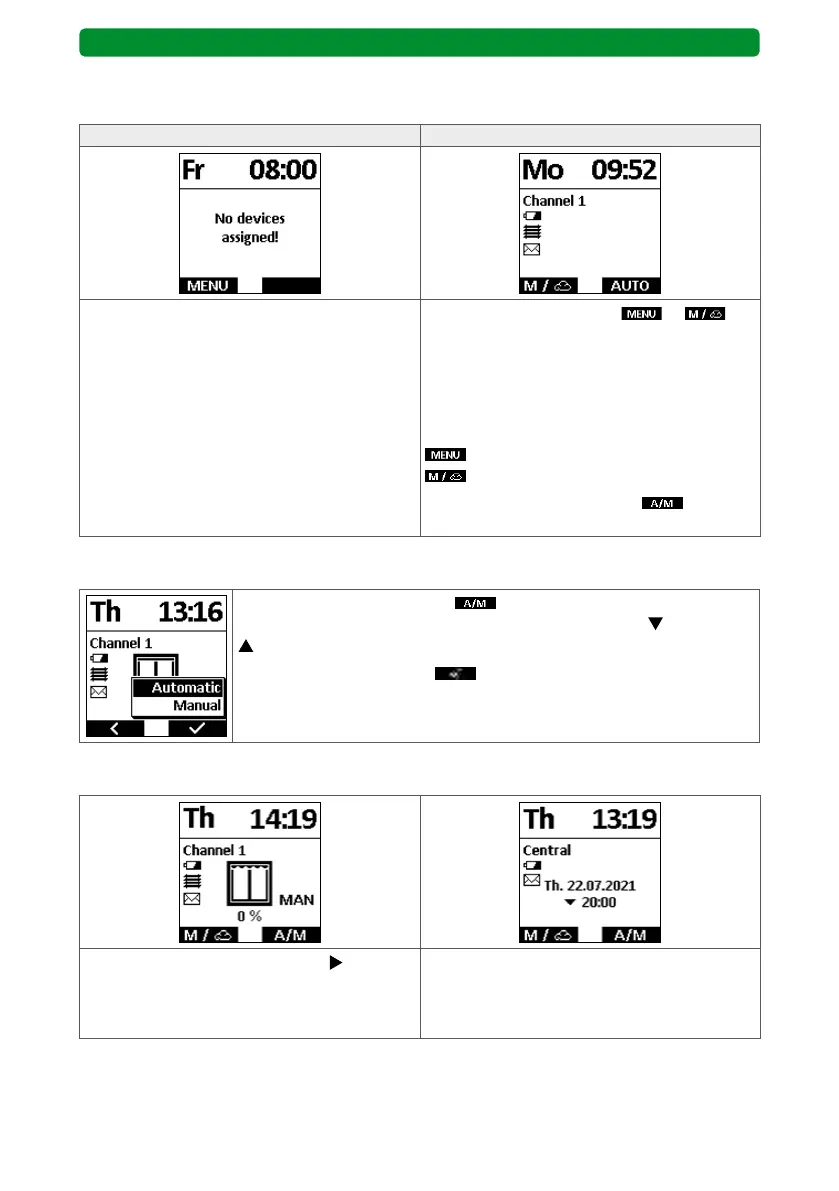
17.1. “Position display” start screen
No devices assigned At least 1 device assigned
No devices are assigned to the commeo
Multi Send when it is first delivered or fol-
lowing a factory reset.
You can access the main menu.
In this state, the drives and receivers must
first be assigned in the commeo Multi Send.
Use the left display button or to
switch from the start screen to the main
menu.
The display of the left display button
depends on whether the sensor visualisation
is activated or deactivated.
: Sensor visualisation deactivated.
: Sensor visualisation activated.
Press the right display button
to switch
between automatic and manual mode.
17.1.1. Automatic mode – manual mode
Press the right display button to activate the selection menu and
select the operating mode using the movement buttons (down) and
(up).
Confirm the selection with
. The display switches back to the
start screen.
17.1.2. Start screen “next switching time”
Use the channel selection button to switch
the display.
If you press the right display button to acti-
vate automatic mode, the next automatically
executed switching time is shown (with
direction of movement).



 To Next Page