94
11. Getting started
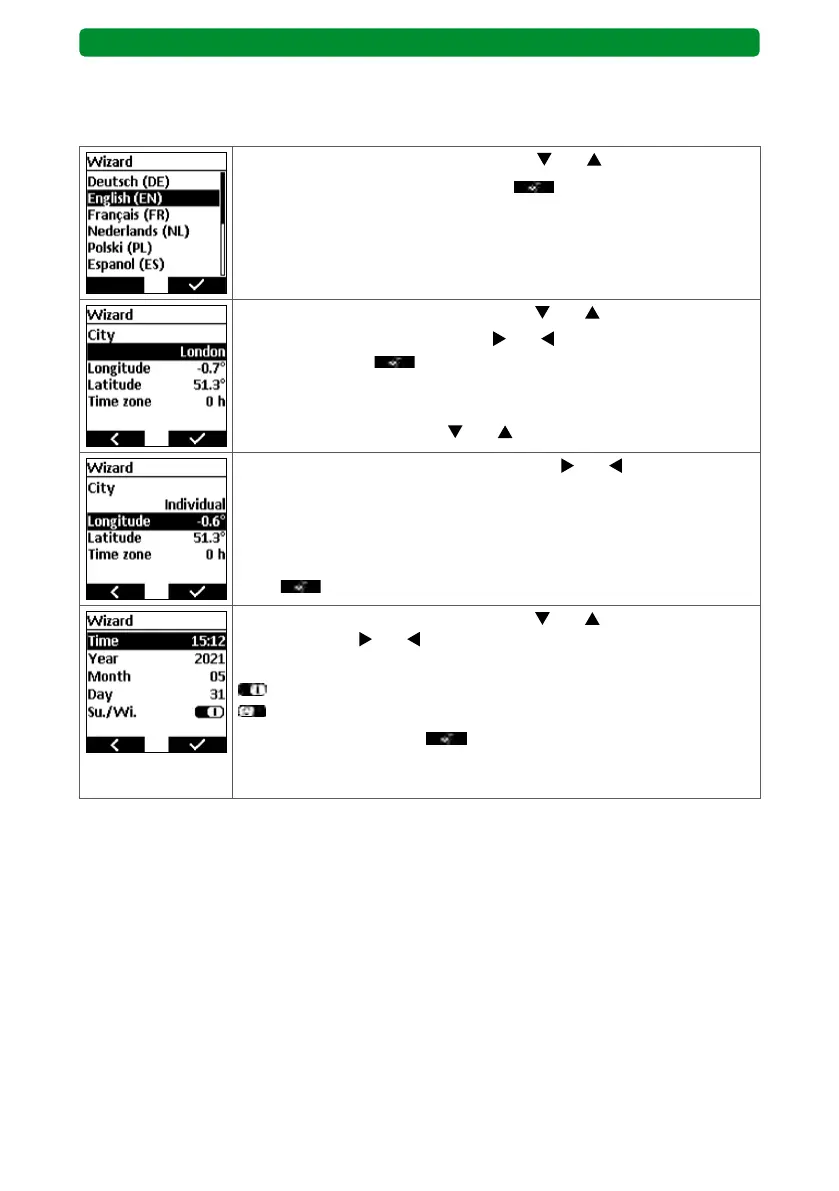
Perform the initial steps in the wizard to get started with the commeo Multi Send. “Wizard” is
shown at the top of the display. Follow the wizard in full at the start.
Select your preferred language using the and buttons.
Confirm your language selection with
. The next image in the dis-
play will open automatically.
Select the required menu item using the and buttons.
Select other preset cities using the
and buttons. Confirm the
choice of city with . The next image in the display opens automat-
ically.
If you wish to enter the precise location using longitude and latitude,
select “Longitude” using the
and buttons.
Change the longitude and latitude using the and buttons. Pressing
once briefly causes a change of 1/10°. Press and hold to change the
value more quickly.
Note: Determine precise length and width measurements, e.g. via rel-
evant websites.
Press
to confirm the geo-coordinates.
Select the required menu item using the and buttons. Change the
values using the and buttons.
Summer/winter time:
= Automatic switching between summer/winter time
= No automatic switching
Confirm the settings with
.
Commissioning is now complete, the commeo Multi Send is ready for
operation.
Note: After changing the battery, the wizard will only show the option to set the time and
date. All other settings remain saved.
General section (BASIS and PREMIUM)



 To Next Page