Self Recording Message OSD
In Self Recording mode, by following some simple
instructions that appear on the monitor screen,
you can easily record a short video message for
somebody. This feature is especially convenient
for editing video letters.
l Perform step 1 of “Normal Self Recording” on
page 49, then perform the procedure below.
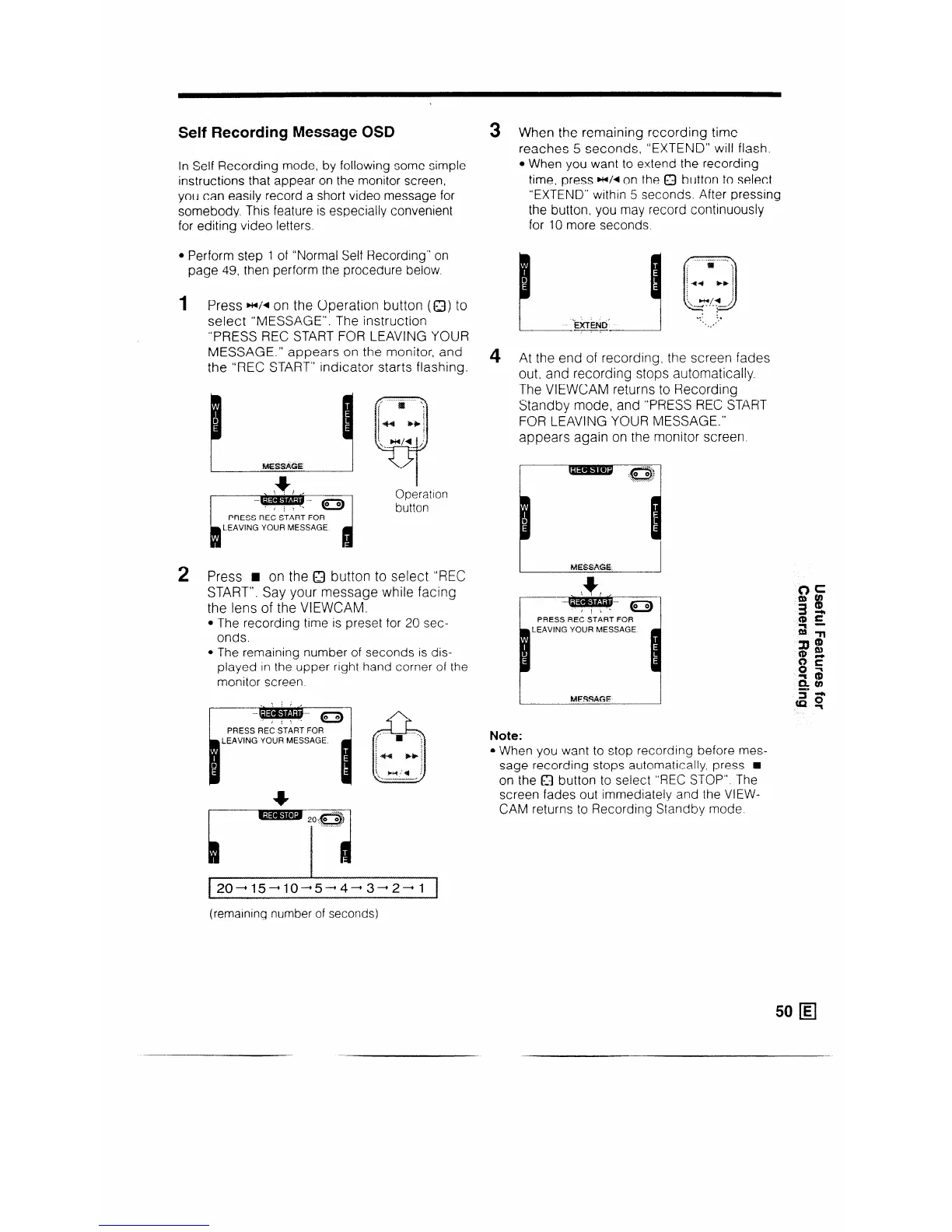
1 Press HI/* on the Operation button (Q) to
select “MESSAGE”. The instruction
“PRESS REC START FOR LEAVING YOUR
MESSAGE.” appears on the monitor, and
the “REC START” indicator starts flashing.
D
s
FdESSAGE
I
Operation
button
/ PRESS REC START FOR 1
h
LEAVING YOUR MESSAGE
d
2 Press H on the Q button to select “REC
START”. Say your message while facing
the lens of the VIEWCAM.
l The recording time is preset for 20 sec-
onds.
l The remaining number of seconds IS dis-
played in the upper right hand corner of the
monitor screen.
PRESS REC START FOR
I
LEAVING YOUR MESSAGE.
m
3 When the remaining recording time
reaches 5 seconds, “EXTEND” will flash.
l When you want to extend the recording
time, press w/d on the Q button to select
“EXTEND” within 5 seconds. After pressing
the button, you may record continuously
for 10 more seconds.
4 At the end of recording, the screen fades
out, and recording stops automatically.
The VIEWCAM returns to Recording
Standby mode, and “PRESS REC START
FOR LEAVING YOUR MESSAGE.”
appears again on the monitor screen.
1
MESSAt3E
1
1
MESSAGE
Note:
l When you want to stop recording before mes-
sage recording stops automatically, press H
on the Q button to select “REC STOP”. The
screen fades out immediately and the VIEW-
CAM returns to Recording Standby mode.
f20-15-10-5-4-3-2-l 1
(remaining number of seconds)



 To Next Page