Manual Focus
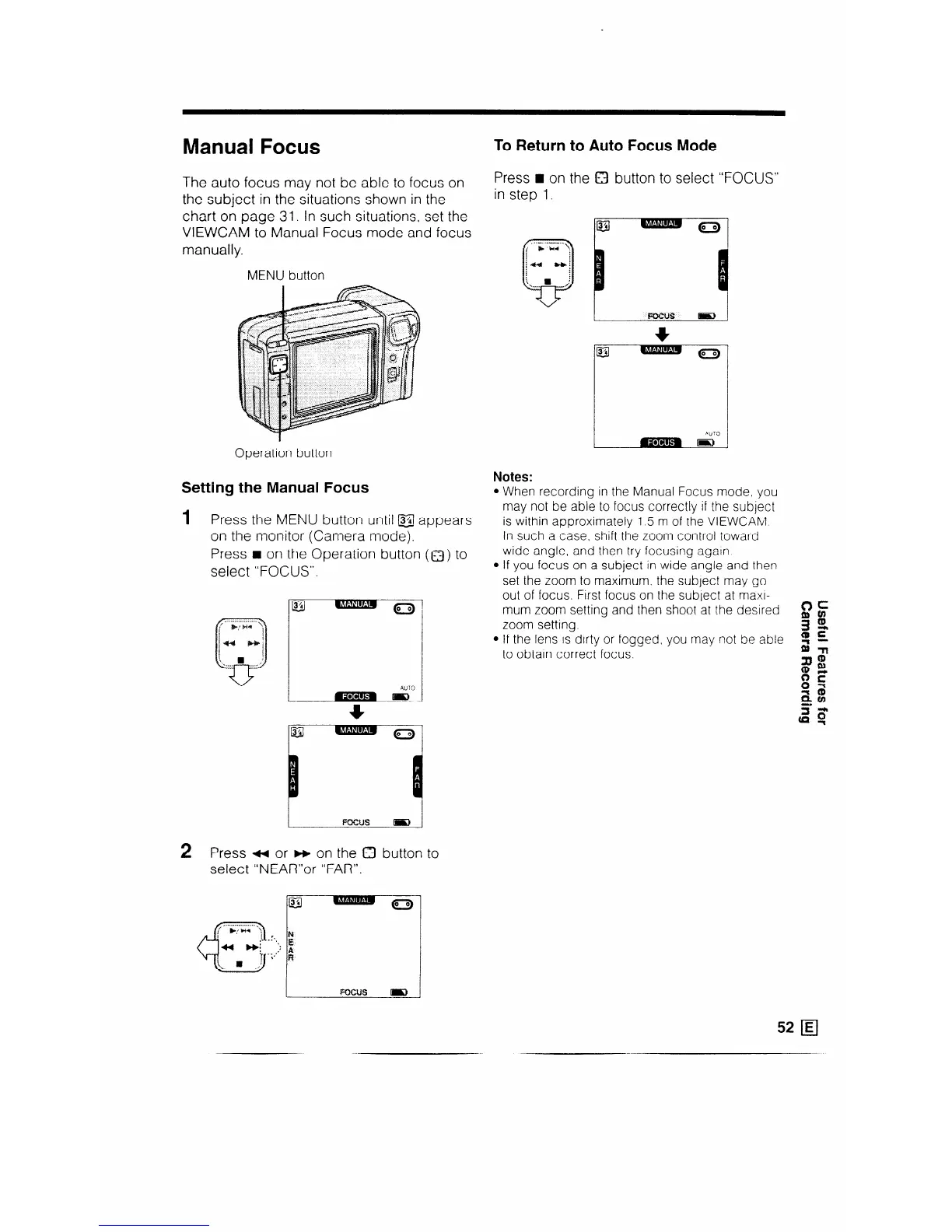
The auto focus may not be able to focus on
the subject in the situations shown in the
chart on page 31. In such situations, set the
VIEWCAM to Manual Focus mode and focus
manually.
MENU button
Operation button
Setting the Manual Focus
1 Press the MENU button until @J appears
on the monitor (Camera mode).
Press n on the Operation buttor
select “FOCUS”.
AUTO
(Q) to
2 Press ti or m on the 0 button to
select “NEAR’or “FAR”.
i
, ~...~;,..~4.. .\
cl
;,“. “i :;::: ;
. . . . ...-’
To Return to Auto Focus Mode
Press n on the Q button to select “FOCUS”
in step 1.
Notes:
l When recording in the Manual Focus mode, you
may not be able to focus correctly if the subject
is within approximately 1.5 m of the VIEWCAM
In such a case, shift the zoom control toward
wide angle, and then try focusing again
l If you focus on a subject in wide angle and then
set the zoom to maximum, the subject may go
out of focus. First focus on the subject at maxr-
mum zoom setting and then shoot at the desired
zoom setting.
l If the lens is dirty or fogged, you may not be able
to obtain correct focus.
52 1Ej



 To Next Page