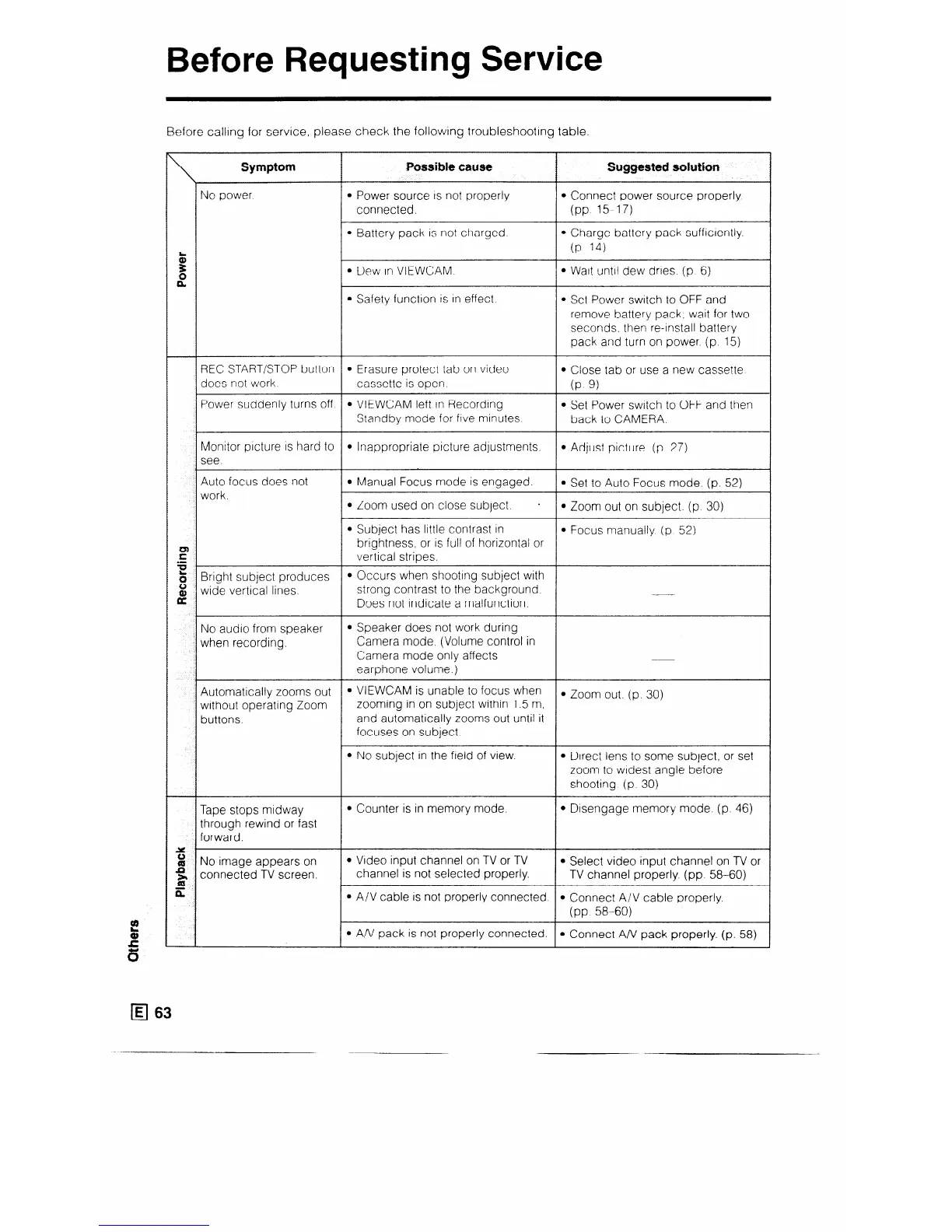
Before Requesting Service
Before callmg for service, please check the following troubleshooting table.
Symptom
Pussib~e cause
I
Suggiested solutSon
No power.
l Power source 1s not properly
l Connect power source properly
connected.
(PP 15-17)
l Battery pack is not charged.
l Charge battery pack sufficiently.
5
(P. 14)
3:
t?
l Dew In VIEWCAM. l Watt until dew dries (p 6)
l Safety function is In effect
l Set Power switch to OFF and
remove battery pack, wait for two
seconds. then re-install battery
pack and turn on power (p. 15)
REC START/STOP button l Erasure protect tab on video
l Close tab or use a new cassette
does not work
cassette is open
(P 9)
Power suddenly turns off l VIEWCAM left in Recording
l Set Power switch to OFF and then
Standby mode for ftve minutes
back to CAMERA.
Monitor picture IS hard to
l Inappropriate picture adjustments.
l Adjust picture (p 27)
see.
Auto focus does not
work
l Manual Focus mode is engaged.
l Set to Auto Focus mode. (p. 52)
l Zoom used on close subject. -
l Zoom out on subject. (p 30)
l Subject has little contrast in
l Focus manually (p 52)
:
brightness, or is full of horizontal or
1_
vertical stripes.
10,
8
Bright subject produces
l Occurs when shooting subject with
8
wide vertical lines.
strong contrast to the background.
Does not indicate a malfunction.
No audio from speaker
when recording.
l Speaker does not work during
Camera mode. (Volume control in
Camera mode only affects
earphone volume.)
Automatically zooms out
l VlEWCAM is unable to focus when
without operating Zoom
zooming in on subject within 1.5 m,
l Zoom out. (p. 30)
buttons.
and automatically zooms out until it
focuses on subject.
l No subject in the field of view.
l Direct lens to some subject, or set
zoom to widest angle before
shooting (p. 30)
Tape stops midway
l Counter is in memory mode.
l Disengage memory mode. (p. 46)
through rewind or fast
forward.
Y .
4 No image appears on
l Video input channel on TV or TV
l Select video input channel on TV or
G
connected TV screen.
channel is not selected properly.
TV channel properly (pp 58-60)
X
l A/V cable is not properly connected
l Connect A/V cable properly.
(PP 58-60)
l An/ pack is not properly connected.
l Connect A/V pack properly. (p. 58)



 To Next Page