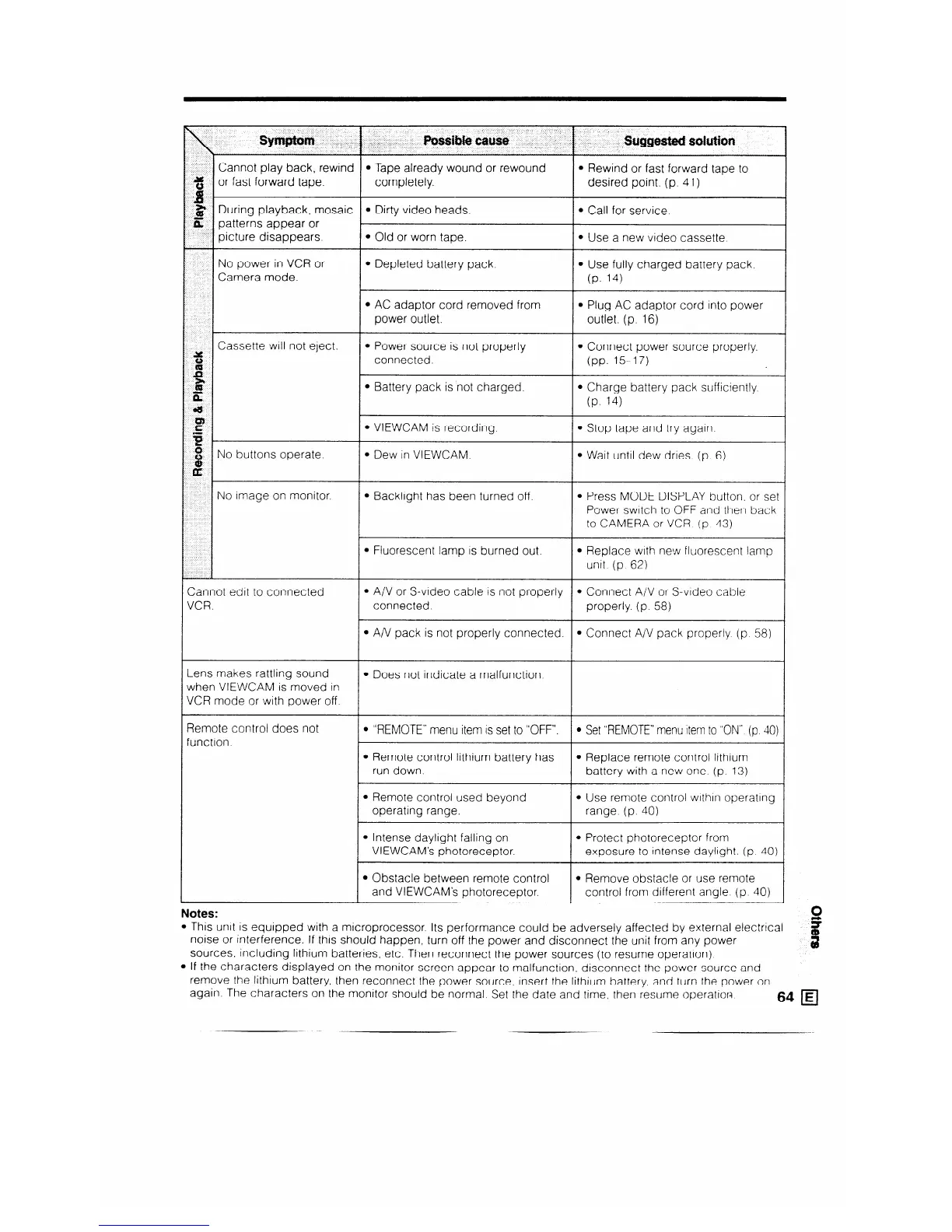
sjfnlptum fWsiMe cause
suggested sdufiotl
Cannot play back, rewind l Tape already wound or rewound
l Rewind or fast forward tape to
$$ or fast forward tape.
completely. desired point. (p. 41)
1$
g During playback, mosaic l Dirty video heads.
6, patterns appear or
picture disappears.
l Old or worn tape.
No power in VCR or
l Depleted battery pack.
Camera mode.
l AC adaptor cord removed from
power outlet.
l Call for service.
l Use a new video cassette.
l Use fully charged battery pack.
(P. 14)
l Plug AC adaptor cord into power
outlet. (p. 16)
~ Cassette will not eject.
l Power source is not properly
l Connect power source properly.
z
connected.
(pp. 15-17)
%
ii:
l Battery pack is not charged. l Charge battery pack sufficiently.
61)
(P. 14)
f
l VIEWCAM is recording.
l Stop tape and try again.
B
8
No buttons operate.
l Dew in VIEWCAM.
l Wait until dew dries (p. 6)
OG
No image on monitor.
l Backlight has been turned off l Press MODE DISPLAY button, or set
Power switch to OFF and then back
to CAMERA or VCR (p 43)
l Fluorescent lamp IS burned out. l Replace with new fluorescent lamp
unit (p 62)
Cannot edit to connected
VCR.
l A/V or S-video cable is not properly l Connect A/V or S-video cable
connected.
properly. (p. 58)
l A/V pack is not properly connected. l Connect A/V pack properly (p 58)
Lens makes rattling sound
l Does not indicate a malfunction.
when VIEWCAM is moved in
_~
VCR mode or with power off.
Remote control does not
function
l “REMOTE” menu item IS set to “OFF”.
l Set “REMOTE” menu Item to “ON” (p 40)
l Remote control lithium battery has
l Replace remote control lithium
run down.
battery with a new one (p 13)
l Remote control used beyond
l Use remote control wlthln operating
operating range. range. (p. 40)
l Intense daylight falling on l Protect photoreceptor from
VIEWCAM’s photoreceptor.
exposure to intense daylight. (p 40)
l Obstacle between remote control
l Remove obstacle or use remote
and VIEWCAM’s photoreceptor.
control from different angle (p. 40)
Notes:
This unit is equipped with a microprocessor. Its performance could be adversely affected by external electrical
noise or interference. If this should happen, turn off the power and disconnect the unit from any power
sources. including lithium batteries, etc. Then reconnect the power sources (to resume operation)
If the characters displayed on the monitor screen appear to malfunction, disconnect the power source and
remove the lithium battery, then reconnect the power source, Insert the lithium battery, and turn the power on
again. The characters on the monitor should be normal Set the date and time, then resume operation
64 H
_



 To Next Page