Wiring
5.12 Connecting interfaces for communication
Distributed I/O system
104 System Manual, 12/2016, A5E03576849-AG
Connecting PROFINET IO to the CPU/interface module via the BA 2xFC
BusAdapter
Introduction
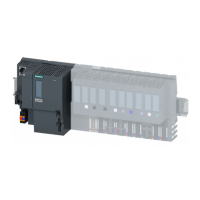
You connect PROFINET IO to the CPU/interface module via the BusAdapter BA 2×FC. To
do this, screw the BusAdapter BA 2xFC to the connected PROFINET connecting cable on
the CPU/interface module. You can loop PROFINET through via the integrated 2-port switch.
Figure 5-14 BA 2×FC BusAdapter
3 to 3.5 mm screwdriver
● If you use Fast Connect Cable, we recommend the Industrial Ethernet Fast Connect
Stripping Tool (6GK1901-1GA00) with green knife cassette (6GK1901-1B...). This
guarantees fast and safe stripping.
● Fast Connect Cable (recommended types):
– IE FC TP Standard Cable GP 2x2 (6XV1840-2AH10)
– IE FC TP Trailing Cable 2x2 (6XV1840-3AH10)
– IE FC TP Marine Cable (6XV1840-4AH10)
– IE FC TP Flexible Cable GP 2x2 (6XV1870-2B)
– IE FC TP Trailing Cable 2x2 (6XV1870-2D)
– IE TP Torsion Cable 2x2 (6XV1870-2F)
– FC TP FRNC Cable GP (6XV1871-2F)
– IE FC TP Food Cable GP 2x2 (6XV1871-2L)
– IE FC TP Festoon Cable 2x2 (6XV1871-2S)
● Please refer to the specifications in the PROFINET Installation Guide
(http://www.profibus.com).



 To Next Page