Programming and Operating Manual (Turning)
01/2017
251
Operating mode overview
A.2.1
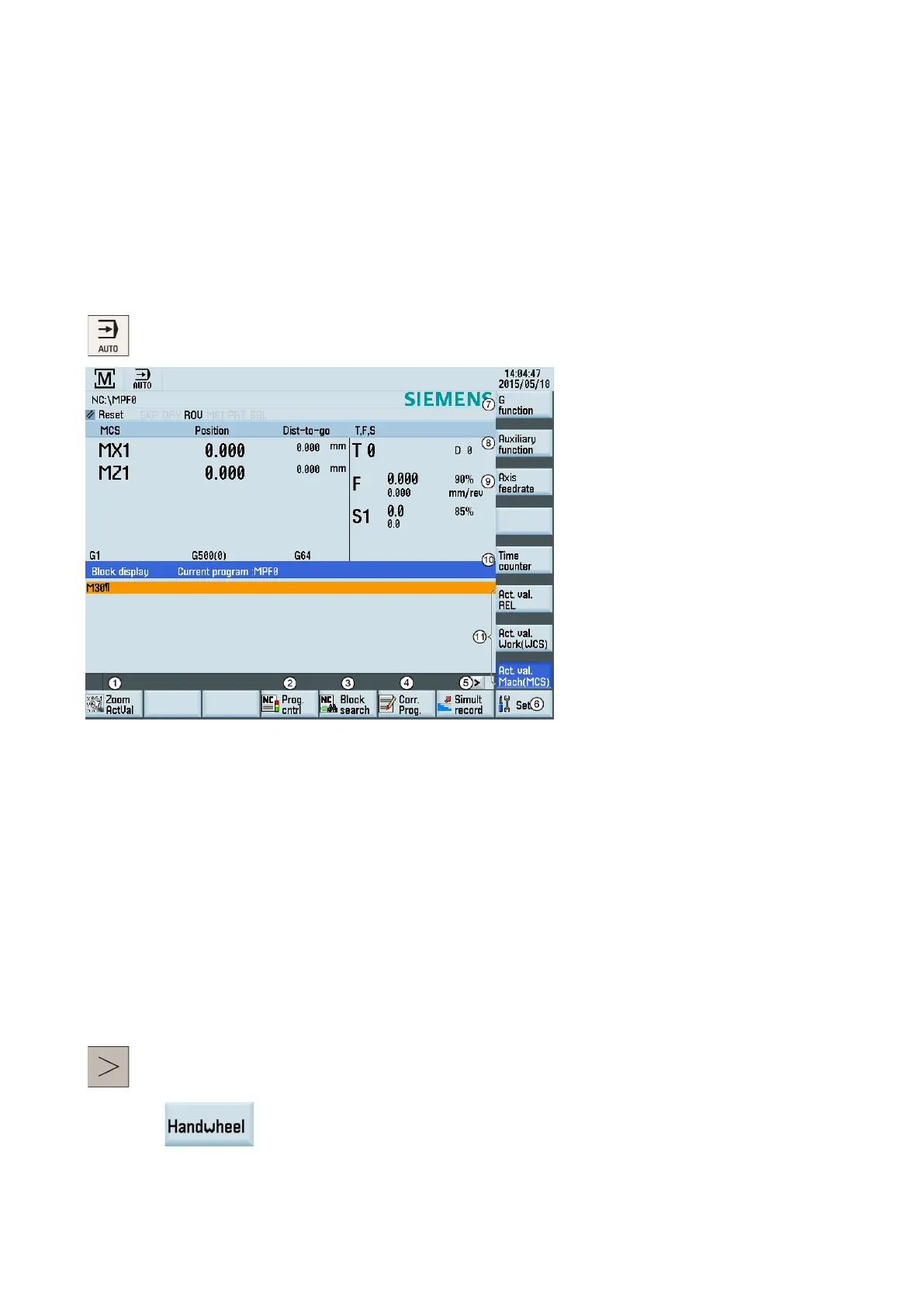
The machine must have been set up for "AUTO" mode according to the specifications of the machine manufacturer. You can
perform such operations as program start, stop, control, block search, and real-time simulation and recording, etc.
Pressing this key in the machini
ng operating area switches to "AUTO" mode.
ms in the actual value window
Performs the program test, dry run, conditional stop, block skipping, and auxiliary function lock
Finds the desired block location
Corrects a wrong program block. Any changes will be stored immediately.
he simulation function
Sets the frequently used setting data
Displays important G functions
Displays currently active auxiliary and M functions
Displays the axis feedrate in the selected coordinate system
Displays the information of part mac
hining time (part timer) and part counter
Switches over the coordinate system in the actual value window
An extended horizontal softkey bar can be accessed via this key on the PPU. The following extended horizontal
softkey is provided:
Assigns and activates the handwheel or contour handwheel. For more info
rmation, refer to
Assigning the handwheel through the MCP (Page 24)" and Appendix "Activating the
contour handwheel via the NC program (Page 259)".










 To Next Page