User Manual |
60
3D Printing - 06 Troubleshooting
06 Troubleshooting
6.1 First Layer Does Not Stick
Possible Causes
(1) The calibration is done improperly.
(2) The printing parameters are improper.
(3) The Print Sheet is dirty and thus uneven.
(4) The nozzle bore or tip is dirty.
(5) The lament is damp.
(6) The ambient temperature is too low.
Solutions
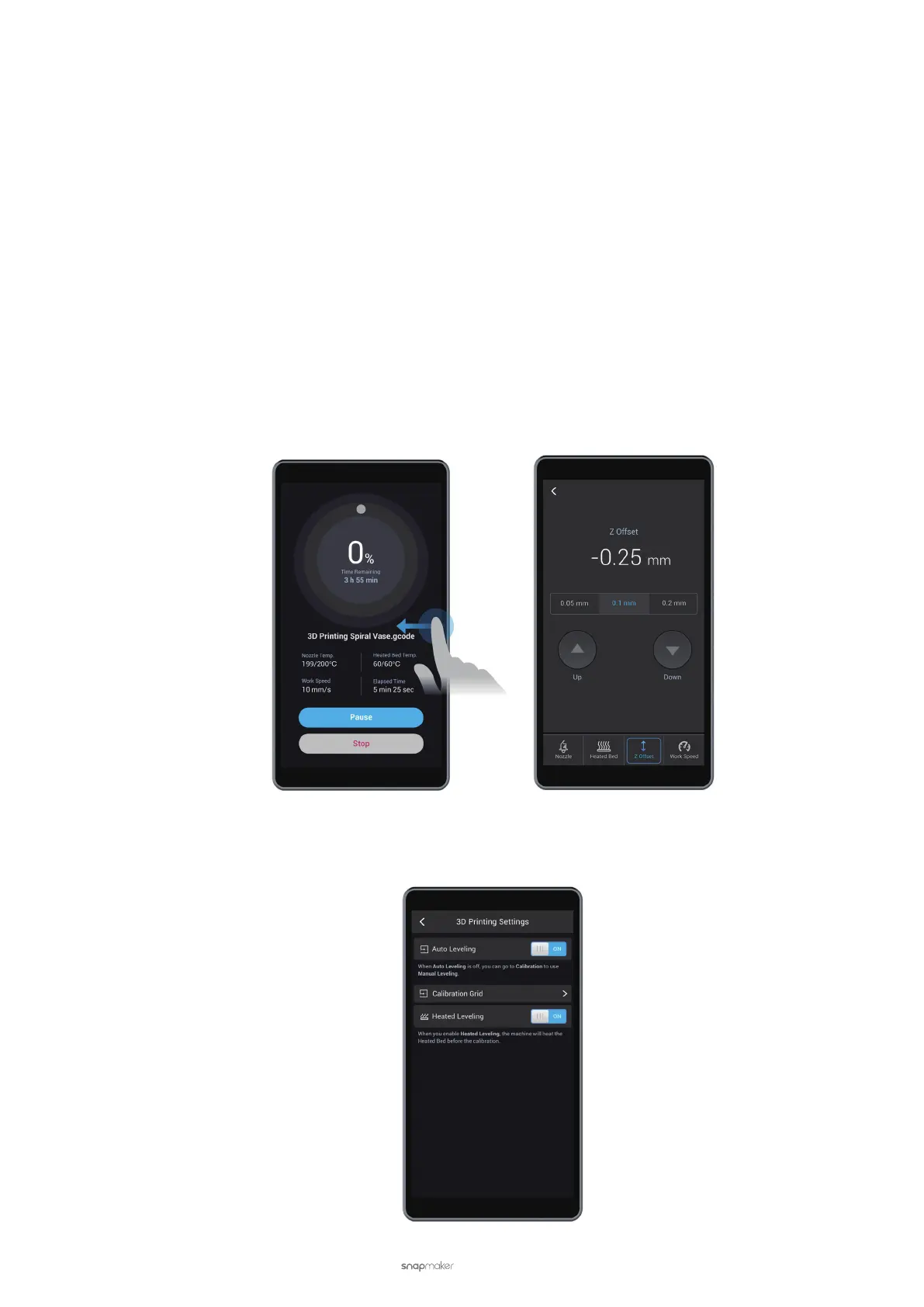
(1) Recalibrate the Heated Bed. If the problem persists, start a new printing job. Right before the lament comes
out, swipe left on the Touchscreen and tap Z Offset at the bottom. Tap Up or Down to adjust the nozzle height.
(2) Recalibrate the Heated Bed using the Heated Leveling mode.
a. In the APP List Screen, tap Settings > 3D Printing > Auto Leveling > Heated Leveling to toggle on the Heat-
ed Auto Leveling mode.



 To Next Page