3 4
Connecng
The C520 can be powered by AC power or Power over Ethernet (PoE).
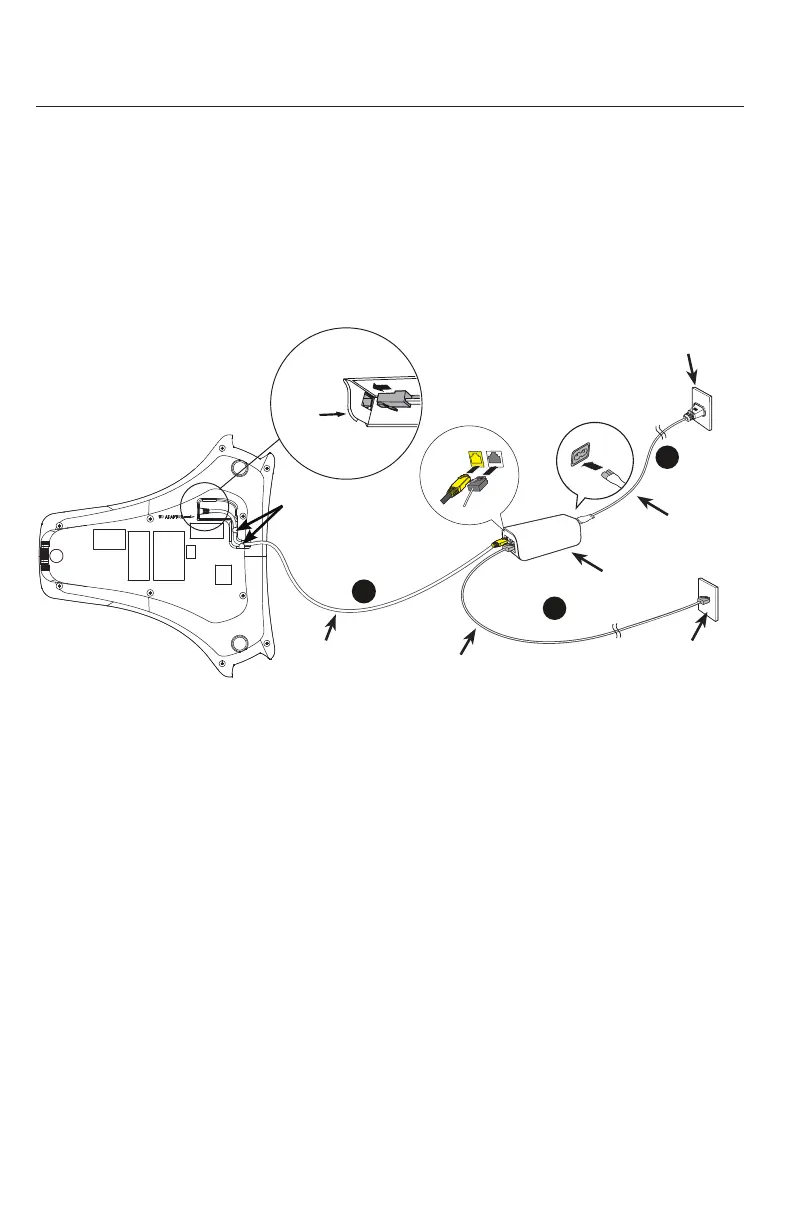
If PoE is not available, use AC power, as shown below.
Note: the conference phone requires a network connecon to an IP PBX to
operate. This manual assumes that your network infrastructure is established and
that your IP PBX phone service has been ordered and congured for your locaon.
1. Plug one end of the DC power cable into the power jack of the phone, and plug
the other end into the yellow C520 jack of the power adapter. Route the cord
through the slots.
2. Plug one end of the Ethernet cable into the LAN jack of the power adapter, and
plug the other end into a network switch or router.
3. Plug the small end of the AC power cord into the power jack of the adapter, and
plug the large end into a wall outlet not controlled by a switch.
• The supplied power adapter is designed for use with only the Conference phone.
It is not designed to power other network devices. Do not connect the supplied
power adapter to any other network devices through the supplied DC power cable
or any other Cat5e ethernet cable.
• The AC power cord is intended for a vercal or oor mount posion. The prongs
are not designed to hold the plug in place if it is plugged into a ceiling or cabinet
outlet.
Geng Started
3
AC power cord
1
2
Wall outlet
or router
DC power cable
(with yellow plugs)
Ethernet cable
Slots
To Adapter
Adapter
Network switch
or router
Ethernet cable
Slots
Battery X2
LAN
C520



 To Next Page