55
Call Sengs
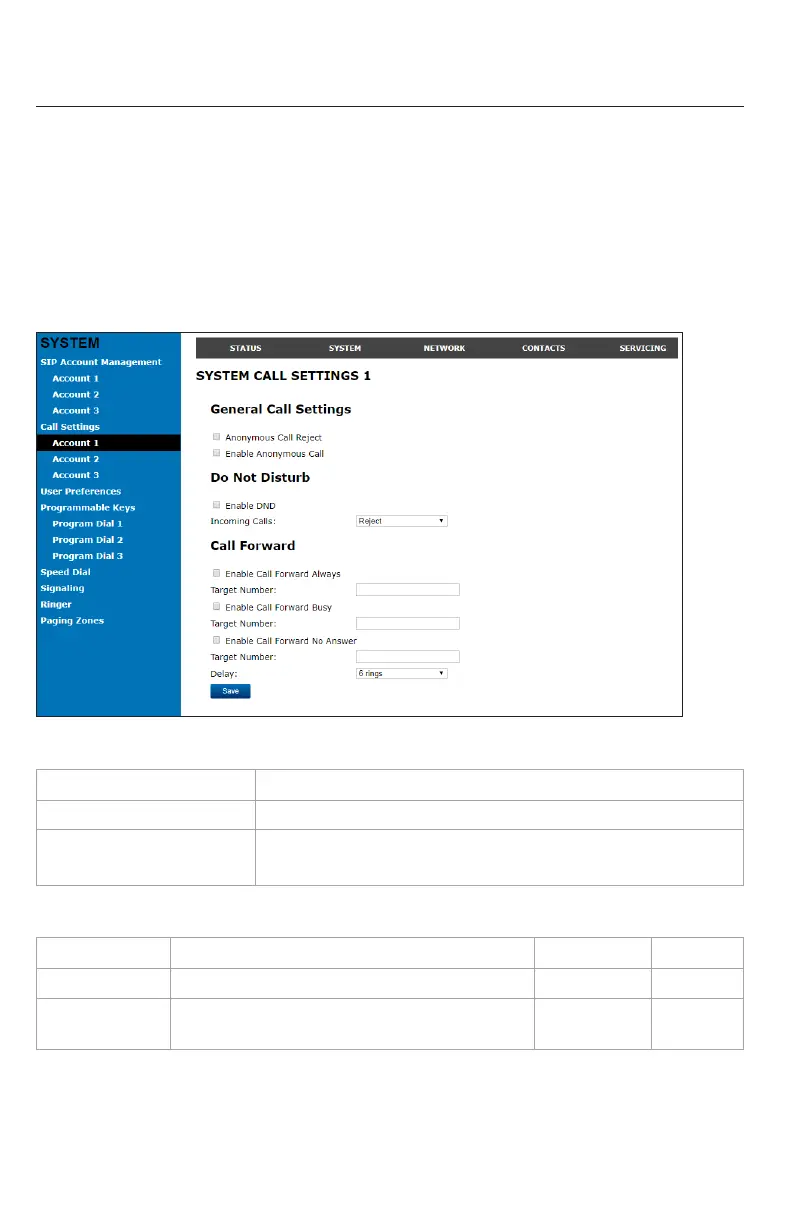
To view the call sengs, click SYSTEM in the WebUI header, and then click Call Sengs
in the sidebar. You can congure call sengs for each account available to your phone.
Click Account 1, Account 2, and so on to select the call sengs page for the desired
account.
Call Sengs include Do Not Disturb and Call Forward sengs. You can also set Do Not
Disturb and Call Forward using the phone menu. See "Using the Call menu" on page
29.
When you have nished changing sengs on this page, click Save to save them.
General Call Sengs
Seng Descripon
Anonymous Call Reject Select to block incoming calls that have no caller ID.
Enable Anonymous Call Select to make outgoing calls that remove your own caller ID
informaon.
Do Not Disturb Sengs
Seng Descripon Range Default
Enable DND Turns Do Not Disturb on or o. n/a Disabled
Incoming Calls Selects whether the phone displays incoming
call informaon while Do Not Disturb is on.
Show, Reject Reject
WebUI



 To Next Page