9 10
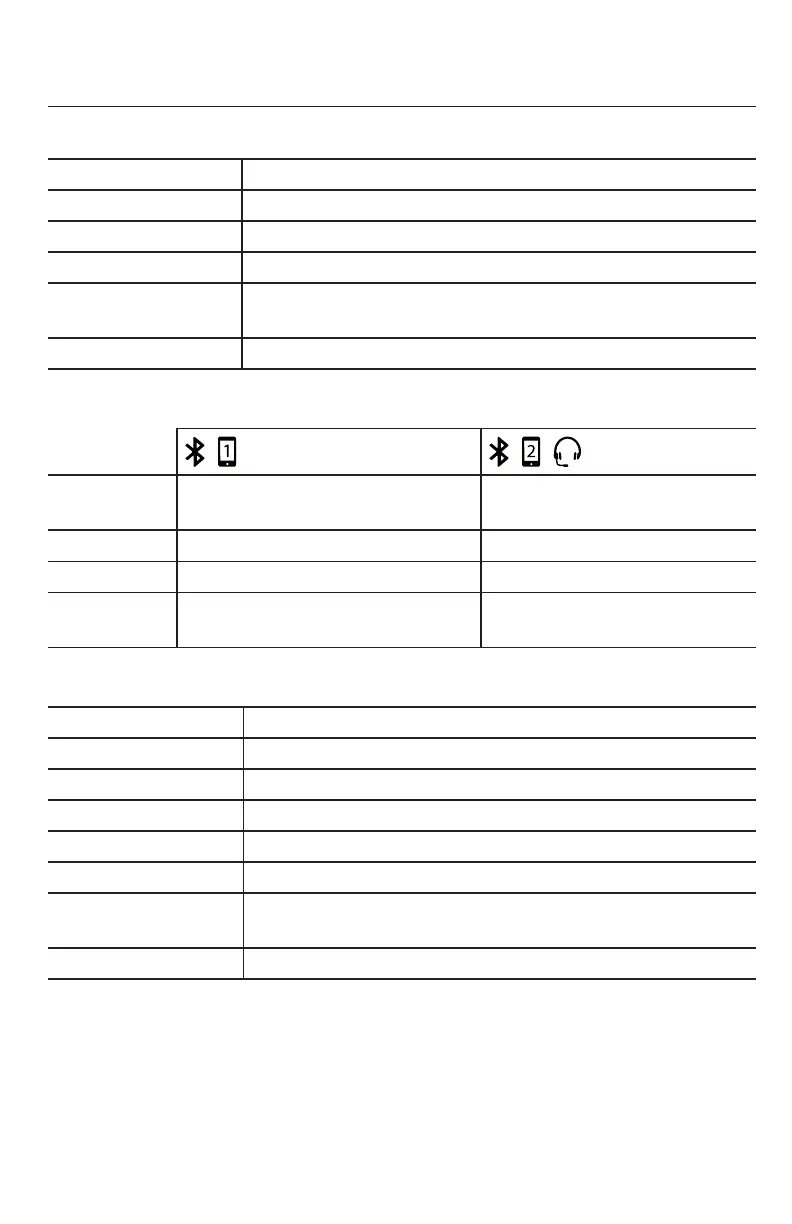
Status indicators overview
Status LED on the conference phone
Yellow (ashing 3x) When phone has powered up and is ready to use.
Green (fast ash) Incoming call
Green (steady) In a call
Green (slow ash) Call on hold
Red (steady) All microphones in the system (phone, wireless microphones,
C52-SP speakerphones) are muted during a call
Yellow (ashing) No line registered or Network down.
Bluetooth Status LEDs, blue
LED (BLUE)
LED (BLUE)
Steady Bluetooth device 1 is connected A second Bluetooth device /
Bluetooth headset is connected
Fast ash Incoming call on device 1 Incoming call on device 2
Slow ash Device 1 is on hold Device 2 is on hold
LEDs ash
alternangly
Phone is in discovery mode Phone is in discovery mode
Status LED on the wireless microphone
Yellow (two seconds) When phone is starng to power up
Orange Charging on the cradle, phone in idle mode
Yellow (ashing) Baery is low
Red/green alternang Wireless microphone is registering to the phone
Green (ashing) Incoming call
Green (steady) In a call (acve or on hold)
Red All microphones in the system (phone, wireless microphones,
C52-SP speakerphones) are muted during a call
O Microphone is in idle mode or without a baery
Geng Started



 To Next Page