16
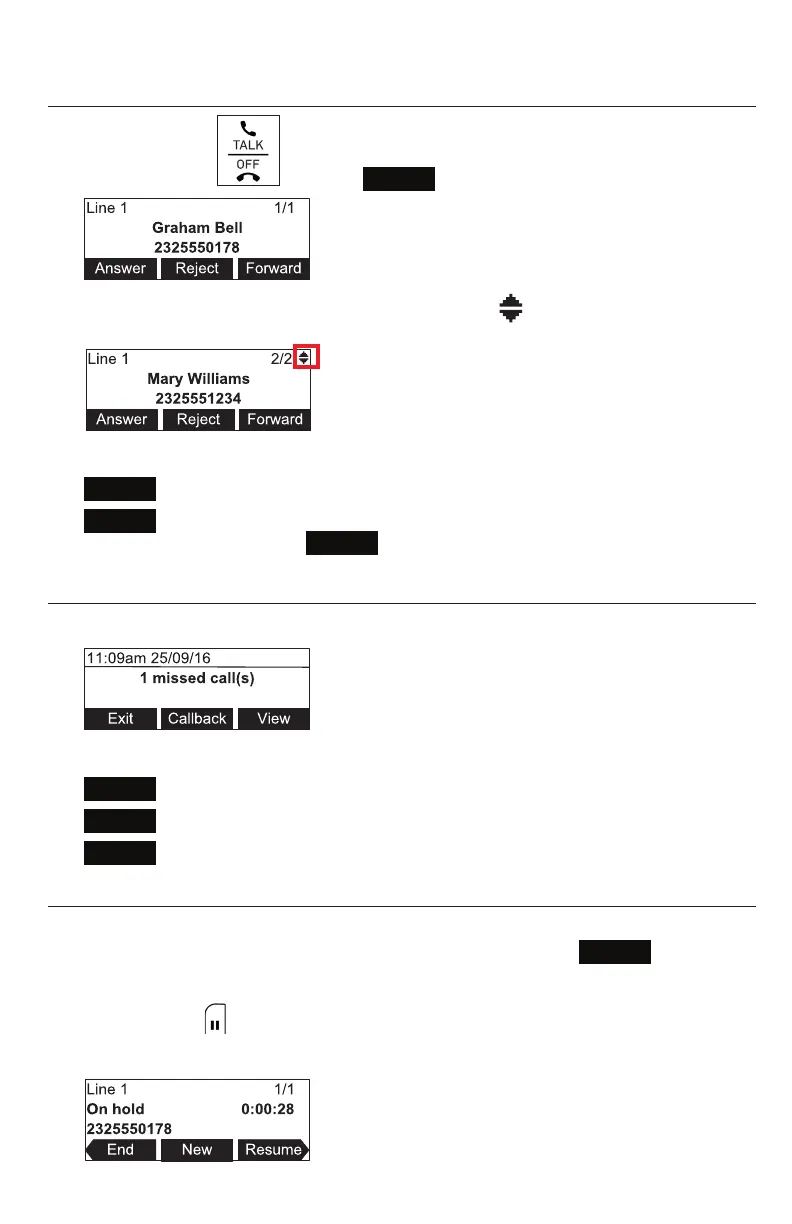
Answering a call
On the phone, press , or press
Answer
.
• If you have mulple incoming calls, as indicated by in the upper right corner of
the display, press q or p to select the call you want to answer.
On the incoming call screen, you can also press:
•
Reject
to terminate the incoming call.
•
Forward
to forward the call to another number.
Dial the number, and press
Forward
.
Missed call
If you don’t respond to an incoming call, the phone displays a missed-call alert screen.
If a missed call alert screen appears, you can press:
•
Exit
to return to the Idle screen.
•
Callback
to immediately dial the caller’s number.
•
View
to see the caller’s informaon in the call history.
Pung a call on hold
Use this feature to hold one call while you access another. The phone also puts calls on
hold automacally when you answer another call by pressing the
Answer
key, transfer
a call, or create a conference.
During a call, press . The On hold screen appears. The status LED ashes green
slowly.
Conference phone operaon



 To Next Page