18
3. Press
Forward
. Your phone returns to idle mode if you have no other acve
calls.
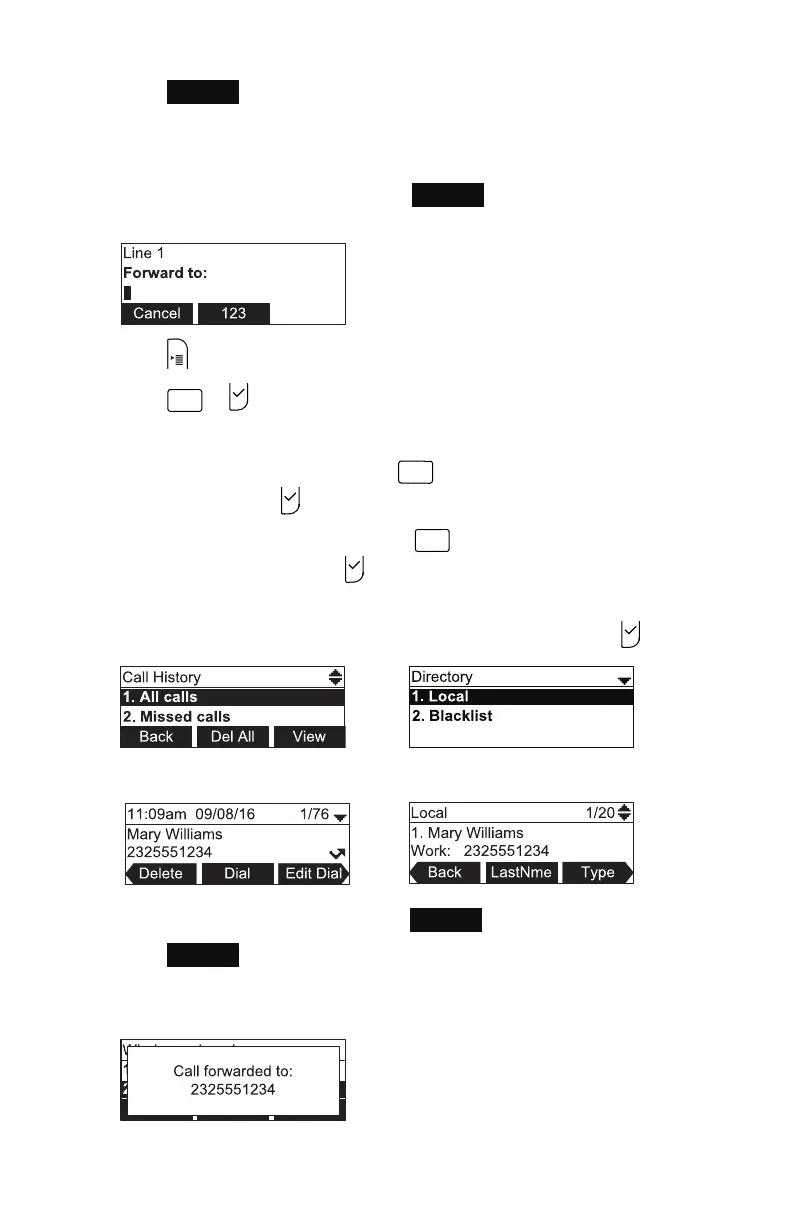
To forward a call using the directory or call history:
1. With an incoming call ringing, press
Forward
. The phone stops ringing and
the Forward to screen appears.
2. Press .
3. Press
1
or to select the Features menu
4. In the Features menu:
• To access the Directory, press
DEF
OR press p or q to select 3 Directory
and then press .
• To access the Call History, press
4
GHI
OR press p or q to select 4 Call
History and then press .
5. Choose the Call History or Directory you want to access: Press the keypad
number OR press p or q to select the menu item, and press .
6. Press p or q to select the number.
7. If necessary, press t or u unl the
Dial
so key appears.
8. Press
Dial
.
The Call Forwarded screen appears. Your phone returns to idle mode if you
have no other acve calls.
Conference phone operaon



 To Next Page