Objet260 User Guide 5 Using Objet Studio
DOC-37004 Rev.E 5-53
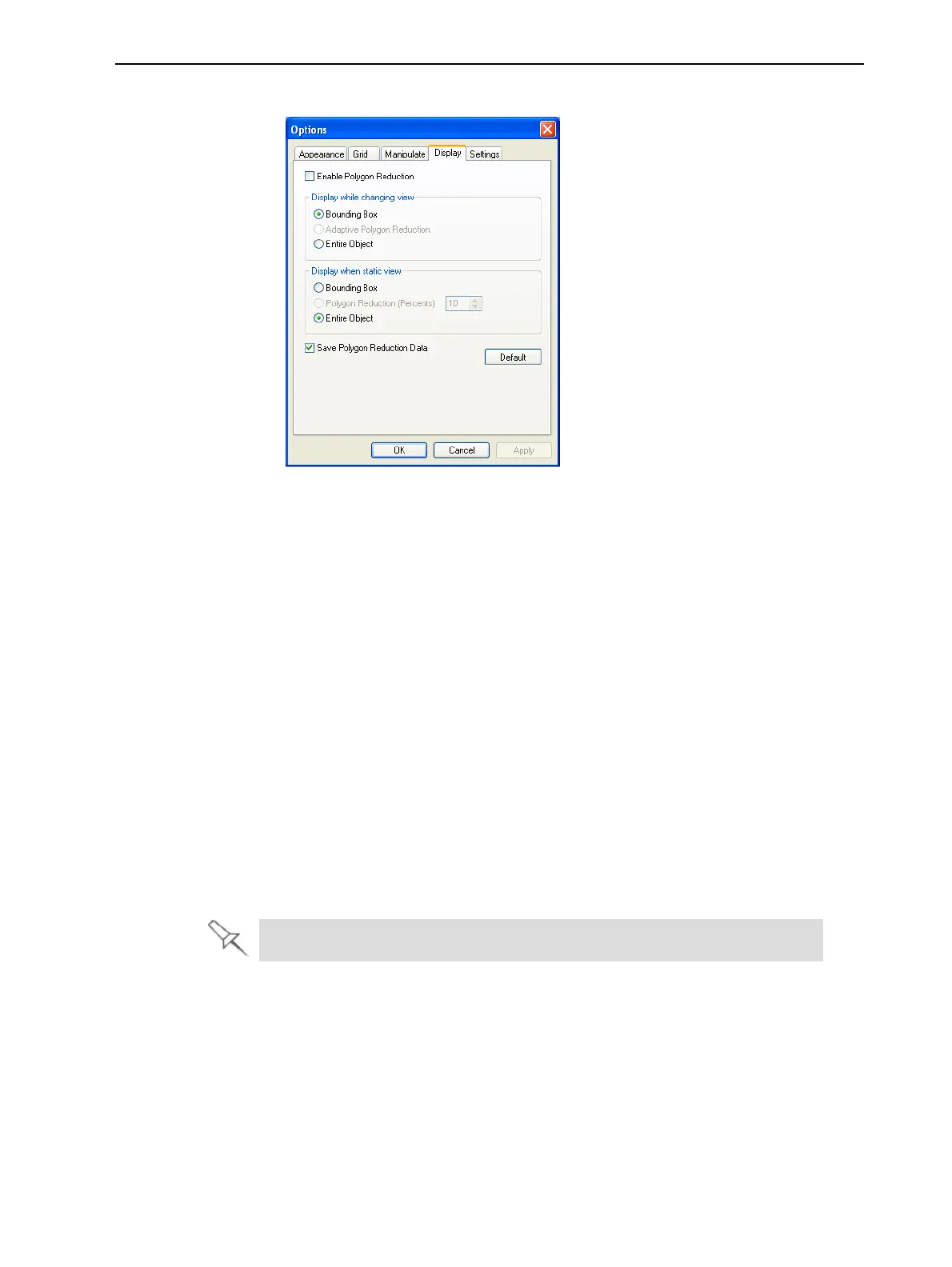
2. IntheOptionsdialogbox,displaytheDisplaytab.
Figure5-67Optionsdialogbox,Display tab
3. SelectEnablePolygonReduction.
4. SelectPolygonReduction(Percent).
5. Enterthepercentageoftotalpolygonstodisplay.
WhenyouclickApply,thedisplaychanges.
Note: Thesettingaffectsthestaticdisplay(whentheobjectisnotbeing
moved).
6. Setdisplayoptionswhentheobjectisbeingmoved(Display while
changing view):
❒ Bounding Box—Aboxrepresentingtheobject’smaximumdimensions
isdisplayed.
❒ Adaptive Polygon Reduction—Varyingdegreesofpolygonreduction
areapplied,asnecessary.
❒
Entire Object—Nopolygonreductionisapplied.
7. Tosavethesesettings,sothattheywillbeappliedeverytimeyouplace
this objectonthebuildtray,clickSavePolygonReductionData.
8. ClickApplytoseetheresultsofthesettingswithoutclosingthedialogbox.
Selectingthe Entire Object optioncancelspolygonreduction.













 To Next Page