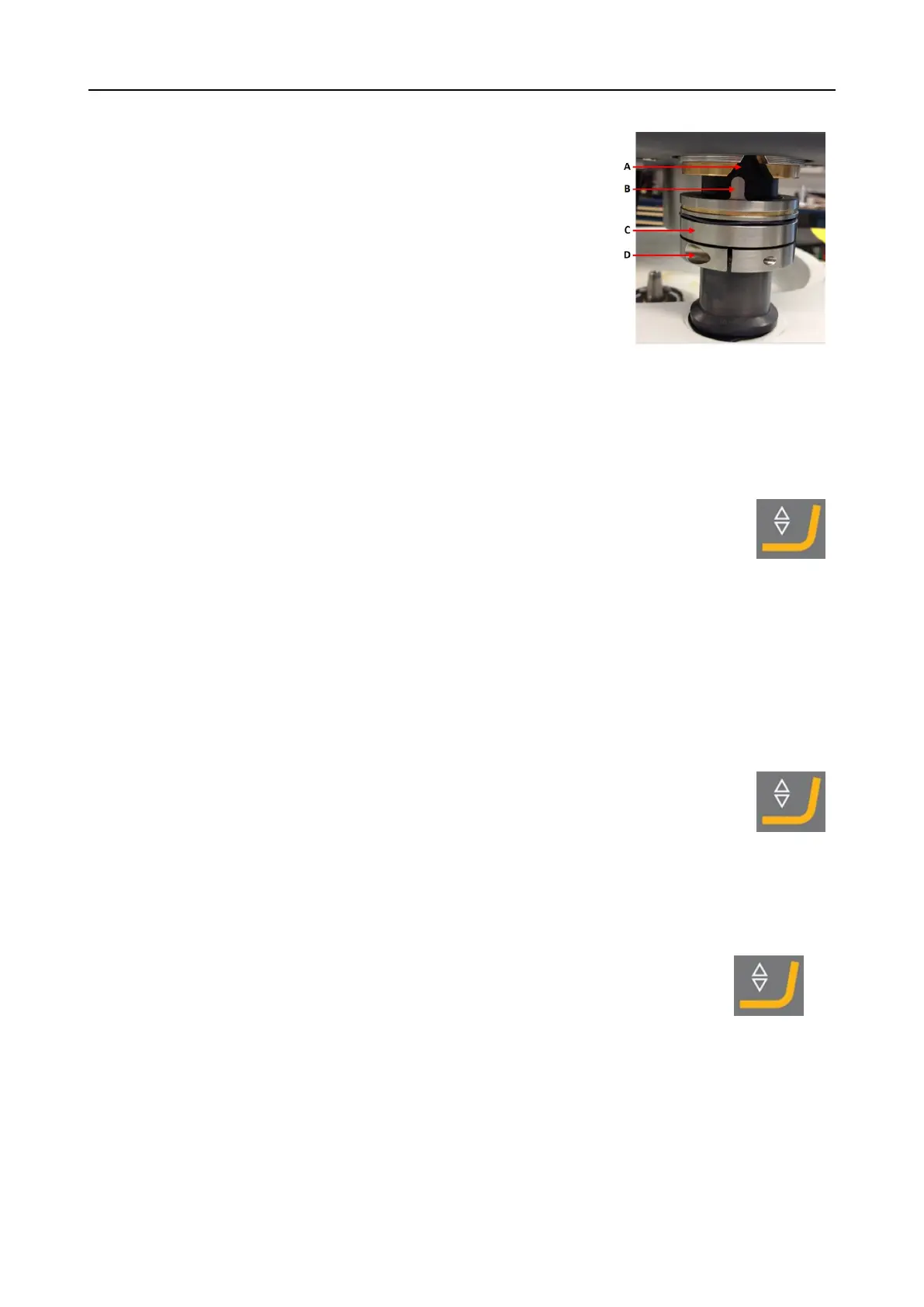
4. Support the LaboForce-100 head and loosen the screw in
the adjustment ring.
A V-shaped groove
B Pin
C Adjustment ring
D Fastening screw
5. Press the Lower/Raise button to lower the specimen
mover head. An error message will appear as the
specimen mover head is not in contact with the
adjustment ring.
6. Move the adjustment ring up until the pin fits into the V-
shaped groove on the cabinet of the control panel.
7. Tighten the adjustment ring to fix it in this position.
8. Press the Turn/push knob knob to clear the error
message.
9. Press the Lower/Raise button to raise the specimen
mover head.
Adjust the horizontal position of the specimen holder or specimen mover plate
With a specimen holder or specimen mover plate mounted:
1. Press the Lower/Raise button to lower the specimen
mover head.
2. Loosen the 2 fastening screws holding the column of
the control panel.
3. Replace the manual splash guard with a splash guard
for semi-automatic preparation or splash guard for Wet
grinding disc.
4. Moves the specimen mover head to the right.
8 LaboForce-100
LaboPol-30 45











 To Next Page