28
NNoottee::
•• TThhee DDeevviiccee CCoonnttrrooll PPaacckkaaggee oonn tthhee SSDDCC33 mmuusstt bbee iinnssttaalllleedd bbeeffoorree SSPPII wwiillll
sshhooww SSIIDDNNEE ddeevviicceess..
•• WWhheenn aa ssoouurrccee vviiddeeoo iiss bbeeiinngg rroouutteedd oonn SSDDCC HHDD aanndd SSiiddnnee ,, tthhee cchhaaiinn rroouuttee
wwiillll aallwwaayyss ppllaaccee tthhee SSiiddnnee aahheeaadd ooff tthhee SSDDCC HHDD.. IInn tthhee pprreevviioouuss eexxaammppllee,,
tthhee EEnnddoo CCaamm vviiddeeoo wwiillll aallwwaayyss bbee rroouutteedd tthhrroouugghh tthhee SSiiddnnee ((wwhhiicchh aaddddss
tthhee SSiiddnnee iiccoonn oovveerrllaayy oonn tthhee vviiddeeoo)),, tthheenn tthhrroouugghh SSDDCC HHDD ttoo bbee rreeccoorrddeedd,,
aanndd tthheenn iitt wwiillll bbee ddiissppllaayyeedd oonn MMoonniittoorr 22..
•• TThhee oorrddeerr iinn wwhhiicchh tthhee SSDDCC HHDD//UUllttrraa oorr MMoonniittoorr 22 aarree sseelleecctteedd ddooeess nnoott
aaffffeecctt tthhee oorrddeerr iinn wwhhiicchh tthhee vviiddeeoo rroouuttee oorr cchhaaiinn iiss ccrreeaatteedd.. IInn tthhee pprreevviioouuss
eexxaammppllee,, iiff MMoonniittoorr 22 iiss sseelleecctteedd bbeeffoorree sseelleeccttiinngg tthhee SSDDCC HHDD//UUllttrraa,, tthhee
vviiddeeoo ffrroomm tthhee EEnnddoo CCaamm wwiillll ssttiillll bbee ppaasssseedd tthhrroouugghh tthhee SSDDCC HHDD//UUllttrraa
bbeeffoorree bbeeiinngg rroouutteedd ttoo MMoonniittoorr 22..
•• AA uusseerr hhaass tthhee ooppttiioonn ooff rreeccoorrddiinngg aa vviiddeeoo oonn aann SSDDCC HHDD//UUllttrraa.. TThhee uusseerr
aallssoo hhaass tthhee ooppttiioonn ooff uussiinngg tthhee vvooiiccee ccoonnttrrooll ffeeaattuurree ffrroomm SSiiddnnee .. TThhee rreesstt ooff
tthhee aaccttiioonnss,, nnaammeellyy sseelleeccttiinngg aa ssoouurrccee ((ee..gg..,, EEnnddoo CCaamm)) aanndd aa ddiissppllaayy ((ee..gg..,,
MMoonniittoorr 22)),, aarree rreeqquuiirreedd iinn oorrddeerr ttoo vviieeww aa ssoouurrccee oonn aa ddiissppllaayy..
7.2 Visual Routing
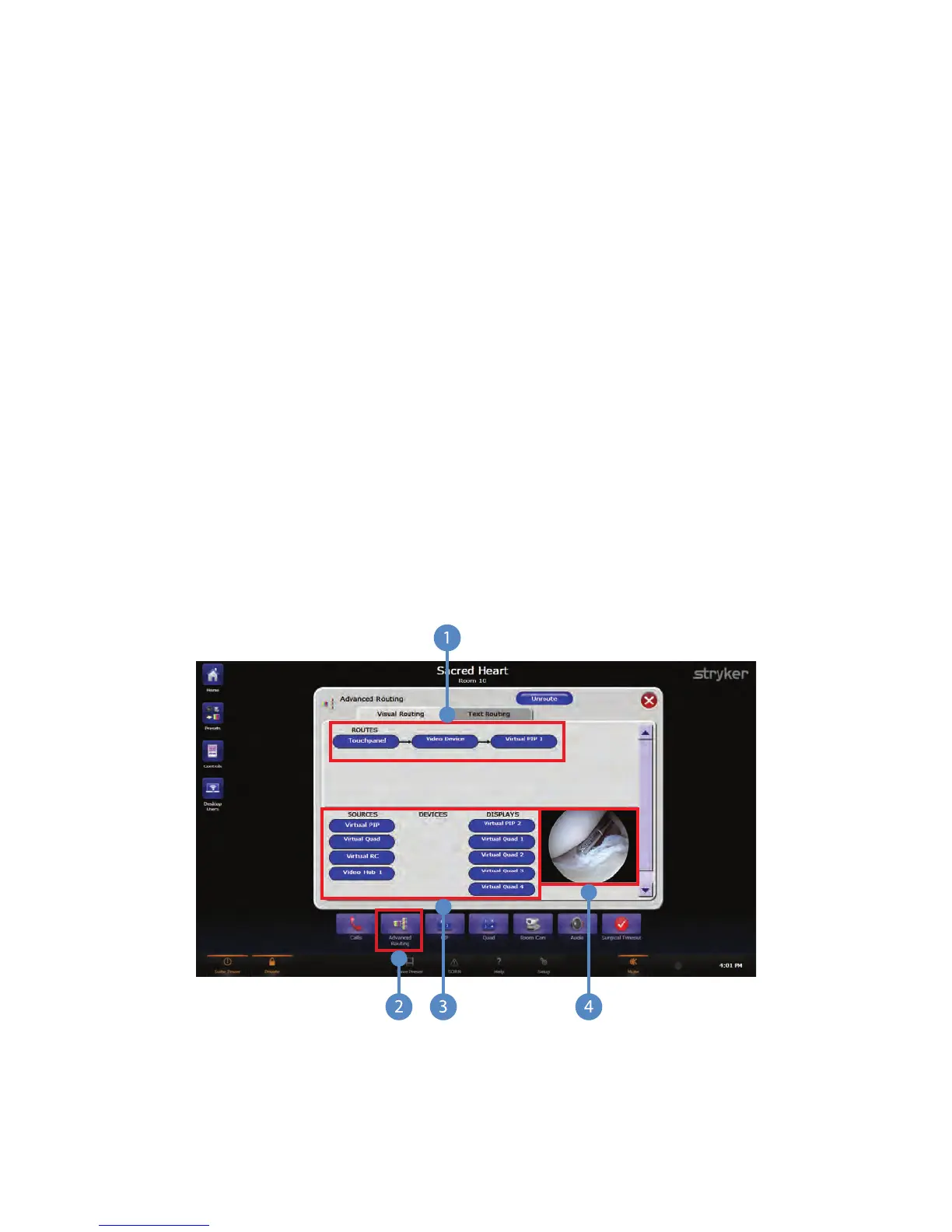
To create a video route using the Visual Routing option, press the AAddvvaanncceedd RRoouuttiinngg
button located on the Quick Button Bar (Item 2).
FFiigguurree 1100.. VViissuuaall RRoouuttiinngg
You will be taken to the Advanced Routing page, which contains two tabs: Visual Routing
and Text Routing. The Visual Routing tab is the default tab. This tab contains three main



 To Next Page