31
8
PIP and Quad View Generator Functionality
8.1 PIP
The Picture-in-Picture (PIP)/Picture-by-Picture (PBP) Generator is intended to be used
with the SwitchPoint Infinity 3 Control System, but can be used as a stand alone PIP in
the OR. This feature enables the user to view two images simultaneously on one monitor.
Using this option the user can view one picture in the corner of another, or view two
pictures side-by-side.
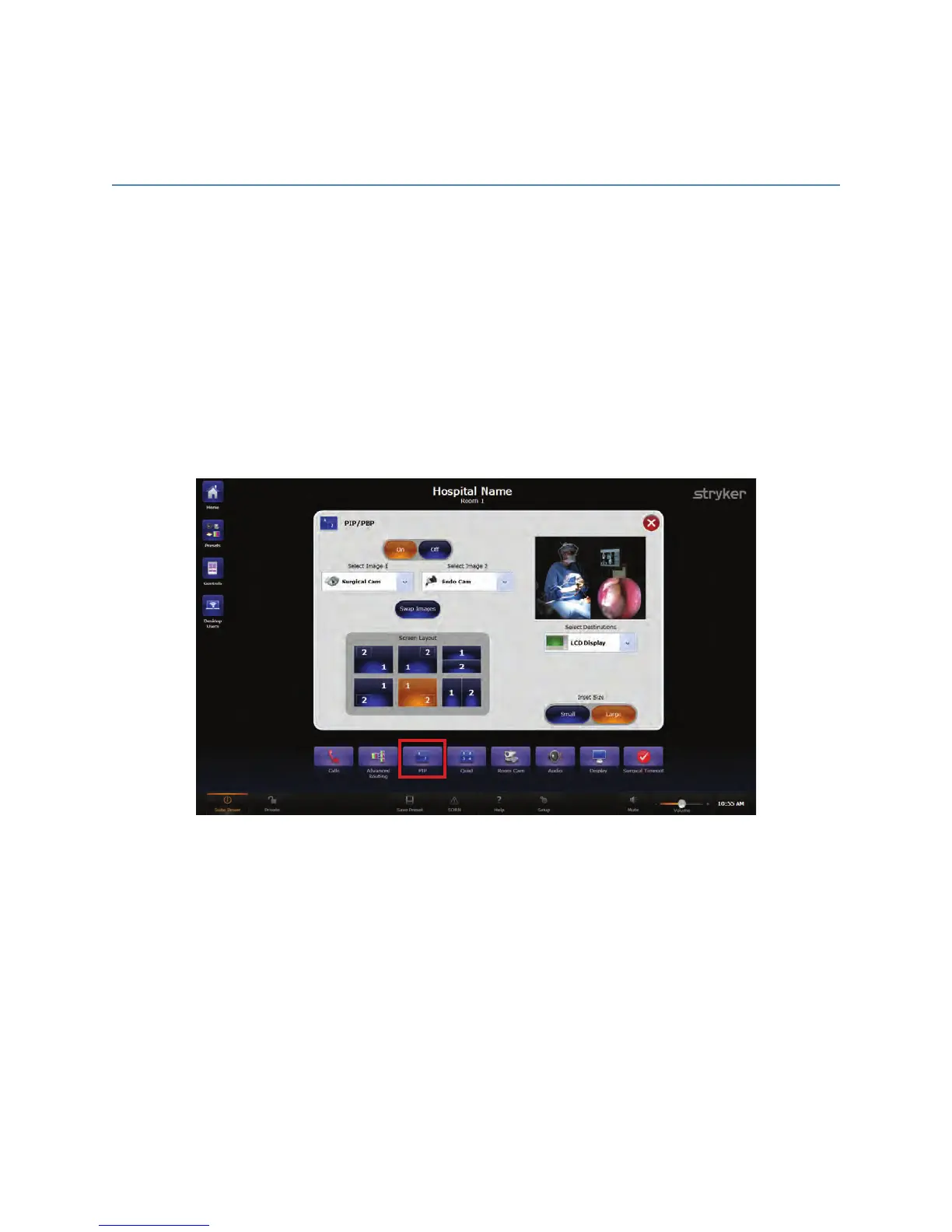
To access the PIP/PBP feature, press the PPIIPP button located on the Quick Button Bar.
The Picture-in-Picture screen will open.
FFiigguurree 1122.. PPiiccttuurree--iinn--PPiiccttuurree VViieeww SSccrreeeenn
The OOnn and OOffff buttons at the top of the PIP screen are used to turn the PIP/PBP option
on or off.
8.1.1 Selecting Images
The “Select Image” drop down menus are used to select which images will appear in
positions 1 and 2 of the screen layouts.
8.1.2 Screen Layout
The six buttons located in the Screen Layout box are used to select which layout will be
displayed.



 To Next Page