40
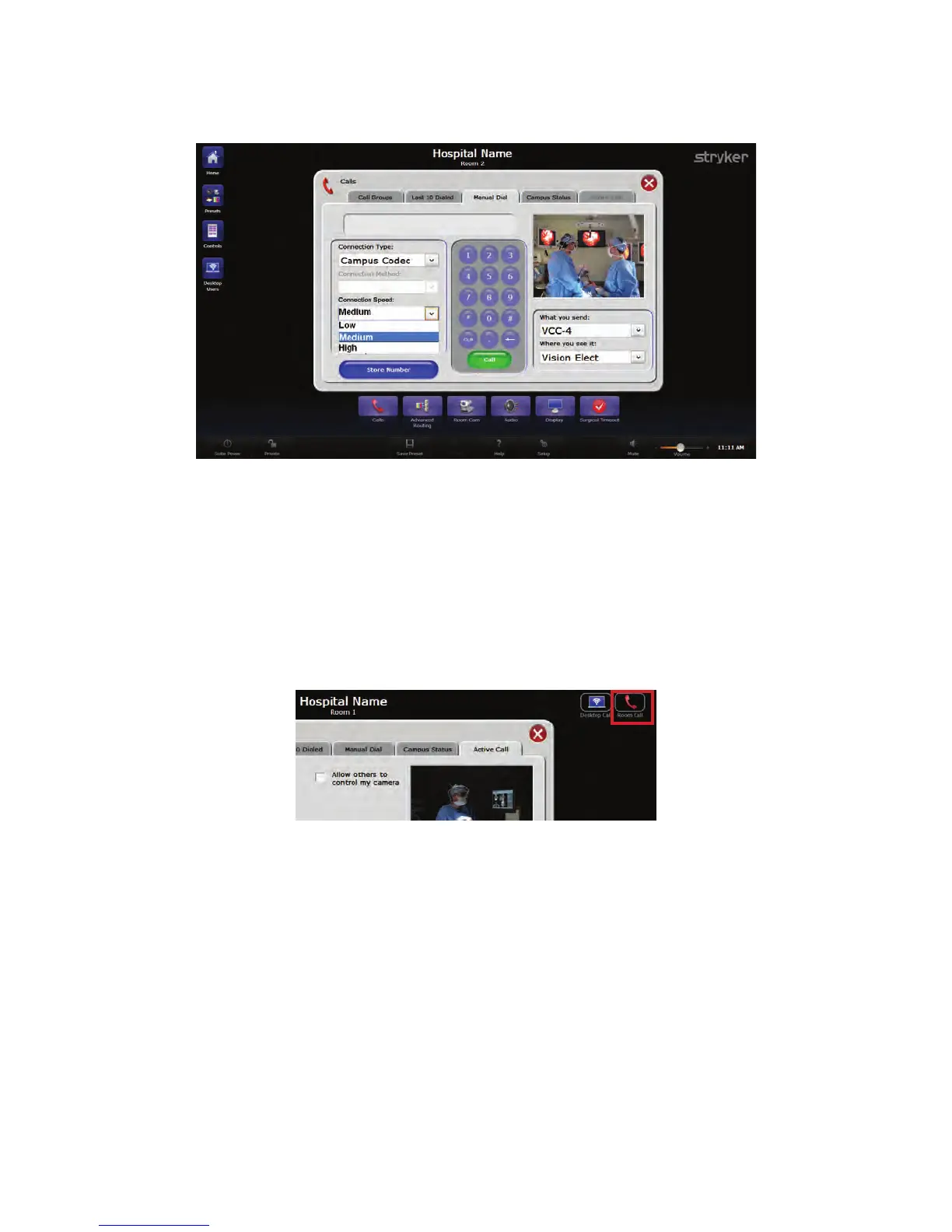
1. Select Campus Codec from the “Connection Type” drop down menu.
FFiigguurree 2200.. MMaakkiinngg aa RRoooomm--ttoo--RRoooomm CCaallll
2. Select the video resolution from the “Connection Speed” drop down menu.
NNoottee:: IIff hhiigghh ssppeeeedd vviiddeeoo rreessoolluuttiioonn iiss sseelleecctteedd,, tthheenn IIPP bbrrooaaddccaassttiinngg ttoo tthhee
ddeesskkttoopp ffrroomm tthhiiss rroooomm wwiillll bbee ddiissaabblleedd..
3. Select which room to connect to from the “Room Name” drop down menu.
4. Press the green CCaallll button under the number pad to make the call.
If the call is successful, you will be taken to the Active Call screen, and the Call Status
bubble will indicate “In Call.”
FFiigguurree 2211.. CCaammppuuss CCooddeecc IInn CCaallll BBuubbbbllee
10.4 Room-to-Room Call
NNoottee:: TThhiiss sseeccttiioonn iiss oonnllyy aapppplliiccaabbllee ttoo ssyysstteemm wwiitthh aa VViiddeeoo NNeettwwoorrkk HHuubb..
To make a video call to another room within the campus:
1. Select Room Call from the “Connection Type” drop down menu.



 To Next Page