67
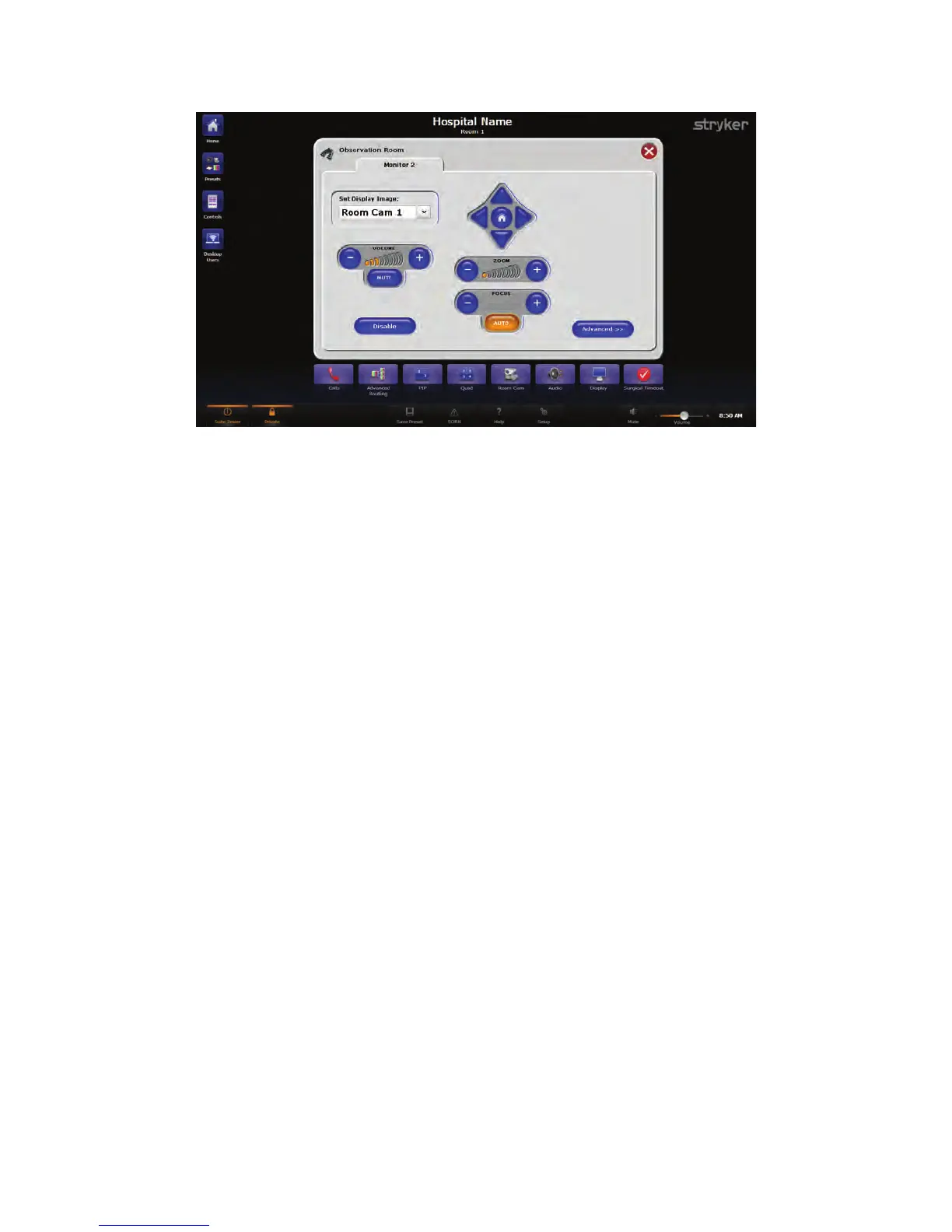
FFiigguurree 4455.. OObbsseerrvvaattiioonn RRoooomm SSccrreeeenn FFrroomm SSwwiittcchhPPooiinntt IInnffiinniittyy 33
To prevent the Observation Room PC from viewing the OR room cameras, press the
DDiissaabbllee button.
18.1 Routing Video
To route video, select a source corresponding to the video input to view from the “Set
Display Image” drop down menu. The output from the source will immediately be visible
on that display.
18.2 Adjusting the Speaker Volume
To adjust the speaker volume, press the “--” and “++” buttons to decrease or increase the
volume, respectively, in the observation room. The MMuuttee button in the center will turn off
the audio for the speaker. The MMuuttee button toggles on and off and stays highlighted in
orange when muted.
NNoottee:: AA sseeccoonndd oobbsseerrvvaattiioonn rroooomm ddiissppllaayy mmaayy oorr mmaayy nnoott bbee ccoonnffiigguurreedd ffoorr aallll
ssyysstteemmss..
18.3 Adjusting the Pan/Tilt/Zoom
For detailed information on using the Pan/Tilt/Zoom features,
see 16 Room Camera,
page 63
.
18.4 Advanced
For detailed information on the Advanced screen,
see 16.1 Advanced, page 64
.



 To Next Page