81
* Connects to a potential equalization conductor. The resulting medical electrical system
shall follow all applicable IEC 60601-1 requirements.
** The 42” touch panel is only compatible with SPI3 software or higher, or SPI3-Lite.
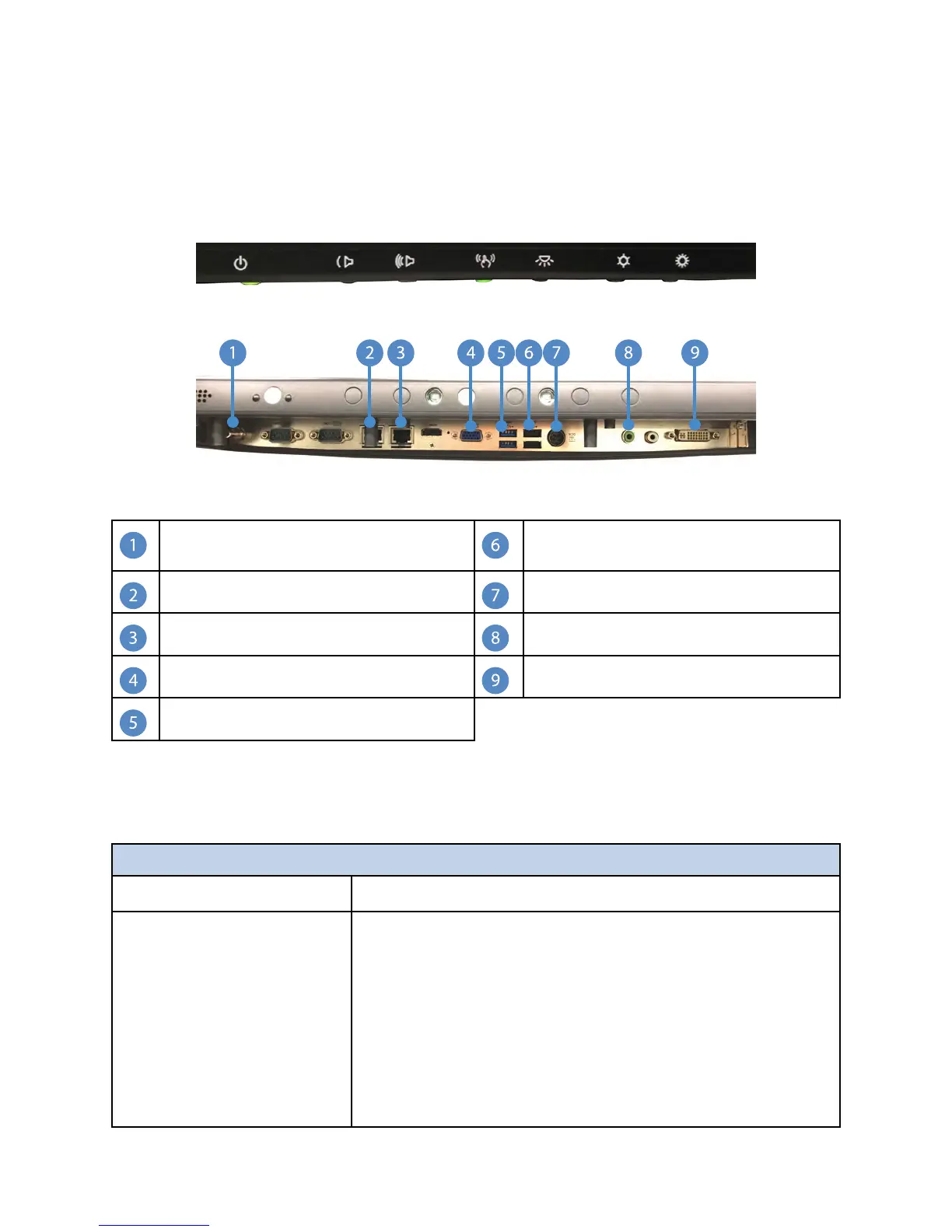
FFiigguurree 5577.. AAIIOO CCoonnttrrooll SSyysstteemm FFrroonntt
FFiigguurree 5588.. AAIIOO CCoonnttrrooll SSyysstteemm BBoottttoomm
Equipotential Ground Plug* USB Connection to Expansion
Board
RJ-45 “SORN” Ethernet Connection DC Power
RJ-45 “LAN” Ethernet Connection Audio Output (to router)
Video Output (to router)
Preview Input
USB 3.0 Ports
* Connects to a potential equalization conductor. The resulting medical electrical system
shall follow all applicable IEC 60601-1 requirements.
25.2.2 Troubleshooting Steps
TToouucchh PPaanneell
SSyymmppttoomm
AAccttiioonn
The Touch Panel does not
respond after the system is
turned on
• Check that the Touch Panel’s Power Switch is ON
• Turn off the power and check the Touch Panel’s
power cord and signal cable for firm connection
• Verify the green LED light located on the back
underside of the touch panel is lit, indicating the
monitor is ON
• For AIO systems, make sure that touch isn’t disabled;
the LED under the touch panel touch icon should be
green



 To Next Page