4-18 Sun Fire X4450 Server Service Manual • November 2009
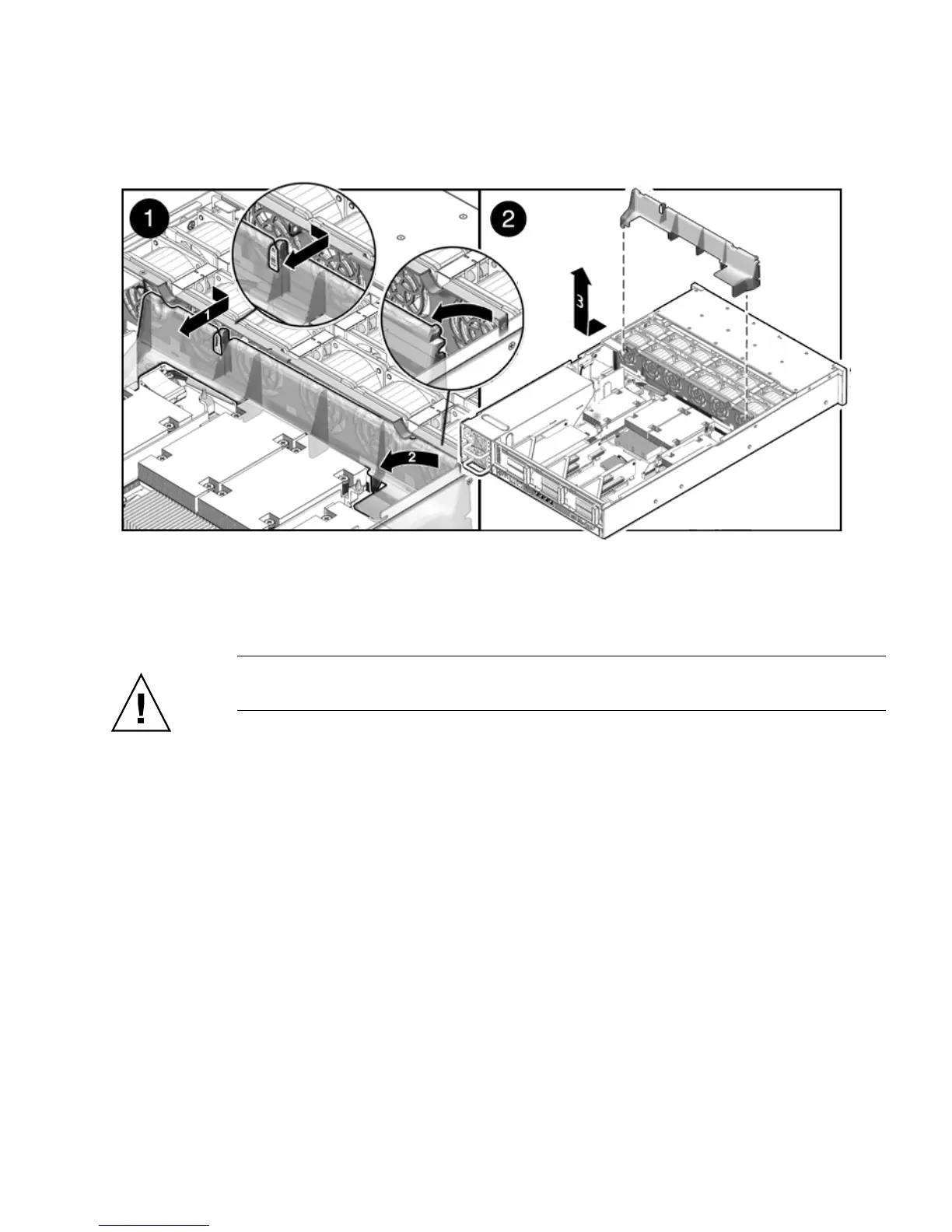
EQUATION 4-1 Removing the Air Duct
4.4.2 Installing the Air Duct
Caution – When the server is in operation, ensure that the air duct is correctly
installed to prevent the system from overheating.
1. Install the air duct into the chassis as shown in
FIGURE 4-10.
Ensure that the air duct is aligned and fully seated in the chassis.
2. Re-install the memory tray.
See Section 4.2.2, “Installing the Memory Tray” on page 4-13.
3. Install the top cover.
See Section 6.1, “Installing the Top Cover” on page 6-2.
4. Slide the server into the rack.
See Section 6.3, “Returning the Server to the Normal Rack Position” on page 6-4.
5. Reconnect the power cord (or cords) to the power supply (or supplies).
Verify that the AC Present LED is lit.
See Section 6.4, “Powering On the Server” on page 6-5.














 To Next Page